Hands-On With the Apple TV's New Color Balance Calibration Feature - MacRumorsOpen MenuShow RoundupsShow Forums menuVisit ForumsOpen Sidebar
Skip to Content

Hands-On With the Apple TV's New Color Balance Calibration Feature

With the launch of tvOS 14.5, Apple introduced a new Color Balance calibration option that's available for the Apple TV 4K models and the ‌Apple TV‌ HD models. The feature was technically designed for and introduced alongside the new ‌Apple TV‌ 4K, but it works on existing ‌Apple TV‌ models too.


Available in the video section of the ‌Apple TV‌ settings app, Color Balance asks you to hold your iPhone to the screen as the television set flashes through a series of colors. Your iPhone reads the colors and compares them to industry-standard color profiles, recommending optimizations.

In some situations, the changes that are recommended are going to be minor and may not look like a significant difference, but some people will see more dramatic and noticeable color profile adjustments. The color changes should help ‌Apple TV‌ content look more realistic, true to life, and as content creators intended it to look.

In the test that Dan shows in the video, for example, the color differences are minor, but others of us here at MacRumors have seen more noticeable results. Apple's demo is below.
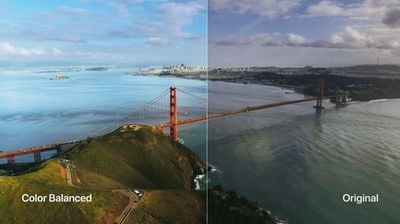
apple tv color balance
The color balance feature is super simple and takes just a few minutes, and it's a much easier process than adjusting a television set's settings. For the feature to work, you need to have an iPhone with Face ID, which includes the iPhone X and later, and it's also worth noting that it can't be used with Dolby Vision.

If you haven't upgraded to tvOS 14.5 yet, it's worth doing so to check out the color balance feature. The update also adds a few other useful features like support for the latest PlayStation 5 DualSense and Xbox Series X controllers.

Related Roundup: Apple TV
Buyer's Guide: Apple TV (Don't Buy)

Popular Stories

imac video apple feature

Apple Released Yet Another New Product Today

Friday March 20, 2026 2:39 pm PDT by
Apple has unveiled a whopping nine new products so far this March, including an iPhone 17e, iPad Air models with the M4 chip, MacBook Air models with the M5 chip, MacBook Pro models with M5 Pro and M5 Max chips, the all-new MacBook Neo, an updated Studio Display, a higher-end Studio Display XDR, AirPods Max 2, and now the Nike Powerbeats Pro 2. iPhone 17e features the same overall design as...
iPhone 18 Pro Deep Red Feature

iPhone 18 Pro Launching Later This Year With These 12 New Features

Wednesday March 18, 2026 7:39 am PDT by
While the iPhone 18 Pro and iPhone 18 Pro Max are not expected to launch for another six months or so, there are already plenty of rumors about the devices. It was initially reported that the iPhone 18 Pro models would have fully under-screen Face ID, with only a front camera visible in the top-left corner of the screen. However, the latest rumors indicate that only one Face ID component...
ios 26 4 pastel

iOS 26.4: Top 10 New Features Coming to Your iPhone

Friday March 20, 2026 2:44 pm PDT by
iOS 26.4 isn't the major update with new Siri features that we hoped for, but there are some useful quality of life improvements, and a little bit of fun with an AI playlist generator and new emoji characters. Playlist Playground - Apple Music has a Playlist Playground option that lets you generate playlists from text-based descriptions. You can include moods, feelings, activities, or...

Top Rated Comments

wolfshades Avatar
64 months ago
Tried mine about half a dozen times. Failed each time. I gave up.
_________________________________________________________-
UPDATE:
I finally got it to work. Prior to that, each time it would begin to calibrate, get halfway through and then fail.

I looked on Reddit for solutions. One guy said to turn off HDR+ on your TV set and then re-run the color calibration. I don't have that setting on my TV but in the video section of my TV settings there's one for "dynamic video" or "standard video". It was set to "dynamic" so I switched it to "standard" instead. Then I re-ran the color calibration and this time it worked!!

That's the good news.

The bad: totally not worth the time and effort. I ended up using the original (brighter) settings.
Score: 15 Votes (Like | Disagree)
matrix6028 Avatar
64 months ago
I have 3 TVs.
Each one error during the process. It never worked.
Score: 15 Votes (Like | Disagree)
64 months ago
Unfortunately it doesn't support a projector... since to put your phone one inch from the screen the shadow blocks the image it's supposed to be looking at.
Score: 13 Votes (Like | Disagree)
Phuz01 Avatar
64 months ago
Am I the only person who had a surprisingly positive experience with this feature? Yes, it took two attempts to work; the first time, I wasn't holding the phone close enough to the screen. But the ability to toggle between the two options allowed me to see which one I found to be preferable, and the color balance was much richer and more realistic.

I like the fact it calibrates the Apple TV and not my 8-year-old Samsung (I have an extensive 3D BluRay collection and will not move to a 4K monitor until it dies), and I went down a rabbit hole last night watching scenes from favorite films just to see how much better they looked.
Score: 11 Votes (Like | Disagree)
64 months ago
My fails every time when the the test cycles to the off-white (sort of a warm white) color. It stays on that color for a few seconds and then gives the error and asks to try again.
Score: 7 Votes (Like | Disagree)
Macintosh IIvx Avatar
64 months ago
Just seems to crank up the warmth from everything I've seen from others.

My TV has 4K Doby Vision which takes care of balancing things between the Apple TV and the TV. Seems to do a much better job of adjusting based on content on its own.

It's a bit like those that try to use Mac Fan Control to adjust the fans on their Mac. Pretty sure the engineers who designed it know how to better operate it than you do. I'll trust the pros.
Score: 6 Votes (Like | Disagree)
Related Apple News: Entertainment | South Africa | Iphone | Culture | Technology