In April, Apple introduced an iPhone-based color balance feature for Apple TV that can improve the overall picture quality of your television set when you're using Apple's set-top box.
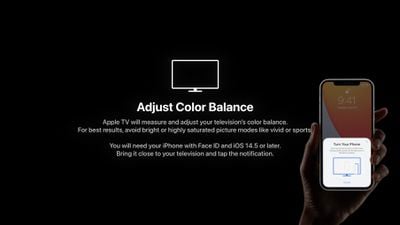
apple tv color balance 1
Using the iPhone's light sensor, the feature compares the color balance to industry-standard specifications, and automatically adjusts your ‌Apple TV‌'s video output to deliver more accurate colors and improved contrast.

Follow the steps below to try it out. For best results, Apple suggests avoiding the use of bright or highly saturated picture modes on your TV like "vivid" or "sports."

What You'll Need

  • ‌Apple TV‌ HD (2015) or later
  • ‌iPhone‌ with Face ID (‌iPhone‌ X or later)
  • tvOS 14.5 or later
  • iOS 14.5 or later

How to Color Balance Apple TV With iPhone

  1. With your ‌iPhone‌ unlocked and nearby, launch the Settings app on your ‌Apple TV‌.
  2. Select the Video and Audio menu.
    Apple TV

  3. Under "Calibration," select Color Balance. If the option says "Not Required," your smart TV doesn't need adjusting. It also is unavailable with Dolby Vision.
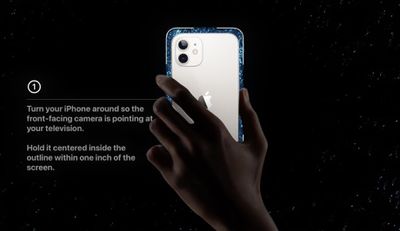
  4. When the notification appears on your ‌iPhone‌, follow the onscreen instructions: Turn your ‌iPhone‌ around so the front-facing camera is pointing at your TV, hold it centered inside the displayed frame within one inch of the screen, and keep it there until the progress icon fills up (it should only take a few seconds).
    apple tv color balance2

  5. Select View Results to see how your TV has been adjusted.
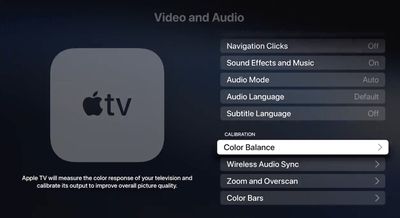
apple tv color balance
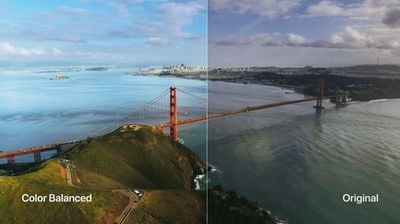
The results show you a side-by-side comparison of the original colors that your TV was displaying and the balance-adjusted colors. The calibrated version should look more natural and perhaps warmer.

Related Roundup: Apple TV
Buyer's Guide: Apple TV (Don't Buy)

Top Rated Comments

Press22 Avatar
63 months ago
Tired of seeing the professional calibrators upset about this feature. It's not for you, its for the masses who use out of the box settings.
This is cool, thanks.
Score: 26 Votes (Like | Disagree)
danny842003 Avatar
63 months ago

Anyone that’s serious about calibration won’t touch this.
Maybe not but most people don’t do any form of calibration, so potentially even if it’s not perfect it could be an improvement for the majority.
Score: 18 Votes (Like | Disagree)
boast Avatar
63 months ago
I personally thought this was the coolest part of the presentation. Can't wait to give it a try.
Score: 14 Votes (Like | Disagree)
mnsportsgeek Avatar
63 months ago
I’ll have to see this for myself but that color balanced image does not look all that realistic to me. Ya it looks pretty but colors don’t look that perfect in real life. Most people would look at a picture where the colors are way too warm and tell you that looks the best. I hope Apple is going for accuracy here and not personal preference of the masses.
Score: 13 Votes (Like | Disagree)
Apple_Robert Avatar
63 months ago
The color balanced picture in the article looks overly saturated and unnatural.
Score: 12 Votes (Like | Disagree)
Dex4788 Avatar
63 months ago

I tried the calibration during the normal lighting conditions of when I normally watch TV (don't know if that affects the accuracy) and while I'm certainly by no means a pro at color calibration, the "balanced" outcome looked significantly "warmer" than the original. So much so to the point that it is still jarring after 3 days. I know I can change back, but I've looked around online and of the dozen or so people that have commented on the coloration, probably like 10/12 of them have said there outcome was also "warmer" as a result.

Are "warmer" colors "more accurate" in general?
Yes, absolutely. The whole industry works off the 6500K white point, which is warmer than it is cooler.

It's how practically all media content is mastered, so if your desire is to view things how the creators have intended, you should leave it.

Give it a few days and your eyes will adjust and forget about it in due time.
Score: 11 Votes (Like | Disagree)

Popular Stories

iOS 26

iOS 26.3 and iOS 26.4 Will Add These New Features to Your iPhone

Tuesday February 3, 2026 7:47 am PST by
We are still waiting for the iOS 26.3 Release Candidate to come out, so the first iOS 26.4 beta is likely still at least a week or two away. Following beta testing, iOS 26.4 will likely be released to the general public in March or April. Below, we have recapped known or rumored iOS 26.3 and iOS 26.4 features so far. iOS 26.3 iPhone to Android Transfer Tool iOS 26.3 makes it easier...
Aston Martin CarPlay Ultra Screen

Apple's CarPlay Ultra to Expand to These Vehicle Brands Later This Year

Sunday February 1, 2026 10:08 am PST by
Last year, Apple launched CarPlay Ultra, the long-awaited next-generation version of its CarPlay software system for vehicles. Nearly nine months later, CarPlay Ultra is still limited to Aston Martin's latest luxury vehicles, but that should change fairly soon. In May 2025, Apple said many other vehicle brands planned to offer CarPlay Ultra, including Hyundai, Kia, and Genesis. In his Powe...
Apple Logo Black

Apple's Next Launch is 'Imminent'

Sunday February 1, 2026 12:31 pm PST by
The calendar has turned to February, and a new report indicates that Apple's next product launch is "imminent," in the form of new MacBook Pro models. "All signs point to an imminent launch of next-generation MacBook Pros that retain the current form factor but deliver faster chips," Bloomberg's Mark Gurman said on Sunday. "I'm told the new models — code-named J714 and J716 — are slated...
Apple MacBook Pro M4 hero

New MacBook Pros Reportedly Launching Alongside macOS 26.3

Sunday February 1, 2026 5:42 am PST by
Apple is planning to launch new MacBook Pro models with M5 Pro and M5 Max chips alongside macOS 26.3, according to Bloomberg's Mark Gurman. "Apple's faster MacBook Pros are planned for the macOS 26.3 release cycle," wrote Gurman, in his Power On newsletter today. "I'm told the new models — code-named J714 and J716 — are slated for the macOS 26.3 software cycle, which runs from...
iOS 26 Home Feature

Apple Gives Final Warning to Home App Users

Tuesday February 3, 2026 8:55 am PST by
In 2022, Apple introduced a new Apple Home architecture that is "more reliable and efficient," and the deadline to upgrade and avoid issues is fast approaching. In an email this week, Apple gave customers a final reminder to upgrade their Home app by February 10, 2026. Apple says users who do not upgrade may experience issues with accessories and automations, or lose access to their smart...