Apple Seeds Sixth Beta of macOS Big Sur 11.3 to Developers [Update: Public Beta Available]

Apple today seeded the sixth beta of an upcoming macOS Big Sur 11.3 update to developers for testing purposes, with the new beta coming one week after the launch of the fifth beta and more than a month after the release of macOS Big Sur 11.2, a bug fix update.

macOS Big Sur Feature Blue
Developers can download the ‌‌macOS Big Sur‌‌ 11.3 beta using the Software Update mechanism in System Preferences after installing the proper profile from the Apple Developer Center.

macOS Big Sur 11.3 introduces more customization options for Safari, adding a way to rearrange the different sections on the Start Page like Favorites, Reading List, Siri Suggestions, Privacy Report, and more. Developers also have access to a new integration to develop features for the Start Page.

The update also includes optimizations for using iOS apps on M1 Macs. When running iPhone and iPad apps on ‌M1‌ Macs, there's a Touch Alternatives preference pane that allows users to set keyboard commands for touch input alternatives, plus iPadOS apps launch with a larger window if the Mac's display allows it. Touch Alternatives can be enabled for ‌iPhone‌ or ‌iPad‌ apps by clicking on the app's name in the menu bar and then selecting the Preferences option. Touch Alternatives let you customize taps, swipes, and drags.

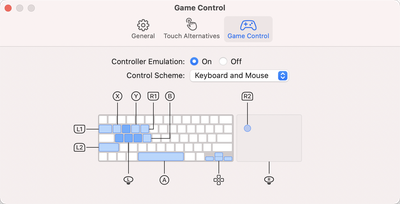
Apple has also added a "Controller Emulation" feature that can be enabled for ‌iPhone‌ and ‌iPad‌ apps to map game controller buttons to keyboard keys and mouse buttons. Controller Emulation will allow ‌‌iPhone‌‌ and ‌‌iPad‌‌ games that have controller support built in to be accurately controlled with a keyboard and/or mouse when those games are played on an ‌‌M1‌‌ Mac.

game control emulation
In the Reminders app, reminder lists can be sorted by Due Date, Creation Date, Priority, or Title, and there is an option to print lists by going to File > Print. Reminders can also be moved manually across lists with drag and drop, something that wasn't possible before.

Apple is adding a new "Made For You" library shortcut in Apple Music for finding personal mixes and Replay playlists, and the Listen Now section has been updated with support for highlighting live events.

The ‌Apple Music‌ app also features a new autoplay option that allows the streaming service to continue to play music after a playlist or music queue ends. ‌Apple Music‌ sources music similar to what's in a person's ‌Apple Music‌ library, similar to the autoplay feature added in iOS 14.
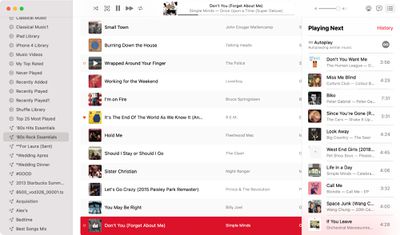
macos big sur apple music autoplay
With this feature enabled, ‌Apple Music‌ audio will not end even after a playlist or album is over. To check that it's on, play a playlist or album and then click on the three dot/line menu button in the upper right hand corner. From there, make sure the infinity symbol is toggled on.

In the Apple News app, there's a redesigned ‌Apple News‌+ tab with a dedicated "For You" section and a new Browse tab that makes it easier to browse through available content. The new For You section is designed to help ‌Apple News‌+ users find favorite magazines and newspapers much faster, plus it adds new tools for managing downloaded issues.

macOS Big Sur 11.3 also adds support for the latest PlayStation 5 DualSense and Xbox Series X/S controllers for use with macOS games.

There's also an updated "Support" interface when accessing "About This Mac." The new design includes details on your warranty and it allows for starting a repair right from the Mac interface.
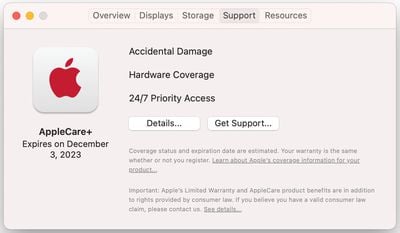
macos big sur beta support
The tab works similarly to the AppleCare coverage menu in the iOS Settings app, which lets users request repairs, buy an ‌AppleCare‌ plan, and check their coverage.

For HomePod users, macOS Big Sur 11.3 brings support for ‌HomePod‌ Stereo pairs, allowing a set of paired HomePods to be set as the default sound output option, with the two HomePods showing up as a single selectable speaker rather than separate as in prior versions of macOS.

Code in macOS Big Sur 11.3 suggests that the Optimized Battery Charging feature will now make sure the Mac's battery is fully charged before a scheduled calendar event. The Mac will charge to 100 percent three hours before a calendar event's start time.

Optimized Battery Charging is designed to preserve the lifespan of the Mac's battery by limiting the amount of time that a Mac sits at 100 percent battery.

In Safari, there's support for WebM video playback, allowing users to play WebM videos using Apple's browser. WebM is a niche video format designed to be a royalty-free alternative to the H.264 codec used in the MP4 format. WebM allows video files to remain small without sacrificing quality and can be played with little processing power, making it ideal for webpages and browsers.

Code in macOS Big Sur 11.3 suggests that Rosetta could be removed from some ‌M1‌ Macs in some select regions after the software is released. There's a mention that "Rosetta is no longer available in this region. Applications requiring Rosetta will no longer run," but no additional information is available at this time.

There are also appear to be new assets that suggest a feature for mapping game controller buttons to keyboard layouts, and there's a Game Center toggle to enable or disable connections with friends, which lets games set you up with your friends or prevents apps from accessing that info.

More on macOS Big Sur can be found in our macOS Big Sur roundup.

Related Forum: macOS Big Sur

Popular Stories

Apple Logo Spotlight

Report: Apple to Launch These New Products in 2026

Sunday November 2, 2025 5:34 am PST by
Apple is planning to launch at least 15 new products in 2026, according to Bloomberg's Mark Gurman. Gurman outlined what to expect from Apple in 2026 in the latest edition of his "Power On" newsletter. He said the company is heading "into one of its most pivotal years in recent memory," with the rollout of major new Apple Intelligence features, intense regulatory pressure on the App Store,...
ios 26 1 slide to stop

iOS 26.1 Brings Back 2007 Feature in New Way

Friday October 31, 2025 1:40 pm PDT by
The upcoming iOS 26.1 update includes a small but helpful change for iPhones, and it could prevent you from running late to something important. Specifically, when an alarm goes off in the Clock app, there is a new "slide to stop" control on the screen for turning off the alarm. On previous iOS 26 versions, there is simply a large "stop" button, which could be accidentally tapped. The new ...
Apple Intelligence General Feature 2

New Version of Siri to 'Lean' on Google Gemini

Sunday November 2, 2025 6:06 am PST by
In his "Power On" newsletter, Bloomberg's Mark Gurman today provided an update on the status of Apple Intelligence and the plans for it in 2026. Apple is still planning to roll out its revamped version of Siri around March of next year. The release should be accompanied by the release of a new smart home display product with speaker-base and wall-mount options. A new Apple TV and HomePod...
HomePod mini and Apple TV

New Apple TV and HomePod Mini Likely Launching Soon

Sunday November 2, 2025 5:49 am PST by
A new Apple TV and HomePod mini could launch as soon as this month, Bloomberg's Mark Gurman today suggested. In today's "Power On" newsletter, Gurman said that Apple retail stores are planning an overnight refresh on the evening of November 11, where changes will be made after closing, such as refreshing displays and placing new products for the following day. The timing of the overnight...
iOS 26

Apple Releases iOS 26.1 With Liquid Glass Toggle, Slide to Stop Alarm, New Apple Intelligence Languages and More

Monday November 3, 2025 1:11 pm PST by
Apple today released iOS 26.1, the first major update to the iOS 26 operating system that came out in September, iOS 26.1 comes over a month after iOS 26 launched. ‌iOS 26‌.1 is compatible with the ‌iPhone‌ 11 series and later, as well as the second-generation ‌iPhone‌ SE. The new software can be downloaded on eligible iPhones over-the-air by going to Settings > General >...
Apple Foldable Thumb

iPhone Fold: Launch, Pricing, and What to Expect From Apple's Foldable

Friday October 31, 2025 8:52 am PDT by
Apple is expected to launch a new foldable iPhone next year, based on multiple rumors and credible sources. The long-awaited device has been rumored for years now, but signs increasingly suggest that 2026 could indeed be the year that Apple releases its first foldable device. Below, we've collated an updated set of key details that have been leaked about Apple's foldable iPhone so far. Ove...
Early Black Friday Deals 2

The Best Early Black Friday Apple Deals

Sunday November 2, 2025 10:04 am PST by
We're officially in the month of Black Friday, which will take place on Friday, November 28 in 2025. As always, this will be the best time of the year to shop for great deals, including popular Apple products like AirPods, iPad, Apple Watch, and more. In this article, the majority of the discounts will be found on Amazon. Note: MacRumors is an affiliate partner with some of these vendors. When ...
M5 MacBook Pro

Waiting for New Macs? Apple Just Shared Bad News

Friday October 31, 2025 7:32 am PDT by
Apple has just given a strong indication that it will not be releasing any additional new Macs for the remainder of the year. Apple's CFO Kevan Parekh dropped the hint during the company's earnings call on Thursday:On Mac, keep in mind, we expect to face a very difficult compare against the M4 MacBook Pro, Mac mini, and iMac launches in the year-ago quarter.Parekh essentially gave a heads up ...

Top Rated Comments

uniquestevejobs Avatar
60 months ago
Build number 20E5224a.

There was times that macrumors posted that. Now we have to.
Score: 11 Votes (Like | Disagree)
reimertz Avatar
60 months ago

We already have a good enough GPU. It’s the M1 GPU. And AMD doesn’t Make GPUs. They make CPUs.
You are wrong. They do.
Score: 6 Votes (Like | Disagree)
blazerunner Avatar
60 months ago
Where are AMD 6000 series GPU drivers?
Score: 6 Votes (Like | Disagree)
robfoll Avatar
60 months ago

it's 2021, and this is the 6th beta of a modern OS and yet ...

"About 5 minutes remaining" with a progress line almost at 100% takes around 15 minutes to complete.
My son's gaming laptop took almost two hours for a Win 10 update. I'd be very happy with what we have!
Score: 5 Votes (Like | Disagree)
TheGeneralist Avatar
60 months ago

I read somewhere, that this year there won't be a new macOS version, but Apple will concentrate it's energy in fixing Big Sur. The next iteration of OS for Mac computers will likely come next year (2022).
Well, from my standpoint that would be about the best thing they could do this year.
Nothing else could potentially be as beneficial as just that.
But I would take almost any bet that this won't happen - they will never ever fix many of the bugs which are currently present in Big Sur (and degrading its daily performance significantly), and release a new feature monster with even more bugs in late summer instead. Thus not improving, but making macOS a bit less useful than it is today - again.

Sorry for my pessimism, but that's just what happened every year, at least for the last couple of years.
Score: 5 Votes (Like | Disagree)
Realityck Avatar
60 months ago
Public beta 6 is now online
Score: 5 Votes (Like | Disagree)