Apple Provides Instructions to Fix macOS Reinstallation Errors on M1 Macs

Shortly after the launch of Apple's new M1 Macs, we saw reports that attempts to restore and reinstall macOS on those machines right away could result in an installation error that would leave your Mac non-functional.
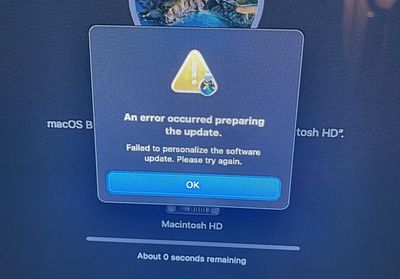
macos big sur m1 macs restore issue
Specifically, the error message would read: "An error occurred preparing the update. Failed to personalize the software update. Please try again."

Over the weekend, Apple posted detailed instructions for users experiencing this issue. Specifically it seems the issue arises if you erase/restore your Mac before upgrading to macOS Big Sur 11.0.1.

If you erased your Mac with Apple M1 chip before updating to macOS Big Sur 11.0.1, you might be unable to reinstall macOS from macOS Recovery. A message might say “An error occurred while preparing the update. Failed to personalize the software update. Please try again.”

Use either of these solutions to reinstall macOS. You should then be able to use macOS Recovery as expected when reinstalling macOS in the future.

Apple suggests that you could create a bootable installer using another Mac. Otherwise, Apple details a more technical 17 step process using Terminal to restore your ‌M1‌ Mac to a functional state.

If you are still having trouble, Apple recommends contacting support, and you can also visit our ongoing forum thread where users are troubleshooting this specific issue.


Popular Stories

iOS 26

iOS 26.2 Coming Soon With These 8 New Features on Your iPhone

Thursday December 11, 2025 8:49 am PST by
Apple seeded the second iOS 26.2 Release Candidate to developers earlier this week, meaning the update will be released to the general public very soon. Apple confirmed iOS 26.2 would be released in December, but it did not provide a specific date. We expect the update to be released by early next week. iOS 26.2 includes a handful of new features and changes on the iPhone, such as a new...
iOS 26

iOS 26.4 and iOS 27 Features Revealed in New Leak

Friday December 12, 2025 10:56 am PST by
Macworld's Filipe Espósito today revealed a handful of features that Apple is allegedly planning for iOS 26.4, iOS 27, and even iOS 28. The report said the features are referenced within the code for a leaked internal build of iOS 26 that is not meant to be seen by the public. However, it appears that Espósito and/or his sources managed to gain access to it, providing us with a sneak peek...
iOS 26

Apple Releases iOS 26.2 With Alarms for Reminders, Lock Screen Changes, Enhanced Safety Alerts and More

Friday December 12, 2025 10:10 am PST by
Apple today released iOS 26.2, the second major update to the iOS 26 operating system that came out in September, iOS 26.2 comes a little over a month after iOS 26.1 launched. ‌iOS 26‌.2 is compatible with the ‌iPhone‌ 11 series and later, as well as the second-generation ‌iPhone‌ SE. The new software can be downloaded on eligible iPhones over-the-air by going to Settings >...
AirPods Pro Firmware Feature

Apple Releases New Firmware for AirPods Pro 2 and AirPods Pro 3

Thursday December 11, 2025 11:28 am PST by
Apple today released new firmware designed for the AirPods Pro 3 and the prior-generation AirPods Pro 2. The AirPods Pro 3 firmware is 8B30, up from 8B25, while the AirPods Pro 2 firmware is 8B28, up from 8B21. There's no word on what's include in the updated firmware, but the AirPods Pro 2 and AirPods Pro 3 are getting expanded support for Live Translation in the European Union in iOS...
macOS Tahoe 26 Thumb

Apple Releases macOS Tahoe 26.2 With Edge Light

Friday December 12, 2025 10:08 am PST by
Apple today released macOS Tahoe 26.2, the second major update to the macOS Tahoe operating system that came out in September. macOS Tahoe 26.2 comes five weeks after Apple released macOS Tahoe 26.1. Mac users can download the macOS Tahoe update by using the Software Update section of System Settings. macOS Tahoe 26.2 includes Edge Light, a feature that illuminates your face with soft...
AirTag 2 Mock Feature

Apple AirTag 2: Four New Features Found in iOS 26 Code

Thursday December 11, 2025 10:31 am PST by
The AirTag 2 will include a handful of new features that will improve tracking capabilities, according to a new report from Macworld. The site says that it was able to access an internal build of iOS 26, which includes references to multiple unreleased products. Here's what's supposedly coming: An improved pairing process, though no details were provided. AirTag pairing is already...
ipados 26 1 slide over

Apple Releases iPadOS 26.2 With Multitasking Improvements

Friday December 12, 2025 10:09 am PST by
Apple today released iPadOS 26.2, the second major update to the iPadOS 26 operating system released in September. iPadOS 26.2 comes a month after iPadOS 26.1. The new software can be downloaded on eligible iPads over-the-air by going to Settings > General > Software Update. iPadOS 26.2 continues with the multitasking improvements that were added with iPadOS 26.1. You can now drag and...
iphone fold text

'iPhone Fold' Arrival Expected to Cement Book-Style Era for Foldables

Friday December 12, 2025 3:55 am PST by
Foldable smartphone panel shipments are projected to jump 46% year-over-year in 2026, with Apple's entry into the market serving as the main catalyst, according to Counterpoint Research's latest Foldable-Rollable Display Shipment Tracker. "Apple is the key driver as it starts to procure panels for its first foldable iPhone," said Counterpoint's Guillaume Chansin. The research firm expects...

Top Rated Comments

sniffies Avatar
66 months ago
Clearly Apple is experiencing a Big Sur’ge of issues with their new Macs
Score: 34 Votes (Like | Disagree)
arn Avatar
66 months ago

Apple does write out the instructions in great detail, so it is easier than a "17 step process" would indicate.
True, though I don't think we see a "copy these terminal commands" instruction from Apple very often.


Attachment Image
Score: 19 Votes (Like | Disagree)
grjj Avatar
66 months ago

What a mess this company has turned into
What mess?
There was a bug in 11.0. Apple issued 11.0.1 but some people received the machine and immediately did a restore for any of various reasons. Since the machines shipped after 11.0.1 they had the bug in 11.0.

The fix is fairly simple for anyone that would have encountered the bug, ie: generic home users are not in the habit of doing a complete system restore out of the box, power users do that.
Score: 18 Votes (Like | Disagree)
IIGS User Avatar
66 months ago
It just works....
Score: 16 Votes (Like | Disagree)
7149041 Avatar
66 months ago

It’s not like windows with a registry or uninstall program
Oh boy, someone is yet to find out about the Application Support dir(s) :cool:
Score: 9 Votes (Like | Disagree)
triangletechie Avatar
66 months ago
I may be in the minority, but when I buy a new MacBook Air, I set it up and then....use it.
Score: 9 Votes (Like | Disagree)