Restoring Apple Silicon M1 Macs Leading to macOS Installation Errors - MacRumorsOpen MenuShow RoundupsShow Forums menuVisit ForumsOpen Sidebar
Skip to Content

Restoring Apple Silicon M1 Macs Leading to macOS Installation Errors

Several customers who purchased a new Mac with an M1 Apple Silicon app have discovered an issue when attempting to restore the machine, which leads to it becoming non-functional and stuck on error screen that says "An error occurred preparing the update. Failed to personalize the software update."
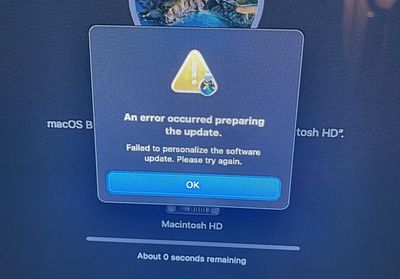
MacOS Big Sur error message
There are at least three threads on the MacRumors forums outlining the issue and warning against restoring one of the new machines. MacRumors reader RyanFlynn describes the problem:

I just received my M1 MacBook Pro and Macbook Air. Because I don't need any of the included software, it is always my procedure to restore the operating system without things like garage band and iMovie.

during the install process, an error occurs relating to "customizing the system update"

after a couple hours on the phone with Apple care, they told me that 75 other people have called in with this issue, and They have no work around. I was instructed to return my systems, or wait for a fix. Without having an operating system running, there is no way for me to install any future updates, so these computers are effectively bricked.

While Apple Support wasn't able to provide RyanFlynn with a reliable fix for the problem, other MacRumors readers have discovered a solution that appears to work.

Apple has instructions on using Configurator 2 and a secondary Mac to revive or restore an ‌Apple Silicon‌ Mac that has become unresponsive. This method requires the newest version of Apple Configurator 2, a functional Mac, and an appropriate cable to connect the two Macs.

Restoring in this way restores the firmware, updates recoveryOS to the latest version, and erases and installs the latest version of macOS on internal storage, thereby erasing all data. This method was successful for two MacRumors readers who had the recovery problem.

Apple may have a fix coming for this issue in the future, but for now it's best to avoid restoring an ‌Apple Silicon‌ Mac. For those that have already done so and are running into trouble, the Apple Configurator solution may be worth trying.


Popular Stories

iPhone 18 Pro Deep Red Feature

iPhone 18 Pro Launching Later This Year With These 12 New Features

Wednesday March 18, 2026 7:39 am PDT by
While the iPhone 18 Pro and iPhone 18 Pro Max are not expected to launch for another six months or so, there are already plenty of rumors about the devices. It was initially reported that the iPhone 18 Pro models would have fully under-screen Face ID, with only a front camera visible in the top-left corner of the screen. However, the latest rumors indicate that only one Face ID component...
ios 26 4 yellow

Here Are Apple's Release Notes for iOS 26.4

Wednesday March 18, 2026 11:56 am PDT by
Apple provided developers and public beta testers with the release candidate versions of iOS 26.4 and iPadOS 26.4, which means we're going to see a public launch as soon as next week. The RC versions of the software include Apple's official release notes, giving us final details on what's included in the update. Apple Music - Playlist Playground (beta) generates a playlist from your...
Apple Logo Sketch Feature

Apple Has Now Unveiled Eight New Products This Month

Tuesday March 17, 2026 9:25 am PDT by
Apple has unveiled a whopping eight new products so far this March, including an iPhone 17e, iPad Air models with the M4 chip, MacBook Air models with the M5 chip, MacBook Pro models with M5 Pro and M5 Max chips, the all-new MacBook Neo, an updated Studio Display, a higher-end Studio Display XDR, and now the AirPods Max 2 this week. iPhone 17e features the same overall design as the iPhone...

Top Rated Comments

BootLoxes Avatar
70 months ago
Couldnt you just uninstall the apps you need? Resorting to a restore right out of the gate seems a bit excessive.
Score: 68 Votes (Like | Disagree)
loekf Avatar
70 months ago
Some things I dont understand. You can remove apps like iMovie and GarageBand and just put the additional stuff into a folder. Why would you restore the OS ?
Score: 53 Votes (Like | Disagree)
70 months ago
Sounds like an invalid procedure to begin with. I would never attempt that. 1). Just delete the apps you don’t want. Makes sense, right. 2) restoring from a non m1 image, what does that even mean?
Score: 29 Votes (Like | Disagree)
70 months ago
Why do some people complain about these people who restore? Just because YOU wouldn’t do it, and just because there are other, probably better ways something can be done doesn’t remove the FACT that people operate in ways that may be different from you. Calling out those people as “wrong” or “why would they do that when they can just uninstall” does not prove your superior intellect, it simply proves you are short in EMPATHY, which btw - understanding this concept is foundational for any company building products for people as well as a foundational concept for any person dealing with any other human in any positive way.
Score: 28 Votes (Like | Disagree)
DHagan4755 Avatar
70 months ago
I understand the whole desire to wipe the new Mac & "start clean" but you can delete those stock apps from Launch Pad without having to go through that hassle.

Meanwhile Apple will definitely improve the restoration process.

Attachment Image
Score: 25 Votes (Like | Disagree)
jlocker Avatar
70 months ago
Thank you all you early hardware adopters for making my life easy for the next 2 years.
Score: 23 Votes (Like | Disagree)
Related Apple News: Travel | Reviews | World News | Motoring | Culture