Apple's battery health management feature cannot be disabled on Apple Silicon Macs, as there is no toggle switch for this in System Preferences on these machines.
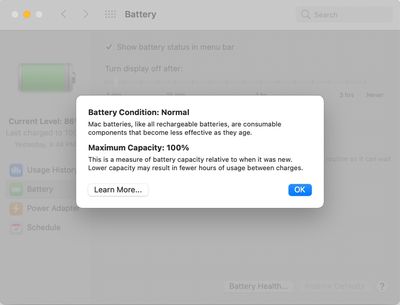
Battery health management cannot be disabled on Apple Silicon-based Macs
Introduced in macOS Catalina version 10.15.5, the battery health management system is designed to improve the lifespan of a Mac notebook's battery by reducing the rate at which it chemically ages. The feature achieves this by monitoring the battery's temperature history and its charging patterns, and temporarily reducing the battery's maximum charging capacity as necessary, according to Apple.
The feature can still be disabled on Intel-based Macs, but Apple warns this may reduce the battery's lifespan. On macOS Big Sur, navigate to System Preferences > Battery > Battery > Battery Health… and uncheck "Manage battery longevity." On macOS Catalina, the checkbox is located in System Preferences > Energy Saver > Battery Health…
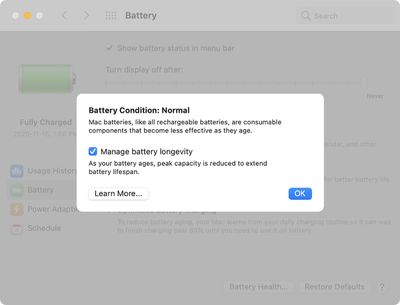
Battery health management can be disabled on Intel-based Macs
Wednesday March 18, 2026 7:39 am PDT by Joe Rossignol
While the iPhone 18 Pro and iPhone 18 Pro Max are not expected to launch for another six months or so, there are already plenty of rumors about the devices.
It was initially reported that the iPhone 18 Pro models would have fully under-screen Face ID, with only a front camera visible in the top-left corner of the screen. However, the latest rumors indicate that only one Face ID component...
Wednesday March 18, 2026 11:56 am PDT by Juli Clover
Apple provided developers and public beta testers with the release candidate versions of iOS 26.4 and iPadOS 26.4, which means we're going to see a public launch as soon as next week. The RC versions of the software include Apple's official release notes, giving us final details on what's included in the update.
Apple Music
- Playlist Playground (beta) generates a playlist from your...
Apple has unveiled a whopping eight new products so far this March, including an iPhone 17e, iPad Air models with the M4 chip, MacBook Air models with the M5 chip, MacBook Pro models with M5 Pro and M5 Max chips, the all-new MacBook Neo, an updated Studio Display, a higher-end Studio Display XDR, and now the AirPods Max 2 this week.
iPhone 17e features the same overall design as the iPhone...
People don't get it. The complaint is not because one would want to disable the feature. It's because one should be free to decide whether to disable the feature or not.
It's your computer. You paid very, very handsomely for it. You're supposed to be able to do what you want to it.
Well, I guess lots of people here would be just delighted to be at the other end of a Darth Vader-style "I am altering the deal, pray I don't alter it any further" speech.
PS: I use the AlDente app, and I manage my battery infinitely better than any crappy machine-learning-AI mumbo-jumbo would ever be able to. So, I do disable it. I wouldn't recommend this to 99.99% of other Apple users, though.
Because they all think they are better hardware/software engineers than any that work at Apple. I wish there was a program that allowed these people to build their own laptops with a live streaming feed so we could watch them blow up within the first 72 hours. Assuming, that is, they can keep them running for more than 15 minutes.
Or maybe a reality show where they each get their own personal UNIVAC to keep running to win a prize while losers get shot out of a cannon into the Sun. It’s a win/win either way and would be funny as hell.
You have no idea what you’re talking about. I, unlike you, do — I’m an electrical engineer, I’ve designed Li-Ion battery-powered products, and I’ve read dozens of actual scientific papers, on peer-reviewed high-impact journals, about battery lifespan.
The Apple feature tries to predict when you’re going to need 100% battery charge, and time the charges that way. To maximize battery lifespan, the main thing it can do is keep it at a lower charge (e.g. 60% seems to be an ideal value) for as long as possible. Batteries degrade much much much faster when near 100% state of charge than when at 60% or even 80%.
I, unlike Apple, actually know when I’m going to need 100% charge. In my case, the answer is: never — OK, maybe once or twice a year, but this year I’ve yet to purposefully charge it beyond 60% (using the AlDente app to control the state of charge).
So, Apple may have the best and brightest engineers of the world. Maybe they can do the very best, state of the art machine-learning mumbo-jumbo (actually, from my experience it’s crap — optimized battery charging doesn’t work for me in the iPhone at all — but let’s pretend for a moment that it’s not crap). Unfortunately one thing that’s beyond Apple is predicting the future: i.e. when will you need 100% charge, so you can start charging it exactly X minutes before so the moment you unplug it, it’s at 100%. Since it can’t do that, those that care enough about managing their battery will always be able to do better. It’s simply impossible to argue with that.