

YouTube for iOS Gaining New Gestures and Controls - MacRumorsOpen MenuShow RoundupsShow Forums menuVisit ForumsOpen Sidebar
Skip to Content

YouTube for iOS Gaining New Gestures and Controls

Google is overhauling the YouTube app for iOS to add more intuitive gestures and control options, according to a new blog post on the YouTube site.
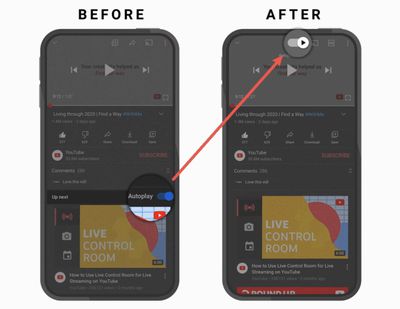
youtubenewcontrols
The AutoPlay button is being moved from below a video to the top of a video, so it's easier to turn off autoplay content if desired. Captions are also easier to get to right above the video screen, and YouTube said there are "snappier" controls that make actions faster.

Entering full screen mode can be done by swiping upwards on a video instead of having to tap the screen expansion icon at the bottom of the video, which makes it easier to get to full screen mode. A swipe down exits full screen mode and returns to the standard view.

youtubeswipegestures
Tapping on the timestamp will now toggle between the time left on a video and the time that has elapsed, so you can view the video length in your preferred way.

YouTube for iOS is getting suggested actions, which are designed to prompt users to do things like rotate a phone or play a video in VR when YouTube thinks a better viewing experience is available.

YouTube in May added video chapters, and now the feature has been expanded to include a list view that pops up when you tap or click on the chapter title. It includes a complete list of all chapters in the video and a preview thumbnail of content.

These features are rolling out to YouTube users on iOS starting today, with YouTube available from the App Store for free. [Direct Link]


Popular Stories

google chrome vertical tabs

Google Brings Vertical Tabs and Improved Reading Mode to Chrome

Tuesday April 7, 2026 1:27 pm PDT by
Google today updated its Chrome browser with support for vertical tabs, which are displayed in a sidebar instead of at the top of the browser. The tab layout can be changed by right clicking on any Chrome window and choosing the "Show Tabs Vertically" option. Sidebar tabs feature full page titles and make it simple to organize tab groups. Google has also added a new full-page interface...
Chrome Feature 22

Gemini in Google Chrome Gets a Skills Library for Saving Custom AI Prompts

Tuesday April 14, 2026 10:00 am PDT by
Chrome has been updated today with a Skills library that's designed to let Chrome users turn AI tasks into repeatable skills that can be used on any website. Useful prompts you create for Gemini in Chrome can be saved as a Skill that can be accessed later with a single click. If you're shopping for skincare and ask Gemini about the ingredients in a product, for example, you can save the...
gemini for mac app google

Google Launches Native Gemini AI App for Mac

Wednesday April 15, 2026 10:46 am PDT by
Google is bringing Gemini to the Mac with a new native macOS app that's available starting today. Gemini for Mac can be activated with a keyboard shortcut, and it has built-in tools for generating images, analyzing what's on your screen, reviewing files, and more. Gemini is the last of the three major AI services to have a dedicated Mac app, because OpenAI and Anthropic have had Mac apps for ...

Top Rated Comments

72 months ago
Could they overhaul it to allow PIP, please?
Score: 45 Votes (Like | Disagree)
CarlJ Avatar
72 months ago
KILL AUTOPLAY!

I’ll pick another video if I want, dammit.
Score: 37 Votes (Like | Disagree)
Kylo83 Avatar
72 months ago
Just let us always have video play at highest quality and easier way to change res without 2 steps, also PIP?
Score: 25 Votes (Like | Disagree)
72 months ago
I honestly think YouTube app is coded by monkeys... Way too many bugs and aggressive ads.
Score: 21 Votes (Like | Disagree)
InGen Avatar
72 months ago
“Sorry guys, we know a lot of you are paying $14.99 per month for Premium but we don’t care about you and we are not adding PiP. But here have a few visual cues and improvements...”
- YouTube
Score: 20 Votes (Like | Disagree)
72 months ago
If they could just enable HDR on iPhones 12, iPad Pro and Apple TV 4K. That would be great.
Score: 18 Votes (Like | Disagree)
Related Apple News: News | Politics | Iphone | Business | Reviews
















