Hands-On With iOS 14.2's New Shazam Music Recognition Toggle in Control Center - MacRumorsOpen MenuShow RoundupsShow Forums menuVisit ForumsOpen Sidebar
Skip to Content

Hands-On With iOS 14.2's New Shazam Music Recognition Toggle in Control Center

Shortly after launching iOS 14, Apple introduced an upcoming iOS 14.2 update, which is now available to developers and public beta testers ahead of a public release that could come at some point in October.


The iOS 14.2 update mainly focuses on the Control Center, introducing a new Music Recognition toggle that deepens the Shazam integration in the iPhone and iPad. We thought we'd test out the new Shazam toggle in the Control Center in our latest YouTube video, giving those who haven't installed the beta a look at what it does.

For those unfamiliar with Shazam, it's designed to listen for music that's playing, providing a song title and artist for identification purposes. Apple's iPhones and iPads have long had Shazam integration, available through the Shazam app and by asking Siri to identify a song that's playing.

After years of ‌Siri‌ integration, Apple acquired Shazam in 2017, and the acquisition was finished in 2018, but until now, Apple hasn't made a move to make song recognition a system-level function.

iOS 14.2 adds a new "Music Recognition" toggle to the Control Center, which you can tap whenever music is playing to get a song recognition. Note that Music Recognition is distinct from Sound Recognition, an Accessibility feature introduced in iOS 14 to help those who are hard of hearing listen for sounds like alarms.

The Music Recognition toggle doesn't show up in Control Center by default (at least in the beta), but it can be enabled by opening up the Settings app, choosing Control Center, and then scrolling down and tapping the "+" button next to Music Recognition.
music recognition

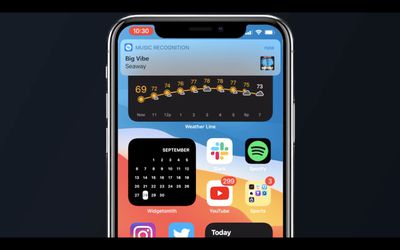
Tapping the Music Recognition button in Control Center will cause an iPhone or ‌iPad‌ to listen for a song that's playing, and when a song is recognized, you'll be notified through a pop up banner. Tapping the banner opens up Shazam, but a long press will give you the option to open the song right in Apple Music, which is handy for ‌Apple Music‌ subscribers.

Music Recognition works with songs playing in the ambient environment as well as songs playing on your iPhone. So if you're watching a video and want to know what song is in it, you can just tap the Music Recognition toggle to find out. It even works when AirPods are connected, so the sound doesn't need to be out loud. This was possible with a ‌Siri‌ command before, but the functionality is easier to use with the simple Control Center toggle.

Along with Music Recognition, there are a few other bonus tweaks in the iOS 14.2 update. The Now Playing interface in Control Center has been redesigned and now, when there's no music playing, it will show suggestions based on songs and albums that you've listened to recently. The design has also been streamlined, and if you want to AirPlay to other devices, there's now a little toggle to tap that brings up all nearby ‌AirPlay‌ 2 compatible devices in a list, rather than displaying them at all times in the widget.

iOS 14.2 also adds one more Accessibility feature, enhancing the Magnifier app on the iPhone. There's now an option to turn on People Detection in Magnifier, which lets the app detect people to let those with low sight know when someone is within six feet. The People Recognition option is also able to identify specific people that have been labeled in the Photos app using the iPhone's facial detection feature.

The iOS 14.2 update is available to both developers and public beta testers at this time, so anyone can test it out if desired. It is a beta, so expect some bugs. iOS 14.2 will likely be in beta testing for some time as we await new iPhones, with a launch perhaps coming later in October.


Related Forum: iOS 14

Popular Stories

imac video apple feature

Apple Released Yet Another New Product Today

Friday March 20, 2026 2:39 pm PDT by
Apple has unveiled a whopping nine new products so far this March, including an iPhone 17e, iPad Air models with the M4 chip, MacBook Air models with the M5 chip, MacBook Pro models with M5 Pro and M5 Max chips, the all-new MacBook Neo, an updated Studio Display, a higher-end Studio Display XDR, AirPods Max 2, and now the Nike Powerbeats Pro 2. iPhone 17e features the same overall design as...
iPhone 18 Pro Deep Red Feature

iPhone 18 Pro Launching Later This Year With These 12 New Features

Wednesday March 18, 2026 7:39 am PDT by
While the iPhone 18 Pro and iPhone 18 Pro Max are not expected to launch for another six months or so, there are already plenty of rumors about the devices. It was initially reported that the iPhone 18 Pro models would have fully under-screen Face ID, with only a front camera visible in the top-left corner of the screen. However, the latest rumors indicate that only one Face ID component...
ios 26 4 pastel

iOS 26.4: Top 10 New Features Coming to Your iPhone

Friday March 20, 2026 2:44 pm PDT by
iOS 26.4 isn't the major update with new Siri features that we hoped for, but there are some useful quality of life improvements, and a little bit of fun with an AI playlist generator and new emoji characters. Playlist Playground - Apple Music has a Playlist Playground option that lets you generate playlists from text-based descriptions. You can include moods, feelings, activities, or...

Top Rated Comments

72 months ago
A long long time ago, Shazam or Soundhound (can't remember which one) was smart enough to recognize and name a song if you just hummed it. It was magical, and I swear I'm not hallucinating it. Now neither seems capable of this. Does anyone know of an app that has this capability?
Score: 9 Votes (Like | Disagree)
nymphe Avatar
72 months ago
It is SoundHound and it still can do it. I used this feature on a French song couple of weeks ago and it recognized the song.

btw I can’t speak French, so I just hummed the melody, so no words at all.

(The song is: une belle histoire)


A long long time ago, Shazam or Soundhound (can't remember which one) was smart enough to recognize and name a song if you just hummed it. It was magical, and I swear I'm not hallucinating it. Now neither seems capable of this. Does anyone know of an app that has this capability?
Score: 7 Votes (Like | Disagree)
mashdots Avatar
72 months ago
I've been using shazam for years and i've loved how easily it has worked. very excited to have it integrated into the OS!
Score: 5 Votes (Like | Disagree)
AppleGuesser Avatar
72 months ago

If the new 14.2 Update is as bug-prone with issues as the original iOS 14 was, PLEASE iron out the kinks before you release it, Apple. I know too many people who have screwed up their Apple watches, iPads & iPhones with battery issues, color shifts, pages that will not load, freeze up, etc. due to updating to iOS 14. :mad:
This is a tired quote. For everyone of these posts, 100 are positive about ios 14. The only mistake apple made was moving from GM to Public release in about a day instead of 1-2 weeks. Other than that, this is better than iOS 13 or 11 judging from the hate comments here on MacRumors.
Score: 4 Votes (Like | Disagree)
Digital Dude Avatar
72 months ago
I just took a look-see at the Magnifier App. While all this adds utility, I'd rather see existing Apps that work. To date, iOS 14.x is the most bug-infested version I have ever used. 🤨

I didn't even see the post above mine (#7) before I posted my comment.
Score: 4 Votes (Like | Disagree)
RevTEG Avatar
72 months ago

If the new 14.2 Update is as bug-prone with issues as the original iOS 14 was, PLEASE iron out the kinks before you release it, Apple. I know too many people who have screwed up their Apple watches, iPads & iPhones with battery issues, color shifts, pages that will not load, freeze up, etc. due to updating to iOS 14. :mad:
I know many are having a different experience, but I’m with you on this one. I’m currently running 14.2 PB on my 2018 12.9. I’m still having issues with battery, widgets not working, some apps are not the correct size and I keep getting stuck with the spinning “wheel” in the upper right corner, which drains the battery really fast. A restart stops the spinning “wheel” but only for a few hours. I‘ve done all I know to do except for erasing and fresh install. Again, not hating on Apple, I’m positive many are not having these issues. However, for me, iOS/PadOS14 has been the most unstable update I‘ve ever experienced.
Score: 4 Votes (Like | Disagree)
Related Apple News: Ipad Mini | Never Miss Doorbell Wearing Iphone | Ipad Pro 2024 Specs | Airpods Max 1 Vs Max 2 | Education