Apple Seeds iOS 14 and iPadOS 14 Public Beta 5 to Testers

Apple today seeded new public betas of upcoming iOS 14 and iPadOS 14 updates to its public beta testing group. Today's software releases, which Apple labels as fifth betas to keep them in line with developer betas, are actually the fourth betas that Apple has provided to public testers and they come two weeks after the prior beta releases.
ios 14 Beta Feature 5
Public beta testers who have signed up for Apple's beta testing program can download the iOS/‌iPadOS‌ 14 updates over the air after installing the proper certificate from the Public Beta website on an iOS device, with instructions available in our how to.

iOS 14 brings changes to the Home Screen, including widget support. Widgets can now be placed right next to your apps, and with the focus on widgets, Apple has introduced new widgets from default apps and is allowing them to be customized in three sizes.

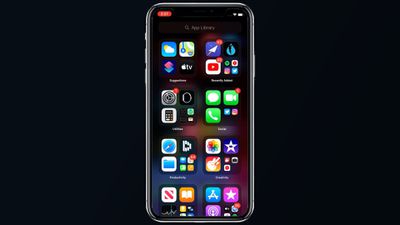
You can put widgets anywhere on any app page, with new widgets able to be found in the widget gallery. Along with widgets, Apple has introduced an App Library, which is an interface that shows all of the apps on your iPhone both in smart folders that are created automatically and in an alphabetical list.
iOS 14 App Library
With the App Library providing access to all your apps, there's now an option to hide entire app pages from your ‌iPhone‌, so you can avoid a cluttered Home Screen.

Apple has worked to make the ‌iPhone‌'s interface more compact, and incoming phone calls and Siri requests no longer take over the whole screen and are instead presented in a banner style, a feature also available on iPadOS.

There's a Picture in Picture mode for watching videos or using FaceTime while doing something else at the same time on the ‌iPhone‌. The Messages app has new features focused on group conversations like pinned conversations, mentions, and inline replies.

A new App Clips feature lets you use small bite sized bits of an app without the need to download the whole app, useful for times when you need an app to buy a coffee, rent a scooter, or make a restaurant reservation. App Clips will work through Apple-designed App Clip codes, NFC tags, or QR codes, and can also be shared in Messages or from Safari.

The Health app supports the Sleep Tracking feature added in watchOS 7, and the ‌iPhone‌ will support the Sleep Mode and Wind Down features designed to help you get a better night's sleep. There's also a new Health Checklist that makes it easier to manage health and safety features like Emergency SOS, Fall Detection, and Medical ID.

The Weather app now provides info on severe weather events and minute-by-minute precipitation readings (U.S. only), and the Maps app supports cycling directions for the first time so bike riders can plan routes with info like busy streets, elevation changes, stairs, and more. Maps also now lets electric vehicle owners plan routes with EV charging spots.

The Home app is smarter with automation suggestions and an Adaptive Lighting feature that lets HomeKit lights adjust their color temperature throughout the day, plus there are new features for ‌HomeKit‌ Secure Cameras.

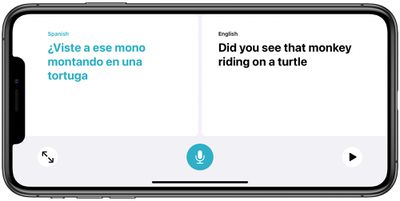
translateconversationmodeios14
A new Apple-designed Translate app provides text and voice translations to and from 11 languages, and with an on-device mode, translations can be done entirely on your phone.

Tons of new privacy features have been added in iOS and iPadOS 14. Apps need permission before accessing devices on a local network, you get notified when an app accesses the clipboard, and there are little icons in the status bar of the ‌Home Screen‌ when an app is using the camera or the microphone.

There are also new options for limiting access to select photos and providing apps with an approximate location rather than an exact location for better privacy protection. Safari has Privacy Report that tells you which trackers sites are using, and in the future, the App Store will include a summary of developers' privacy practices in an easy-to-read format.

AirPods can now seamlessly and automatically switch between devices, and AirPods Pro gain a new spatial audio feature for surround sound complete with dynamic head tracking.
ipadossidebars
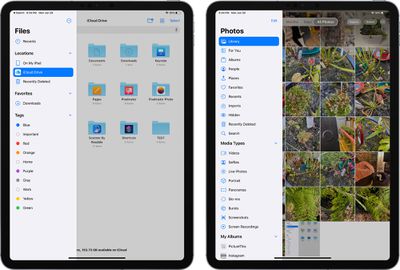
As for iPadOS 14, it includes most of the new iOS 14 updates, minus the ‌Home Screen‌ redesign. The biggest change is the new Scribble feature that lets you use the Apple Pencil to write on any text field, with the written text converted to typed text.

Scribble works throughout the operating system so you can use the ‌Apple Pencil‌ for Safari searches, adding new items in Calendar and Reminders, sending Messages, handwriting in the Notes app, and more.

Beta 5 for developers introduced a larger Apple News widget option, a scrolling clock wheel for apps like Alarm Clock, an option to turn on Exposure Notifications, and a feature to better hide photo albums, and these new additions are also available in today's public beta.

For more on everything that's new in iOS and iPadOS 14, make sure to check out our iOS 14 and iPadOS 14 roundups, which have a detailed look on all of the new features.


Related Forum: iOS 14

Popular Stories

iOS 26

iOS 26.4 and iOS 27 Features Revealed in New Leak

Friday December 12, 2025 10:56 am PST by
Macworld's Filipe Espósito today revealed a handful of features that Apple is allegedly planning for iOS 26.4, iOS 27, and even iOS 28. The report said the features are referenced within the code for a leaked internal build of iOS 26 that is not meant to be seen by the public. However, it appears that Espósito and/or his sources managed to gain access to it, providing us with a sneak peek...
apple beta 26 lineup

Apple Leak Confirms Work on Foldable iPhone, AirTag 2, and Dozens More Devices

Monday December 15, 2025 2:05 pm PST by
Last week, details about unreleased Apple devices and future iOS features were shared by Macworld. This week, we learned where the information came from, plus we have more findings from the leak. As it turns out, an Apple prototype device running an early build of iOS 26 was sold, and the person who bought it shared the software. The OS has a version number of 23A5234w, and the first...
Apple Logo Top Half

Early iOS 26 Software Leak Uncovers Dozens of Upcoming Apple Features

Monday December 15, 2025 3:05 pm PST by
Software from an iPhone prototype running an early build of iOS 26 leaked last week, giving us a glimpse at future Apple devices and iOS features. We recapped device codenames in our prior article, and now we have a list of some of the most notable feature flags that were found in the software code. In some cases, it's obvious what the feature flags are referring to, while some are more...
Apple Foldable Thumb

Leak Reveals Foldable iPhone Details

Monday December 15, 2025 9:09 am PST by
The first foldable iPhone will feature a series of design and hardware firsts for Apple, according to details shared by the Weibo leaker known as Digital Chat Station. According to a new post, via machine translation, Apple is developing what the leaker describes as a "wide foldable" device, a term used to refer to a horizontally oriented, book-style foldable with a large internal display....
iOS 26

Apple Releases iOS 26.2 With Alarms for Reminders, Lock Screen Changes, Enhanced Safety Alerts and More

Friday December 12, 2025 10:10 am PST by
Apple today released iOS 26.2, the second major update to the iOS 26 operating system that came out in September, iOS 26.2 comes a little over a month after iOS 26.1 launched. ‌iOS 26‌.2 is compatible with the ‌iPhone‌ 11 series and later, as well as the second-generation ‌iPhone‌ SE. The new software can be downloaded on eligible iPhones over-the-air by going to Settings >...
iOS 26

iOS 26.3 Beta 1 Features: What's New So Far

Monday December 15, 2025 4:23 pm PST by
Apple is testing iOS 26.3, the next version of iOS 26 that will launch around January. Since iOS 26.3's testing is happening over the holidays, it is a smaller update with fewer features than we've seen in prior betas. We've rounded up what's new so far, and we'll add to our list with subsequent betas if we come across any other features. Transfer to Android Apple is making it simpler...
iOS 26

iOS 26.2 Coming Soon With These 8 New Features on Your iPhone

Thursday December 11, 2025 8:49 am PST by
Apple seeded the second iOS 26.2 Release Candidate to developers earlier this week, meaning the update will be released to the general public very soon. Apple confirmed iOS 26.2 would be released in December, but it did not provide a specific date. We expect the update to be released by early next week. iOS 26.2 includes a handful of new features and changes on the iPhone, such as a new...
airpods max 2024 colors

AirPods Max 2 Likely to Offer These 10 New Features

Monday December 15, 2025 7:41 am PST by
Apple released the AirPods Max on December 15, 2020, meaning the over-ear headphones launched five years ago today. While the AirPods Max were updated with a USB-C port and new color options last year, followed by support for lossless audio and ultra-low latency audio this year, the headphones lack some of the features that have been introduced for newer generations of the regular AirPods and the ...

Top Rated Comments

harper101 Avatar
70 months ago
Dude. Stop. Just download. Or not. ??‍♂️
Score: 8 Votes (Like | Disagree)
lanegandy Avatar
70 months ago

That was an assumption on previous versions of Apple Watch. Apparently they have changed that.

And no reason for a thumbs down on my original post.
This has never been an assumption. I've ran betas every year and this is the first year a public beta for the AW was even offered.
Score: 8 Votes (Like | Disagree)
viettanium Avatar
70 months ago
where is macOS Big Sur Beta 5?
Score: 6 Votes (Like | Disagree)
lanegandy Avatar
70 months ago

I'd love to try out the beta, but since I have AW I would have to use the beta on the watch too. The phone I can downgrade, can't do that with the watch. :(
You don't have to use the beta on the Apple Watch just because your phone is on the beta.
Score: 6 Votes (Like | Disagree)
Nütztjanix Avatar
70 months ago
It's the other way round. If you want to use watchOS Beta, your phone has to be on the corresponding iOS Beta, too.
Score: 6 Votes (Like | Disagree)
anthb Avatar
70 months ago

I'd love to try out the beta, but since I have AW I would have to use the beta on the watch too. The phone I can downgrade, can't do that with the watch. :(
You don’t have to go beta on the AW. I haven’t.
Score: 5 Votes (Like | Disagree)