

iOS 14 Includes Redesigned Field Test Mode - MacRumorsOpen MenuShow RoundupsShow Forums menuVisit ForumsOpen Sidebar
Skip to Content

iOS 14 Includes Redesigned Field Test Mode

Apple's upcoming iOS 14 update introduces multiple design changes, including a new look for the hidden Field Test Mode feature on the iPhone.

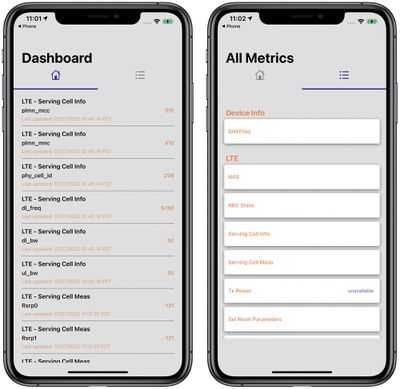
As noted on the MacRumors forums, Apple has overhauled Field Test Mode to provide more useful information at a glance.
ios14fieldtestmode

Field Test Mode in iOS 14

There's now a Home section with LTE Cell Serving Info, along with a menu section that has other details like device info and breakdowns of LTE, UMTS, and GSM functionality.

Much of the info available in iOS 13 and iOS 14 is the same when it comes to Field Test Mode, so the change is primarily related to design and making it easier to navigate through the hidden app.

Field Test Mode is designed to allow iPhone users to access in-depth information about cellular signal and cellular connection. Field Test Mode is designed for engineers and cellular operators and most people will not need to use it on a regular basis.
ios14fieldtest

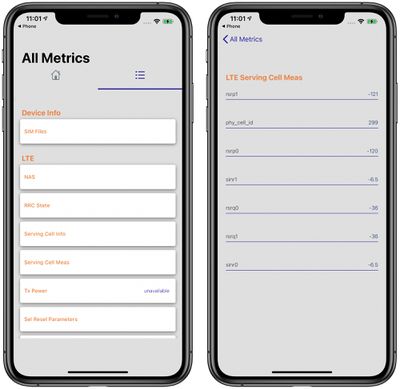
Field Test Mode in iOS 14

You can access Field Test Mode on an iPhone by opening up the Phone app, inputting *3001#12345#* and pressing the phone button. It won't make a call, but will instead open the Field Test app.

Field Test Mode was formerly useful because it could turn the cellular signal bars into a numerical measurement, but that is not something that works on modern iPhones with recent versions of iOS.
ios13fieldtest

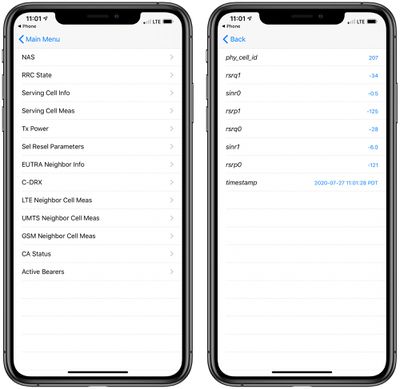
Field Test Mode in iOS 13

It can still sometimes be useful to see cellular signal represented as a number, and that's still possible on iOS 13 and 14. After entering the Field Test app, tap on LTE (from the main menu on iOS 13 or the menu list on iOS 14) then tap on "Serving Cell Meas."

The measurements that read "rsrp0" and "rspr1" are your cellular signal strength in decibel-milliwatts. These numbers are always negative, and a lower negative number is better than a higher negative number and represents a stronger connection. Numbers range from about -50 to -130. Closer to -50 is a strong signal strength, and when you get to around -100, that's a poor connection that's spotty with slow data speeds if a connection can be made at all.

Update 6/15/21: Apple appears to have updated Field Test Mode and certain metrics like "Serving Cell Meas" appear to be no longer available to access.


Related Forum: iOS 14

Popular Stories

iPhone 18 Pro Deep Red Feature

iPhone 18 Pro Launching Later This Year With These 12 New Features

Wednesday March 18, 2026 7:39 am PDT by
While the iPhone 18 Pro and iPhone 18 Pro Max are not expected to launch for another six months or so, there are already plenty of rumors about the devices. It was initially reported that the iPhone 18 Pro models would have fully under-screen Face ID, with only a front camera visible in the top-left corner of the screen. However, the latest rumors indicate that only one Face ID component...
Apple Logo Sketch Feature

Apple Has Now Unveiled Eight New Products This Month

Tuesday March 17, 2026 9:25 am PDT by
Apple has unveiled a whopping eight new products so far this March, including an iPhone 17e, iPad Air models with the M4 chip, MacBook Air models with the M5 chip, MacBook Pro models with M5 Pro and M5 Max chips, an updated Studio Display, a higher-end Studio Display XDR, and now the AirPods Max 2 this week. iPhone 17e features the same overall design as the iPhone 16e, but it gains Apple's...
ios 26 4 yellow

Here Are Apple's Release Notes for iOS 26.4

Wednesday March 18, 2026 11:56 am PDT by
Apple provided developers and public beta testers with the release candidate versions of iOS 26.4 and iPadOS 26.4, which means we're going to see a public launch as soon as next week. The RC versions of the software include Apple's official release notes, giving us final details on what's included in the update. Apple Music - Playlist Playground (beta) generates a playlist from your...

Top Rated Comments

74 months ago
-130 is a lower number than -50, and is more negative, though. Rather than “a lower negative number is better,” it’s more accurate to say “a less negative number is better.”
Score: 15 Votes (Like | Disagree)
74 months ago

We need a manual for this field test so people can understand exactly what is what!
Yep, because this is a clear case of "a little knowledge is a dangerous thing." It's the kind of info one might see in a professional telecommunications test instrument. It's not a go/no-go test, it's quantitative measurement. Unless you know what every measurement means and how various measurements interrelate, it's nearly useless. But an end-user can latch onto one or two measurements out of the bunch and decide they have a problem.

Radio signal strength/signal quality measurements are particularly tricky, as strength and quality are affected by even small changes in the local receiving environment - moving as little as a few inches or slightly changing the angle of the receiving antenna can make a huge difference.

Consider the comments about whether -130 should be considered "lower" or "less negative." In the case of signal strength, -50 is a stronger signal (better) than -130. However, if we were talking about a noise measurement, -130 would be better than -50. Still, this doesn't tell us whether -130 is good enough.
Score: 7 Votes (Like | Disagree)
Stridr69 Avatar
74 months ago
Too bad that iOS doesn't allow the use of apps like this one. However this can be used as a reference.
For example -101 dBs = RSPO on iOS. The lower the number, the better the signal.
LTE+=CA status IS in use. This particular app dosen't show total Mhz bandwidth in use, unfortunately(like another app that I use shows 3XCA:20x5x5MHZ for a total of 30 MHz
The number 66 on the upper right is the frequency band band in use. Don't see it on the examples given here in this thread. S/B freq_band_ind 66
Fc=Actual frequency used, in this case 2145 Mhz(2.145 Ghz)

Reference only folks, but fun to use...

Attachment Image
Score: 6 Votes (Like | Disagree)
littlepud Avatar
74 months ago

We need a manual for this field test so people can understand exactly what is what!

I find it strange that it doesn't look like iOS at all.
A manual and a nice interface are both completely unnecessary. The labels and meaning for each value are all in the UMTS/HSPA/LTE specifications defined by 3GPP, the standardization body that writes the cellular network specs. Anyone who truly needs to work with the Field Test Mode (i.e. an RF engineer working for a mobile carrier or a cell-site / base-station manufacturer) would already know what to do with all of the output. This is not a feature meant for end-users (like most on the forum here) and is not really useful beyond being a technological curiosity.
Score: 5 Votes (Like | Disagree)
74 months ago

Yep, because this is a clear case of "a little knowledge is a dangerous thing."...
Maybe, but it can also be extremely useful - even if you don't know what one or two numbers are about. Case in point:me! We moved to a new house whee my T-Mobile cellular connection showed "No service". But by looking at the field test screens, I saw that there actually was a signal - it's just that the iPhone interprets it so weak as to constitute "No service". Knowing this, I was able to get cellular service by installing an antenna on the roof - again using the field test mode to point it in the best direction - and an indoor amplifier (and indoor antenna). Now I have service. And the only measures in field test mode I used were rsrp0 and another one that measured quality rather than strength but whose name I already forgot again :-)
Score: 4 Votes (Like | Disagree)
69 months ago
anyone know how to restore deleted line ?

Attachment Image
Score: 3 Votes (Like | Disagree)
Related Apple News: Entertainment | Travel | Local News | Opinion | Technology














