

In this week's App Recap, we've highlighted food and drink app "Soosee," productivity app "Tasks," and health and fitness app "Taurus" as three apps that are worth checking out. We've also compiled a list of apps that received major updates this week.
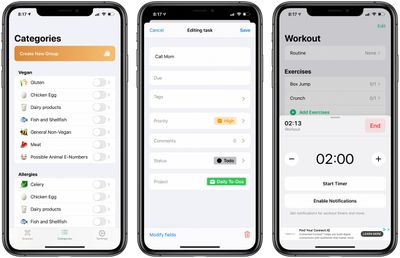
Apps to Check Out
- Soosee: Food Scanner (iOS, Free) - Soosee scans ingredient labels from food and intelligently checks for allergens as well as any other dietary restrictions users may have. Upon downloading the app, users are able to select from preset common food allergen groups like gluten, nuts, lactose, and more. Additionally, users can create their own list of ingredients to be checked when a label is scanned. Soosee is also great for those who are vegan or vegetarian, as the app can scan labels for foods that may contain animal-based products. Although the app is free to download, some features are limited to subscribers of the Soosee Supporter plan, which is available in monthly and annual plans as well as a lifetime plan priced at $0.99, $8.99, and $12.99 respectively. Becoming a Soosee Supporter lets users create an unlimited number of custom groups, auto scan labels, change the app's icon, and more.
- Tasks: Smart Lists & Reminders (iOS, Free) - Productivity app Tasks takes a traditional to-do list a step further with the ability to create tasks with automatic date detection and tag suggestions, group all tasks in an organized manner through projects, and add priority levels to each task. Users have the ability to add images and notes to tasks, sync projects across iCloud devices, and more. Tasks is free to download, but some features like project collaboration, iCloud sync, and an unlimited number of projects are reserved for those who subscribe to Tasks Plus. Tasks Plus is available in both a yearly subscription as well as a one time purchase and is priced at $9.99 and $34.99 respectively.
- Taurus (iOS, Free) - Taurus is an app that lets users easily log gym workouts, add and customize workout routines, select from over 100 built-in strength exercises, and more. Users can add notes to specific sets in a workout and conveniently create timers during set and rest periods. In addition, all workout data is stored in iCloud. The app also automatically calculates workout statistics and conveniently displays charts to help visualize progress.
App Updates
- Facebook Messenger - Facebook this week announced its Messenger app would be gaining various privacy enhancements including a new "App Lock" feature, which will require Face ID or Touch ID authentication before the app is opened.
- Google Fit - Google this week updated its Google Fit app with a weekly recap of users' daily goals, favorite workouts, activity, and sleep. The app also now lets users view workouts with pace breakdowns and distance markers.
- Mario Kart Tour - Nintendo this week shared news that its Mario Kart Tour game will now support landscape mode. The app was previously limited to portrait mode since its initial launch in 2019.
- Spotify - Spotify this week announced a new video podcast feature available for select podcasts in all markets where podcasts are supported. The new feature is available for both Spotify Premium and free users.
Are you using a great new app we've missed? Let us know in the comments and we'll check it out for next week's App Recap. Are you a developer of a unique app you'd like us to consider? Send us a message through our tip line at the top of the page and we'll check it out.
Tag: App Recap






















