

Some iPhone Users Report Significant Battery Drain Due to Music App Background Activity in iOS 13.5.1

apple music icon for ios 100594580 origA significant minority of iPhone users have taken to Apple's Support Communities and Reddit to report battery drain issues largely related to the Music app and high levels of background activity.

Hundreds of users, many running iOS 13.5.1 on devices both new and old, are experiencing rapid battery drain when the Music app is not in use. In some cases, the background activity occurs over several hours each day, even if the app has not been used for weeks or even at all.

User: Mojo06
I just purchased a new iPhone 11 a few days ago, and my battery is crashing so fast. I haven't even used the Apple Music App yet and it says that it has been running in the background for over 18 hours and has used 95% of my battery. My phone is also getting very hot from this. I am concerned this will kill my battery on my new phone.

User: Brianwpi
Phone is burning up. Switched off background app refresh. Restarted phone. Battery health 91%. iPhone X running iOS 13.5.1. Had to recharge several times during the day just to keep up. Help?

User: svphies
I'm having this exact same problem with my iPhone 11, recently updated to IOS 13.5.1. I never had Background App Refresh turned on and I haven't found any downloading song in the Music app. I might try to backup my phone to iTunes and do a reset later. I hope Apple fixes this issue soon.

While reports of the Music app draining battery in the background go back to April, there has been a rapid uptick in reports over the last week, suggesting Apple may have recently changed something on the server side which is causing the problem.
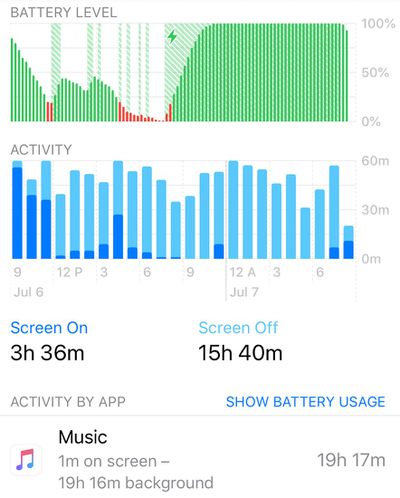
apple music battery drain
Below are some of the steps that users have taken to try to resolve the issue, but which appear to have a low rate of success.

  • Force quit the Music app.
  • Restart / Restore ‌iPhone‌.
  • Delete Music app then reinstall it.
  • Turn off Automatic Downloads (Settings -> Music -> Automatic Downloads).
  • Disable background app refresh (Settings -> General -> Background App Refresh -> Disable Music).
  • Turn off Mobile Data (Settings -> Music -> Mobile Data).
  • Cancel all downloads in the Music Library.

Some users have resorted to deleting the Music app on their device, which brings the battery usage to an end. For those with Apple Music subscriptions, however, this isn't even a short-term solution, so we're bringing these reports to the attention of the wider community in the hope that it will prompt Apple to investigate.


Popular Stories

Aston Martin CarPlay Ultra Screen

Apple's CarPlay Ultra to Expand to These Vehicle Brands Later This Year

Sunday February 1, 2026 10:08 am PST by
Last year, Apple launched CarPlay Ultra, the long-awaited next-generation version of its CarPlay software system for vehicles. Nearly nine months later, CarPlay Ultra is still limited to Aston Martin's latest luxury vehicles, but that should change fairly soon. In May 2025, Apple said many other vehicle brands planned to offer CarPlay Ultra, including Hyundai, Kia, and Genesis. In his Powe...
Apple Logo Black

Apple's Next Launch is 'Imminent'

Sunday February 1, 2026 12:31 pm PST by
The calendar has turned to February, and a new report indicates that Apple's next product launch is "imminent," in the form of new MacBook Pro models. "All signs point to an imminent launch of next-generation MacBook Pros that retain the current form factor but deliver faster chips," Bloomberg's Mark Gurman said on Sunday. "I'm told the new models — code-named J714 and J716 — are slated...
iOS 26

iOS 26.3 and iOS 26.4 Will Add These New Features to Your iPhone

Tuesday February 3, 2026 7:47 am PST by
We are still waiting for the iOS 26.3 Release Candidate to come out, so the first iOS 26.4 beta is likely still at least a week or two away. Following beta testing, iOS 26.4 will likely be released to the general public in March or April. Below, we have recapped known or rumored iOS 26.3 and iOS 26.4 features so far. iOS 26.3 iPhone to Android Transfer Tool iOS 26.3 makes it easier...
Apple MacBook Pro M4 hero

New MacBook Pros Reportedly Launching Alongside macOS 26.3

Sunday February 1, 2026 5:42 am PST by
Apple is planning to launch new MacBook Pro models with M5 Pro and M5 Max chips alongside macOS 26.3, according to Bloomberg's Mark Gurman. "Apple's faster MacBook Pros are planned for the macOS 26.3 release cycle," wrote Gurman, in his Power On newsletter today. "I'm told the new models — code-named J714 and J716 — are slated for the macOS 26.3 software cycle, which runs from...
iOS 26 Home Feature

Apple Gives Final Warning to Home App Users

Tuesday February 3, 2026 8:55 am PST by
In 2022, Apple introduced a new Apple Home architecture that is "more reliable and efficient," and the deadline to upgrade and avoid issues is fast approaching. In an email this week, Apple gave customers a final reminder to upgrade their Home app by February 10, 2026. Apple says users who do not upgrade may experience issues with accessories and automations, or lose access to their smart...

Top Rated Comments

shabagiuly Avatar
73 months ago
It’s not only the Music app, since 13.5 a lot of apps suffer of constant background activity. You can check this subject ('https://discussions.apple.com/thread/251435983?answerId=253009672022&page=1') on Apple forum.
Score: 14 Votes (Like | Disagree)
shabagiuly Avatar
73 months ago

Nah, it was 100% the music app.
Maybe for you. But if you check Apple’s forum, it’s far from the only one app with troubles.
Score: 8 Votes (Like | Disagree)
shabagiuly Avatar
73 months ago

I don't know if this is related, I checked this background activity and on my phone it showed the KMB app (only relevant to users in HK) had 19hrs of background activity within the last day. Doesn't seem to affect the battery though, as it is just an app for bus schedules.
Yes, it’s related. The bug is for background activity in general, not only Music app.
Score: 7 Votes (Like | Disagree)
ChpTrk Avatar
73 months ago

I’ll ask again and re-phrase. Does everyone with this issue subscribe to iTunes Match?
I use iTunes Match, and I have the issue.

I believe the assumptions about a server side issue are correct. I typically manually download a couple of playlists to my iPhone for offline listening. For the past couple of days I haven't been able to download the songs in any of my playlists. It looks like the phone starts to download a song, then fails and keeps retrying. I might be able to download a few songs, but the majority won't download. They don't time out and give an error or anything, the app just keeps trying to download them, which I think is where the background utilization/hot iPhone issue is happening.

My phone got so hot one day the flash wouldn't work until I was able to cool the device down.

It's now 10:00 AM. I unplugged my iPhone at 7:00 AM with 100% charge and haven't used it much today. I'm at 57% battery. I have a iPhone SE 2020.
Score: 6 Votes (Like | Disagree)
Squuiid Avatar
73 months ago
A picture tells 1000 words. Didn't even use Apple Music. All 'Background Activity".
One more thing, as soon as this started happening, iTunes Match no longer works on my HomePods. I've tried so many things to try and fix, nothing.

Definitely a server side change Apple have made to their music backend to cause this IMO.


Attachment Image
Score: 5 Votes (Like | Disagree)
KaPOWitsCHRIS Avatar
73 months ago
I’ve been having this issue for months and thought it was only me. I even reset my device and setup as new and it returned.
Score: 4 Votes (Like | Disagree)
















