Widgets in iPadOS 14 Limited to Today View in Landscape Mode
In iOS 14 for iPhone and iPod touch, widgets can be pinned in different sizes on any home screen page, providing useful information at a glance. The same can't be said for iPad.
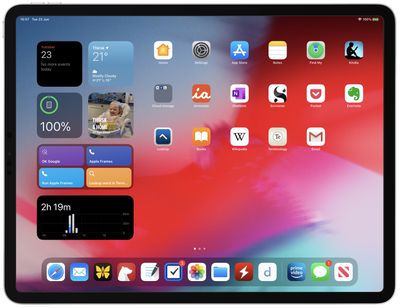
In iPadOS 14, the use of widgets is limited to the Today View sidebar that only appears on the first screen of apps when viewing in landscape mode. When viewed in portrait mode, Widgets disappear along with the Today View and the user's apps are automatically rearranged in a typical grid to fill the screen.
In other respects, Widgets in iPadOS 14 share the same new functionality as widgets in iOS 14. Users can create a Smart Stack of widgets, which uses machine learning to surface the right widget based on time, location, and activity. Widgets also can be customized for work, travel, sports, entertainment, and other areas of interest.
Currently, the App Library feature is missing in iPadOS 14, although it could possibly appear in a later beta. Apart from this and the limitation of widgets, iPadOS 14 shares the same new features as iOS 14, along with some additional ones that make better use of the larger screen, including new interface functionality for stock apps, universal Search, new Apple Pencil features, and more.
Popular Stories
Apple is expected to unveil iOS 27 during its WWDC 2026 keynote on June 8, and there are already many rumored features and changes for iPhones.
The first developer beta of iOS 27 will likely be available immediately following the keynote, and a public beta typically follows in July. Following beta testing, the software update should be released to all users with a compatible iPhone in...
Apple refreshed the 14-inch and 16-inch MacBook Pro with M5 Pro and M5 Max models in March 2026, but depending on your needs and interests, you might want to skip this generation because there's something better in the works.
The M5 Pro and M5 Max MacBook Pro models have faster chips, but the same design that Apple has used since 2021. An updated design with new display technology and faster ...
Apple today released a new Pride Edition Sport Loop for the Apple Watch. The band features a rainbow design with 11 colors of woven nylon yarns.
The new Pride Edition Sport Loop is available to order now on Apple.com and in the Apple Store app in 40mm, 42mm, and 46mm sizes, and it will be available at Apple Store locations starting later this week. In the U.S., the band costs $49.
There...