

In this week's App Recap, we've highlighted productivity app "Noted," utility app "PodWise," and health app "Sidekick" as three apps that are worth checking out. We've also compiled a list of apps that received major updates this week.
Apps to Check Out
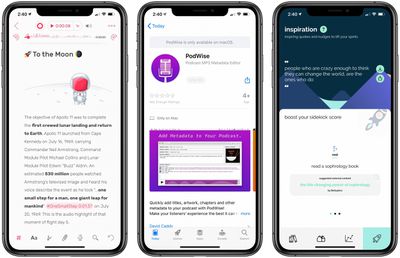
- Noted. (iOS & Mac, Free) - Noted is a productivity app that fully integrates audio recordings with notes to help users make the most out of note-taking. The app's simple design allows users to easily create notes and start recording in just a few taps. While recording audio, Noted adds a timestamp to each new line, and it's easy to navigate to specific places within the audio. Additionally, users can add #TimeTags, which link to key parts of the audio that can be placed anywhere in the note. Noted also features multitasking, iCloud syncing, the ability to lock notes with a password or Touch ID/FaceID, and more. Noted is free to download, but users looking to gain access to even more of the app's capabilities can upgrade to Noted+, which consists of monthly and yearly subscriptions priced at $2.49 and $23.99 respectively.
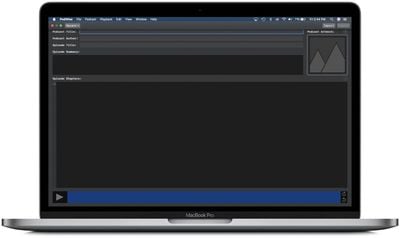
- PodWise (Mac, $14.99) - PodWise is an app that allows users to seamlessly add metadata to .mp3 audio files such as titles, artwork, chapters, author information, and more. The app consists an intuitive interface that allows users to import the file, add in the desired metadata, and then easily export the file. The convenient chapters feature allows users to listen to the audio and pause at desired points to add chapter information, which can even include URL links and images. Although PodWise is priced at $14.99, it features no ads or additional in-app purchases.
- Sidekick (iOS, Free) - Health app Sidekick is comprised of exercises and tips to boost the mental well-being of its users. Upon downloading the app, users can select up to three goals to achieve through Sidekick, which will then create suggestions in users' libraries based on the selected goals. Aside from wellbeing exercises, the app has a toolkit tab that allows users to access daily wellbeing workouts, favorited exercises for specified situations, and more. Sidekick also features an inspiration tab that contains inspirational quotes and tips to improve one's mental well-being.
App Updates
- Etsy - Popular shopping app Etsy was updated this week with a new feature that allows for the viewing of items with AR. Users can now explore thousands of items and use AR to determine the fit of the item in a room before adding it to their basket.
- Fantastical Calendar & Tasks - Flexibits this week updated its Fantastical app with several new features. The update introduces a "Work From Home" feature that includes automatic conference call detection and timed calendar sets. Timed calendar sets will automatically activate at any given time and day as specified by the user. In addition to timed calendar sets, users can activate location-based calendar sets that will automatically activate a calendar set when a users arrives or leaves a certain location. The update also features bug fixes, other improvements, and new iMessage stickers for those who have the iOS version of the app installed.
- Grammarly Keyboard (iPadOS) - Productivity app Grammarly was updated this week with full iPad support that allows users to access the document editor and personal writing statistics. Grammarly also introduced several improvements to the Grammarly Keyboard on iPad.
- Notability - Popular note-taking and productivity app Notability was updated this week with improvements to audio controls. Users can now rename, reorder, trim, merge, and split audio recordings. Additionally, the update introduces support for eight new languages for handwriting recognition.
Know of a great new app that we've missed? Let us know in the comments and we'll check it out for next week's App Recap.
Tag: App Recap






















