Adobe Adds New Features to Creative Cloud Apps

Adobe today announced the launch of new services and features for many of its Creative Cloud apps, focusing on the creativity renaissance that's happening while people are spending more time at home.

adobecreativecloud
Adobe says its new updates are designed to introduce new ways for creative people to connect and learn, collaborate, and "produce whatever they can imagine" more quickly. New features are outlined below for each of Adobe's Creative Cloud software offerings.

Photoshop

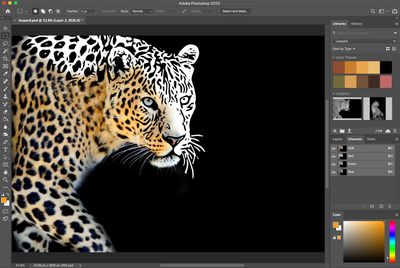
Adobe is adding a Select Subject Portrait feature to Photoshop, which is an Adobe Sensei-powered feature that's designed to make it simple to select a person in an image and get all the details like hair and clothing with a single click.

photoshopselecthair
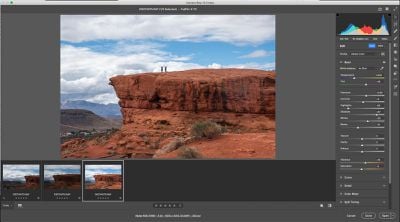
Adobe Camera Raw in Photoshop has several interface improvements that make it easier to do things like image adjustments and batch processing. Lightroom-style sliders are included, and the Curves UI is now simpler to use. There are improvements to the Crop tool and controls can be stacked vertically to make it easier to find necessary features.

There's also a new rotatable pattern feature that lets any pattern applied in Photoshop to be rotated, so the rotation angle of pattern fills, pattern overlays, and pattern strokes can be adjusted.

Match Font, a Photoshop feature that identifies fonts found in images, has been updated with support for more fonts, vertical text, and multiple-line detection.

Adobe Capture, a feature available for mobile devices, is available on Photoshop for the desktop with the new update. Adobe Capture lets users take any photo or image and pull out patterns, shapes, color themes, and gradients to use in a project.
adobephotoshopcapturepanel

Illustrator

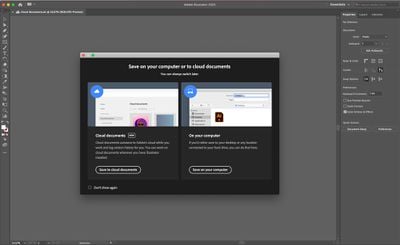
Adobe is introducing Cloud documents support for Adobe Illustrator.
illustratorcloudsaves

Cloud documents are the best way to work faster, smarter, with anyone. They save automatically and fast. Easily accessible right from the Home screen, now you can track, label, and revert to previous versions directly within Illustrator.

In the future, Adobe plans to add support for sharing documents with others for editing or reviewing directly in the app. Adobe has plans to bring Illustrator to the iPad in the near future, and the app will also support cloud documents at launch.

The new update also maximizes a computer's GPU to render graphics live while designing is taking place, artboards can be cut and pasted across different documents, rulers can be activated for multiple documents, and the New Documents window loads 10x faster.

Premiere Rush

Adobe's Premiere Rush video editing app is getting Auto Reframe, a feature designed to make it easier to resize video content. With Auto Reframe, a video shot horizontally can be reframed in a vertical format while keeping the action in the forefront.

Adobe says that Auto Reframe is available to all in the Rush public beta, and will come to all Rush users later in the year.

Adobe Live

Adobe Live is a feature where artists and creatives introduce new techniques and offer up creative challenges. Adobe says that views on Adobe Live content have doubled during the global health criss, and so Adobe plans to produce double the amount of content as well as engage local artists the UK, France, and Germany.

Adobe Fresco Livestreaming

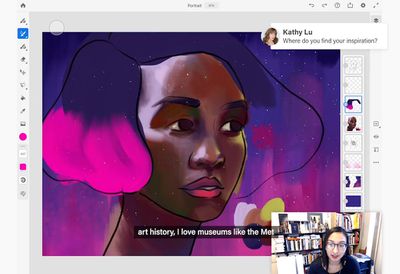
Adobe is adding a feature that will allow anyone to live stream their techniques for painting and drawing in the Adobe Fresco app for ‌iPad‌.

adobefrescolivestream

Lightroom

Lightroom has a new feature that lets photographers share edited images in the "Discover" section of the app using the "Share Edits" button. Using Share Edits saves the original image and shows the edits that were used to create it.

New Local Hue controls in Lightroom also let users make fine-grained changes to image elements like skin tones without impacting the color of the whole image.

Versions is a feature designed to let photographers experiment with several different editing approaches for the same image and save several versions if desired.

With Lightroom for ‌iPad‌, photographers can now send their images to Photoshop for ‌iPad‌ for additional edits. When exporting images from Lightroom, watermarks are synced across devices to make sure they're available on all platforms.
adobecamerarawlightroom
Improvements have also been made to watermarking, shared albums, and the Camera Raw interface, plus performance in Lightroom Classic has been enhanced. Lightroom Classic also gains Tone Curve, Color Panel, and Sync UI improvements.

InDesign

In InDesign, Adobe is introducing a "Share for Review" option that allows designers to share their work with colleagues to get feedback quicker. Feedback is provided in the app, with suggestions and questions able to be replied to an answered without having to switch to another platform.

Creative Cloud App

Adobe has added several useful new features to the Creative Cloud app, including font management for Adobe Fonts, and searching all cloud documents for apps like Photoshop, Photoshop for ‌iPad‌, Adobe XD, Fresco, Aero, and Illustrator.

More Info

Other apps and features, such as Aero, XD, Behance, Premiere Pro, Spark, Adobe Fonts and more, have also received updates, with additional information available on the Adobe website. Adobe's website also features pricing details for those who wish to subscribe.


Tag: Adobe

Popular Stories

iOS 26

iOS 26.4 and iOS 27 Features Revealed in New Leak

Friday December 12, 2025 10:56 am PST by
Macworld's Filipe Espósito today revealed a handful of features that Apple is allegedly planning for iOS 26.4, iOS 27, and even iOS 28. The report said the features are referenced within the code for a leaked internal build of iOS 26 that is not meant to be seen by the public. However, it appears that Espósito and/or his sources managed to gain access to it, providing us with a sneak peek...
Apple Logo Top Half

Early iOS 26 Software Leak Uncovers Dozens of Upcoming Apple Features

Monday December 15, 2025 3:05 pm PST by
Software from an iPhone prototype running an early build of iOS 26 leaked last week, giving us a glimpse at future Apple devices and iOS features. We recapped device codenames in our prior article, and now we have a list of some of the most notable feature flags that were found in the software code. In some cases, it's obvious what the feature flags are referring to, while some are more...
apple beta 26 lineup

Apple Leak Confirms Work on Foldable iPhone, AirTag 2, and Dozens More Devices

Monday December 15, 2025 2:05 pm PST by
Last week, details about unreleased Apple devices and future iOS features were shared by Macworld. This week, we learned where the information came from, plus we have more findings from the leak. As it turns out, an Apple prototype device running an early build of iOS 26 was sold, and the person who bought it shared the software. The OS has a version number of 23A5234w, and the first...
Apple Foldable Thumb

Leak Reveals Foldable iPhone Details

Monday December 15, 2025 9:09 am PST by
The first foldable iPhone will feature a series of design and hardware firsts for Apple, according to details shared by the Weibo leaker known as Digital Chat Station. According to a new post, via machine translation, Apple is developing what the leaker describes as a "wide foldable" device, a term used to refer to a horizontally oriented, book-style foldable with a large internal display....
iOS 26

iOS 26.3 Beta 1 Features: What's New So Far

Monday December 15, 2025 4:23 pm PST by
Apple is testing iOS 26.3, the next version of iOS 26 that will launch around January. Since iOS 26.3's testing is happening over the holidays, it is a smaller update with fewer features than we've seen in prior betas. We've rounded up what's new so far, and we'll add to our list with subsequent betas if we come across any other features. Transfer to Android Apple is making it simpler...
iOS 26

Apple Releases iOS 26.2 With Alarms for Reminders, Lock Screen Changes, Enhanced Safety Alerts and More

Friday December 12, 2025 10:10 am PST by
Apple today released iOS 26.2, the second major update to the iOS 26 operating system that came out in September, iOS 26.2 comes a little over a month after iOS 26.1 launched. ‌iOS 26‌.2 is compatible with the ‌iPhone‌ 11 series and later, as well as the second-generation ‌iPhone‌ SE. The new software can be downloaded on eligible iPhones over-the-air by going to Settings >...
airpods max 2024 colors

AirPods Max 2 Likely to Offer These 10 New Features

Monday December 15, 2025 7:41 am PST by
Apple released the AirPods Max on December 15, 2020, meaning the over-ear headphones launched five years ago today. While the AirPods Max were updated with a USB-C port and new color options last year, followed by support for lossless audio and ultra-low latency audio this year, the headphones lack some of the features that have been introduced for newer generations of the regular AirPods and the ...
iOS 26

iOS 26.2 Coming Soon With These 8 New Features on Your iPhone

Thursday December 11, 2025 8:49 am PST by
Apple seeded the second iOS 26.2 Release Candidate to developers earlier this week, meaning the update will be released to the general public very soon. Apple confirmed iOS 26.2 would be released in December, but it did not provide a specific date. We expect the update to be released by early next week. iOS 26.2 includes a handful of new features and changes on the iPhone, such as a new...

Top Rated Comments

japanime Avatar
72 months ago
The headline should be:

Adobe Adds More Bloat to Creative Cloud Apps
:p
Score: 12 Votes (Like | Disagree)
japanime Avatar
72 months ago

Did you actually bother to read about the new features to Photoshop?
Yes, I did. And none of them make up for the fact that Photoshop CC is a bloated memory hog on my Mac.
Score: 12 Votes (Like | Disagree)
vladi Avatar
72 months ago
30 years later they are still showcasing masking abilities on a subject against neutral background.
Score: 12 Votes (Like | Disagree)
Silverjerk Avatar
72 months ago

Yes, I did. And none of them make up for the fact that Photoshop CC is a bloated memory hog on my Mac.
Adobe's usage of resources has actually improved over time, not gotten worse. As someone who's been working with their apps professionally for nearly 20 years, I can attest to this firsthand. When I first started in my industry, you needed a very capable machine to use the entire suite of apps effectively (along with all the Macromedia apps, which is what many of us designers and developers had to do in the early days). Now I can run the entire Creative Cloud library on everything from my Mac Pro, down to the MacBook Air I use while traveling. Not only that, but I can switch from my Mac to my PC when I need to, and I have all of my resources, files, and other assets available across platforms.

I have my own criticisms of Adobe, but this just sounds like the cynical "crap on the company for likes, because reasons" response I see all over these forums. It's cliche. Add something constructive to the conversation, or move on -- and if you have a real complaint, give actual examples of what you're dealing with, rather than just flinging nonsense around to garner upvotes from like-minded luddites.
Score: 7 Votes (Like | Disagree)
CheesePuff Avatar
72 months ago

The headline should be:

Adobe Adds More Bloat to Creative Cloud Apps
:p

Did you actually bother to read about the new features to Photoshop?
Score: 6 Votes (Like | Disagree)
now i see it Avatar
72 months ago
For the billion$ of dollars they're now extorting from users via their subscription only model, the least they can do is incrementally improve things
Score: 5 Votes (Like | Disagree)