Adobe Adds Curves and Apple Pencil Pressure Sensitivity Adjustments to Photoshop for iPad

When Adobe introduced Photoshop for iPad back in November, it promised to provide regular updates to add missing features that are available on the desktop but not in the tablet version of the software.
photoshopipadcurves
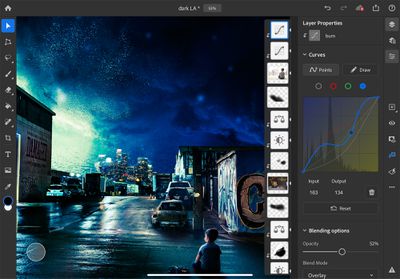
Adobe is making good on that promise and today has a Photoshop for iPad update out that introduces two useful features: Curves and Apple Pencil pressure sensitivity adjustments.

Curves are designed to allow ‌iPad‌ Photoshop users to make adjustments to the color and the tone of the image, editing contrast, exposure, saturation, highlights, shadows, and color balance in a non-destructive way. The initial version of the Curves tool includes adjustments of total curves for all channels, multi-node selections, and a feature that lets the app recognize when you want to tap and drag a node or select it.

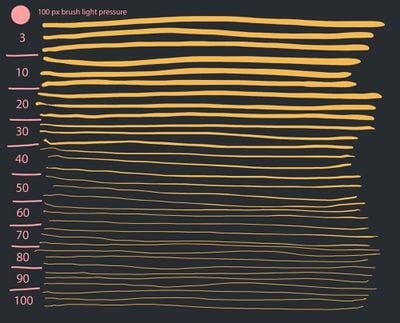
As for ‌Apple Pencil‌, Adobe is adding options to adjust the pressure sensitivity of the ‌Apple Pencil‌ for more precise brushing and effects when using brush-based tools. A new pressure sensitivity slider provides greater pressure values applied with less force at the end of the range and greater force for maximum pressure at the higher end of the range.
photoshopipadapplepencil
Adobe is also updating Adobe Fresco today, adding a multicolor eyedrop for selecting multiple colors, capture shapes, vector trimming tools for cleaning up vector art, support for Photoshop Mixer brushes, advancements to the ruler tool (pinning and pixel-length measurements), better blending for Live Oil brushes, new keyboard shortcuts, and more, with full details available in Adobe's blog post covering the update.

adobefresco1
Adobe Fresco and Adobe Photoshop can both be downloaded from the App Store for free, but there are subscriptions required to use the software. Adobe Photoshop for ‌iPad‌ is available for all Creative Cloud plans that include Photoshop access, while Adobe Fresco is $9.99 per month after a 7-day free trial on a standalone basis or available through Creative Cloud plans.


Popular Stories

Aston Martin CarPlay Ultra Screen

Apple's CarPlay Ultra to Expand to These Vehicle Brands Later This Year

Sunday February 1, 2026 10:08 am PST by
Last year, Apple launched CarPlay Ultra, the long-awaited next-generation version of its CarPlay software system for vehicles. Nearly nine months later, CarPlay Ultra is still limited to Aston Martin's latest luxury vehicles, but that should change fairly soon. In May 2025, Apple said many other vehicle brands planned to offer CarPlay Ultra, including Hyundai, Kia, and Genesis. In his Powe...
Apple Logo Black

Apple's Next Launch is 'Imminent'

Sunday February 1, 2026 12:31 pm PST by
The calendar has turned to February, and a new report indicates that Apple's next product launch is "imminent," in the form of new MacBook Pro models. "All signs point to an imminent launch of next-generation MacBook Pros that retain the current form factor but deliver faster chips," Bloomberg's Mark Gurman said on Sunday. "I'm told the new models — code-named J714 and J716 — are slated...
Apple MacBook Pro M4 hero

New MacBook Pros Reportedly Launching Alongside macOS 26.3

Sunday February 1, 2026 5:42 am PST by
Apple is planning to launch new MacBook Pro models with M5 Pro and M5 Max chips alongside macOS 26.3, according to Bloomberg's Mark Gurman. "Apple's faster MacBook Pros are planned for the macOS 26.3 release cycle," wrote Gurman, in his Power On newsletter today. "I'm told the new models — code-named J714 and J716 — are slated for the macOS 26.3 software cycle, which runs from...
iOS 26

iOS 26.3 and iOS 26.4 Will Add These New Features to Your iPhone

Tuesday February 3, 2026 7:47 am PST by
We are still waiting for the iOS 26.3 Release Candidate to come out, so the first iOS 26.4 beta is likely still at least a week or two away. Following beta testing, iOS 26.4 will likely be released to the general public in March or April. Below, we have recapped known or rumored iOS 26.3 and iOS 26.4 features so far. iOS 26.3 iPhone to Android Transfer Tool iOS 26.3 makes it easier...
14 inch MacBook Pro Keyboard

Apple Changes How You Order a Mac

Saturday January 31, 2026 10:51 am PST by
Apple recently updated its online store with a new ordering process for Macs, including the MacBook Air, MacBook Pro, iMac, Mac mini, Mac Studio, and Mac Pro. There used to be a handful of standard configurations available for each Mac, but now you must configure a Mac entirely from scratch on a feature-by-feature basis. In other words, ordering a new Mac now works much like ordering an...

Top Rated Comments

ikir Avatar
75 months ago
Just use Affinity Photo, ditch Adobe.
Score: 6 Votes (Like | Disagree)
cfurlin Avatar
75 months ago
Meh. Moved on to Affinity products a couple of years ago.
Score: 6 Votes (Like | Disagree)
2013.1 Avatar
75 months ago
This is as if Ford would say, hey, we added windshield wipers to our smaller cars.
Affinity has the full feature set in Photo and Designer.
Score: 4 Votes (Like | Disagree)
richpjr Avatar
75 months ago

Meh. Moved on to Affinity products a couple of years ago.
If Affinity ever comes out with a good DAM, I would consider it. I already have both the iPad and desktop version, but the cross platform access that Lightroom and Creative Cloud provides is just way too convenient for my workflow.
Score: 3 Votes (Like | Disagree)
shaun3000 Avatar
75 months ago
I’m late to the party, here. Curves weren’t present at release? Seriously?? They’ve LITERALLY been part of Photoshop since version 1 ('https://creativeoverflow.net/history-of-photoshop-journey-from-photoshop-1-0-to-photoshop-cs5/'), way back in 1990, yet they didn’t include them on the iPad version?!!
Score: 3 Votes (Like | Disagree)
cupcakes2000 Avatar
75 months ago
This is great news, and it will be a solid app. Two things make it still unusable for the most part for me.

1) No RAW support ? This is ridiculous.
2) No round tripping from lightroom CC. This will be a key feature, for me. To be able to link lightroom classic to lightroom CC using smart previews like normal, and then be able to round trip those previews between Lightroom and Photoshop on the ipad, and then have them sync back to classic with the edits applied to the raw.
Score: 2 Votes (Like | Disagree)