

Day One Journaling App Update Adds iPad Trackpad Support, New Day View, and More - MacRumorsOpen MenuShow RoundupsShow Forums menuVisit ForumsOpen Sidebar
Skip to Content

Day One Journaling App Update Adds iPad Trackpad Support, New Day View, and More

by

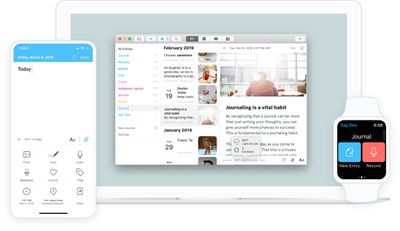
Popular journaling app Day One today updated to version 4.13, adding support for trackpad navigation on iPad, a new Day View interface, and other improvements.
day one app
This release comes after the launch of iOS and iPadOS 13.4, which added support for trackpads and mice on ‌‌iPad‌‌.

After updating, Day One users on ‌iPad‌ can use various trackpad actions to interact with the app, including two-finger swipe down to dismiss, and two-finger horizontal swipe to open and close the journal drawer.

The new Day View offers quicker access to daily entries by tapping on or clicking dates in the calendar or the timeline.

Also in this update, Daily Reminders now include additional information like the number of photos taken and locations visited on a given day, and the Settings pages now provide links to Day One feature documents.

Elsewhere, several bugs have been fixed, including one that caused video thumbnails not to display in the media timeline, and one that prevented photos in the activity feed from showing location or calendar events.

Day One is a free download for iPhone and ‌iPad‌ from the App Store with in-app purchases for premium features. [Direct Link]

Tag: Day One

Top Rated Comments

Apple Knowledge Navigator Avatar
78 months ago
Great! Love this app - one of the few sub' services I don't mind paying for.
Score: 5 Votes (Like | Disagree)
stephenschimpf Avatar
78 months ago
Day One is a fantastic app. I used to keep entries about things I did on vacation, lectures I saw, what we did on our anniversary, etc., in a Word file, but that doesn't show you where you were on a map, or what the weather was at the time, or what you did that day in previous years, or do a lot of things that Day One does so well.

I was a little hesitant when they went subscription, but it's an app I use almost every day, and whenever I report a problem or make a suggestion, I get a reply within a day if not within hours. Support is great. For whatever reason, I got locked in at the lower subscription price of $25 a year, which I don't mind paying at all.
Score: 2 Votes (Like | Disagree)
4jasontv Avatar
78 months ago

Love this app and it is a subscription that I don't mind paying for at all. I have close to 7,000 entries now dating back to 11 years ago and spread out over 13 different journals. Love it.


Seriously? A Subscription is only $35 a year which breaks down to less than $3 a month. It's a great journal app.
It doesn't matter if it's $0.99 a year. They converted an app they already sold as a one time price into a subscription platform. IOS apps are not the same as desktop apps. You can't just slap a 2 on it and claim it requires another purchase. There was no additional expense for adding Dark Mode because they had already promised feature updates when they originally listed the app. The cost of that development should have been accounted for in their price.

What is their justification for needing recurring revenue on a text editor? Providing proprietary cloud storage? Continued support? They could have just added the ability to export and save to icloud or one of the dozen of existing cloud storage services. They could develop a new app that justifies another purchase.

It is simple. They fleeced their early adopters.They could have added their proprietary cloud service as an IAP, and than developed a service that outperforms other options, but they didn't.

And before you throw the 'entitled' word about, you should know that yes, we are entitled to feature updates and bug fixes on software I purchased that promised feature updates and bug fixes. We shouldn't have to pay them over and over to fix their software.


I don’t subscribe. I can add new journals and dark mode works for me.
You can have multiple journals and dark mode without paying?! That makes their pricing page ('https://dayoneapp.com/pricing/') confusing as it specifically says you have to subscribe to get those 'features'.
Score: 1 Votes (Like | Disagree)
ugahairydawgs Avatar
78 months ago

Did it fix the issue where basic things like dark mode and adding journals requires a monthly subscription?
I don’t subscribe. I can add new journals and dark mode works for me.
Score: 1 Votes (Like | Disagree)
SawThings Avatar
78 months ago
Wow never knew about this one - just downloaded it and love it so far.
Score: 1 Votes (Like | Disagree)
4jasontv Avatar
78 months ago
Did it fix the issue where basic things like dark mode and adding journals requires a monthly subscription?

EDIT: You can see here ('https://dayoneapp.com/pricing/')that Dark Mode is $2.92 a month.


Attachment Image
Score: 1 Votes (Like | Disagree)

Popular Stories

iOS 27 on iPhone 17 1

iOS 27 Will Add These New Features to Your iPhone

Saturday May 2, 2026 8:43 am PDT by
Apple is expected to unveil iOS 27 during its WWDC 2026 keynote on June 8, and there are already many rumored features and changes for iPhones. The first developer beta of iOS 27 will likely be available immediately following the keynote, and a public beta typically follows in July. Following beta testing, the software update should be released to all users with a compatible iPhone in...
Apple Event Logo

Apple Just Released a New Accessory

Monday May 4, 2026 8:13 am PDT by
Apple today released a new Pride Edition Sport Loop for the Apple Watch. The band features a rainbow design with 11 colors of woven nylon yarns. The new Pride Edition Sport Loop is available to order now on Apple.com and in the Apple Store app in 40mm, 42mm, and 46mm sizes, and it will be available at Apple Store locations starting later this week. In the U.S., the band costs $49. There...
Apple MacBook Pro M4 hero

Why You Might Want to Wait to Buy a MacBook Pro

Friday May 1, 2026 3:43 pm PDT by
Apple refreshed the 14-inch and 16-inch MacBook Pro with M5 Pro and M5 Max models in March 2026, but depending on your needs and interests, you might want to skip this generation because there's something better in the works. The M5 Pro and M5 Max MacBook Pro models have faster chips, but the same design that Apple has used since 2021. An updated design with new display technology and faster ...
Related Apple News: Local News | Iphone | Ipad | Culture | Politics

















