

Google Fit iOS App Update Switches Focus to Step Goals - MacRumorsOpen MenuShow RoundupsShow Forums menuVisit ForumsOpen Sidebar
Skip to Content

Google Fit iOS App Update Switches Focus to Step Goals

by

Google's fitness tracking app Google Fit is getting a redesign this week that puts the user's step count front and center.
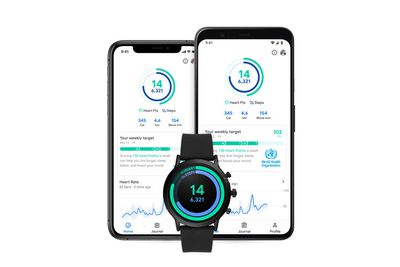
google fit ios redesign 2020
The app launched on iOS in April 2019 with an interface oriented around Move Minutes and Heart Points, based on American Heart Association and World Health Organization recommendations for weekly physical activity.

These activity data points were visualized with two rings that tracked progress throughout the day. After this week's update is installed, the Move Minutes goal is replaced with your steps goal, and Heart Points get a more prominent visualization under the rings.

There are new celebrations when a daily goal is met, while the update also introduces a bolder and brighter design overall, which should make it more enjoyable to use, whether or not you have a Wear OS smartwatch.

The fitness tracking app can track workout sessions completed with both an Apple Watch or a Wear OS smartwatch, and it also integrates movement data from apps connected to Apple Health, such as Sleep Cycle, Nike Run Club, and Headspace.

The Google Fit app for iPhone is free to download from the App Store. [Direct Link]

Top Rated Comments

Singin Hobo Avatar
79 months ago
I wish Apple would do this. I love my Apple Watch but the thing I dislike about it under my old Fitbit is the focus on vague goals. The Fitbit had me getting out of the house at 8:30 at night to make two laps around the block to get another thousand steps and hit my goal.
The prospect of filling in fraction of a red circle doesn't really tell me anything about where I am and where I should be. "Oh wow, I'm 47º to completing my exercise goals for the day! This is such useful information! Wait, now that I've clicked on it I can see it's actually 107 calories to burn. More information that is totally useful and measurable for me in my day-to-day life."
Score: 3 Votes (Like | Disagree)
grobik Avatar
79 months ago
Classic google. Can’t stick to one thing for longer than a few months. They’re probably gonna rebrand the whole thing by the end on the year.
Score: 3 Votes (Like | Disagree)
Vol Braakzakje Avatar
79 months ago
Hmm, those rings look familiar..
Score: 3 Votes (Like | Disagree)
ftaok Avatar
79 months ago

I can watch my fitbit count steps as I walk. I use a waist one. It’s dead on.
In my opinion, the best pedometer of all time was the iPod nano 6G worn on the hip. It was the most accurate step counter I walked a mile once while counting each step in my head. At the end, the number in my head and the number on the iPod was with 5 steps.
Score: 1 Votes (Like | Disagree)
V_Man Avatar
79 months ago

Fitbit is known for overstating steps, and you need to do a tracked outdoor walk to improve AW step counting.
I can watch my fitbit count steps as I walk. I use a waist one. It’s dead on.
Score: 1 Votes (Like | Disagree)
spazzcat Avatar
79 months ago

I have a Apple Watch and still use my Fitbit to count steps. The watch is not an accurate step counter at all.


Not really and what would you use on a round watch.
Fitbit is known for overstating steps, and you need to do a tracked outdoor walk to improve AW step counting.
Score: 1 Votes (Like | Disagree)

Popular Stories

google chrome vertical tabs

Google Brings Vertical Tabs and Improved Reading Mode to Chrome

Tuesday April 7, 2026 1:27 pm PDT by
Google today updated its Chrome browser with support for vertical tabs, which are displayed in a sidebar instead of at the top of the browser. The tab layout can be changed by right clicking on any Chrome window and choosing the "Show Tabs Vertically" option. Sidebar tabs feature full page titles and make it simple to organize tab groups. Google has also added a new full-page interface...
Chrome Feature 22

Gemini in Google Chrome Gets a Skills Library for Saving Custom AI Prompts

Tuesday April 14, 2026 10:00 am PDT by
Chrome has been updated today with a Skills library that's designed to let Chrome users turn AI tasks into repeatable skills that can be used on any website. Useful prompts you create for Gemini in Chrome can be saved as a Skill that can be accessed later with a single click. If you're shopping for skincare and ask Gemini about the ingredients in a product, for example, you can save the...
gemini for mac app google

Google Launches Native Gemini AI App for Mac

Wednesday April 15, 2026 10:46 am PDT by
Google is bringing Gemini to the Mac with a new native macOS app that's available starting today. Gemini for Mac can be activated with a keyboard shortcut, and it has built-in tools for generating images, analyzing what's on your screen, reviewing files, and more. Gemini is the last of the three major AI services to have a dedicated Mac app, because OpenAI and Anthropic have had Mac apps for ...
Related Apple News: Mac | Technology | Education | Mac | Travel

















