

Testing Brydge's New Pro+ Keyboard With Trackpad for iPad Pro - MacRumorsOpen MenuShow RoundupsShow Forums menuVisit ForumsOpen Sidebar
Skip to Content

Testing Brydge's New Pro+ Keyboard With Trackpad for iPad Pro

Well ahead of when Apple introduced trackpad support in iOS 13.4, Brydge announced an iPad Pro keyboard with a built-in multi-touch trackpad. We have one of Brydge's new Pro+ keyboards on hand, and thought we'd check it out to see how it works with Apple's new 2020 ‌iPad Pro‌ models.


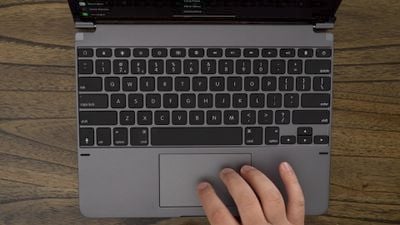
The Brydge Pro+ keyboard is similar in design to past Brydge keyboards, attaching to the ‌iPad Pro‌ using a set of hinges that allow the ‌iPad Pro‌'s angle to be adjusted to best suit each person's needs. It's made entirely from aluminum and matches the ‌iPad Pro‌ well, and at the bottom, there's a new trackpad.

Brydge keyboards always offer a great typing experience, and this year's Pro+ is no exception. In fact, we thought it was even better than last year's version because there's no need to press as hard for a key to register.
brydgeprotopdownkeyboard
There are dedicated iPad controls on the keyboard, including a Siri button and options for accessing the Home screen, locking the ‌iPad‌, adjusting brightness, controlling media playback, and more. As with other Brydge keyboards, this one connects via Bluetooth and lasts for quite awhile before needing to be recharged.
brydgeprotrackpad
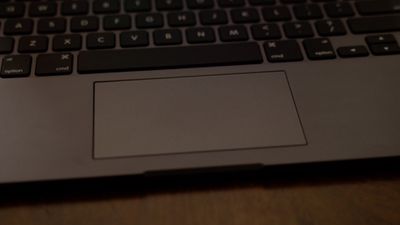
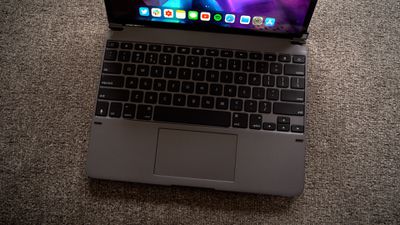
When it comes to the trackpad, it's clear that it was designed before the release of iOS 13.4 because compared to official trackpad support with the Magic Trackpad 2, it's a bit lacking. Scrolling is smooth and works well through a standard two finger gesture, but we did run into a bug with continuous scrolling at the top or bottom of a page.
brydgeprotopdownkeyboard2
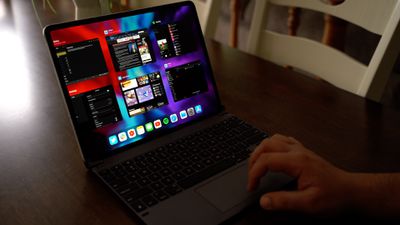
While you can use any two finger gesture with the trackpad on the Brydge Pro+, it doesn't really work with three finger gestures. You can add some three finger button presses with Accessibility functionality, but it's not as convenient as the three finger gesture support on the Magic Trackpad 2.
brydgepro3fingertap
We did a full overview of how the Magic Trackpad 2 works with the ‌iPad Pro‌ in a prior video, and this is what we can expect to see when Apple's own Magic Keyboard comes out in May.


In the future, Brydge may be able to work with Apple to add more functionality to its keyboard, as Apple has worked with Logitech on some custom keyboards with trackpad support. Even without the full functionality of the Apple-designed trackpad, the Brydge Pro+ has a lot to offer.

Apple's Magic Keyboard is priced starting at $300 for the 11-inch model, while the Brydge Pro+ is priced starting at $199, so it's certainly a more affordable option. For those interested, more on the Brydge Pro+ can be found on Brydge's website.


Tag: Brydge

Popular Stories

iPhone 18 Pro Deep Red Feature

iPhone 18 Pro Launching Later This Year With These 12 New Features

Wednesday March 18, 2026 7:39 am PDT by
While the iPhone 18 Pro and iPhone 18 Pro Max are not expected to launch for another six months or so, there are already plenty of rumors about the devices. It was initially reported that the iPhone 18 Pro models would have fully under-screen Face ID, with only a front camera visible in the top-left corner of the screen. However, the latest rumors indicate that only one Face ID component...
imac video apple feature

Apple Released Yet Another New Product Today

Friday March 20, 2026 2:39 pm PDT by
Apple has unveiled a whopping nine new products so far this March, including an iPhone 17e, iPad Air models with the M4 chip, MacBook Air models with the M5 chip, MacBook Pro models with M5 Pro and M5 Max chips, the all-new MacBook Neo, an updated Studio Display, a higher-end Studio Display XDR, AirPods Max 2, and now the Nike Powerbeats Pro 2. iPhone 17e features the same overall design as...
ios 26 4 yellow

Here Are Apple's Release Notes for iOS 26.4

Wednesday March 18, 2026 11:56 am PDT by
Apple provided developers and public beta testers with the release candidate versions of iOS 26.4 and iPadOS 26.4, which means we're going to see a public launch as soon as next week. The RC versions of the software include Apple's official release notes, giving us final details on what's included in the update. Apple Music - Playlist Playground (beta) generates a playlist from your...

Top Rated Comments

pdaholic Avatar
78 months ago

Um...why not just get a laptop if you're going to go that route?
I think you can look up nearly every iPad thread ever made for a response to this question.
Score: 12 Votes (Like | Disagree)
ascender Avatar
78 months ago
You have to feel for Brydge and their timing... given the Magic Keyboard announcement I’m not sure how many of these they’re going to sell. If someone is willing to spend £200 on a keyboard, they’re probably willing to spend £300 on one.

The Apple one used the smart connector, has the neat pass-through charging port and looks like you can remove the iPad with much less effort than on this one.

i wonder how the Apple one will compare in terms of weight though - when I tried a Brydge I was surprised by just how heavy and bulky it was.
Score: 11 Votes (Like | Disagree)
Kabeyun Avatar
78 months ago

The closest I've seen are those supposed "2-in-1" laptops... except they are usually 13"+ and are thick and heavy.
And have that “Cortana” thing in them.
Score: 5 Votes (Like | Disagree)
cibonak Avatar
78 months ago
Brydge = too heavy unfortunately and no smart connector :(
Score: 5 Votes (Like | Disagree)
GuruZac Avatar
78 months ago
I was going to buy the Brydge keyboard, but Apple announced the Magic Keyboard with trackpad. I’m ordering that next month. I don’t care for Bluetooth connection, plus I like that you get an extra USB-C port with the Magic Keyboard.
Score: 5 Votes (Like | Disagree)
OldCorpse Avatar
78 months ago
To each his own. Personally - speaking just for my own preferences - I never could understand the whole Brydge keyboard concept. Lord, those hinges :( the very definition of "ultra-klunky". What in the world - the whole reason I like the iPad is the extreme portability, I can super quickly attach an Apple Smart Keyboard, or go without for the clean look - no fussing with anything, no syncing no nothing. This thing turns it into a not very attractive and heavy laptop. Holy Moses, this thing is just barking up the wrong tree... in my book of course. I accept that others may love it. YMMV.
Score: 4 Votes (Like | Disagree)
Related Apple News: Sport | Iphone | Motoring | Iphone | Health















