Apple Card Now Supports Exporting Transactions in OFX File Format - MacRumorsOpen MenuShow RoundupsShow Forums menuVisit ForumsOpen Sidebar
Skip to Content

Apple Card Now Supports Exporting Transactions in OFX File Format

Apple Card users are now able to export their transaction data in an OFX file format for use with third-party financial apps such as Quicken and Mint, as noted by Kyle Seth Gray. The option shows up when a monthly statement is available.

The exporting feature first rolled out last month, but only with CSV file support.
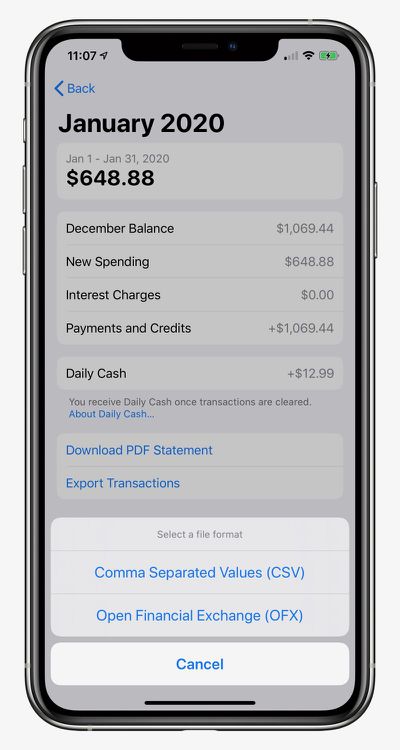
apple card ofx

How to Export and Download Apple Card Transactions

  1. Open the Wallet app on your iPhone and tap on Apple Card.
  2. Tap on Card Balance.
  3. Under Statements, tap on the statement you want to export.
  4. Tap on Export Transactions and choose CSV or OFX.

Apple launched its credit card in the United States in August. Key features include color-coded spending summaries in the Wallet app, no fees beyond any applicable interest, and up to three percent cashback on purchases paid out daily.

To apply for an ‌Apple Card‌, simply open the Wallet app on an iPhone running iOS 12.4 or later, tap the plus button in the top-right corner, and follow the on-screen steps. The process takes just a few minutes, and if approved, your digital ‌Apple Card‌ will be ready for purchases immediately. A physical titanium-based Apple Card is also available for use at retail stores that do not accept contactless payments.

Popular Stories

apple card savings account

Apple Lowers Savings Account Rate for Apple Card Users

Thursday April 23, 2026 8:07 am PDT by
The interest rate on Apple Card's savings account was today lowered from 3.65% to 3.50%. Push notifications regarding the cut were sent to ‌Apple Card‌ users on Thursday. Savings account interest rates often fluctuate with changes made by the Federal Reserve, and when rates are lowered, banks cut their annual percentage yield (APY). That said, today's cut doesn't appear tied to a...
iOS 27 on iPhone 17 1

iOS 27 Will Add These New Features to Your iPhone

Saturday May 2, 2026 8:43 am PDT by
Apple is expected to unveil iOS 27 during its WWDC 2026 keynote on June 8, and there are already many rumored features and changes for iPhones. The first developer beta of iOS 27 will likely be available immediately following the keynote, and a public beta typically follows in July. Following beta testing, the software update should be released to all users with a compatible iPhone in...
Apple MacBook Pro M4 hero

Why You Might Want to Wait to Buy a MacBook Pro

Friday May 1, 2026 3:43 pm PDT by
Apple refreshed the 14-inch and 16-inch MacBook Pro with M5 Pro and M5 Max models in March 2026, but depending on your needs and interests, you might want to skip this generation because there's something better in the works. The M5 Pro and M5 Max MacBook Pro models have faster chips, but the same design that Apple has used since 2021. An updated design with new display technology and faster ...


Top Rated Comments

bladerunner88 Avatar
81 months ago
Cant seem to import into Banktivity Vs 5.6.12. I've created a new account but get the following when trying to import the OFX File:


Received this from IGG Support:

Thank you for contacting IGG Software Support. Is this an OFX file downloaded from Apple Card? If so, we have already received reports of this issue. The problem is the OFX file is missing many tags required by the OFX specification. The OFX file will not be able to be imported until Apple (or Goldman Sachs) adds all tags properly, in accordance to the OFX specification. We have brought this to Apple's attention and they hope to have this corrected soon.

Attachment Image
Score: 3 Votes (Like | Disagree)
ajfahey Avatar
81 months ago
I still won’t be using my Apple Card much at all until downloads are supported in “One Step Update”. OFX just isn’t near good enough for me the change my mind. I have two dozen accounts in my Quicken file. Using OFX to update even one of them is one nuisance too far and I have plenty of other credit cards to turn to.
Score: 3 Votes (Like | Disagree)
78 months ago

*UPDATE

I kust received my April statement and was successfully able to import it into Quicken (Mac) for the first time.

Is it working for everyone else now?
OMG!! YAY! IT WORKED! Thank you so much for posting this! It's a real card now. lol
Score: 2 Votes (Like | Disagree)
79 months ago

This now works! I spoke to support at GS and they said since IOS 13.4 the OFX export will work and was able to import statements into Banktivity.
I can confirm this as well. I imported March into Banktivity last week using OFX and it worked great!
One step closer to being able to use this card again!

I should also mention that I put in a feature request to GS for exporting transactions during the month, and for OFX support to connect financial tools.
Score: 2 Votes (Like | Disagree)
81 months ago

Correct me if I'm wrong, but Mint.com doesn't allow you to import transactions. You can manually add transactions one at a time to an existing account if they are missing however it doesn't allow you set up a "Blank" account that isn't linked to a financial institution.
Exactly, until I can import these to Mint directly I will pass on the Apple card
Score: 2 Votes (Like | Disagree)
81 months ago
Quicken isn't importing these either. It's complaining about "OFX parsing failed Missing bid data"
Score: 2 Votes (Like | Disagree)
Related Apple News: Lifestyle | Sport | Culture | Entertainment | World News