

iOS 13.2 Beta 2 Bricking Some iPad Pro Models, Update Now Unavailable

Following the release of iOS 13.2 beta 2 yesterday, some 2018 iPad Pro owners found that the update failed to install properly, ultimately bricking their tablets and requiring a full restore.
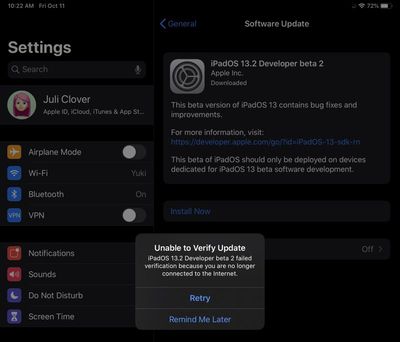
ios132ipadproerror
We've seen several complaints from ‌iPad Pro‌ owners who were affected by the issue, and in some cases, even a restore from DFU mode failed to work. From the MacRumors forums:

My iPad Pro 11" is in the same position, it failed during the update of iOS 13.2 beta 2. What you can try is putting it into DFU mode (press volume up, volume down, then hold power for 5 or so seconds) and plug it into iTunes via cable to restore it that way.

However, unfortunately mine gets an error when i try this so i have an Apple appointment tomorrow to get them to fix it.

Amid these reports, Apple appears to have pulled the iOS 13.2 beta 2 update for the ‌iPad Pro‌ as attempting to install the software at this time now produces an error message that the update was unable to be verified because of a lack of an internet connection, despite a connection being available.

Apple appears to have been blocking the iOS 13.2 beta update from the ‌iPad Pro‌ as of last night, and the company likely has a new version in the works that is safer to install. For now, ‌iPad Pro‌ owners should avoid attempting to install iOS 13.2.

Related Forum: iOS 13

Popular Stories

iOS 26

iOS 26.4 and iOS 27 Features Revealed in New Leak

Friday December 12, 2025 10:56 am PST by
Macworld's Filipe Espósito today revealed a handful of features that Apple is allegedly planning for iOS 26.4, iOS 27, and even iOS 28. The report said the features are referenced within the code for a leaked internal build of iOS 26 that is not meant to be seen by the public. However, it appears that Espósito and/or his sources managed to gain access to it, providing us with a sneak peek...
iOS 26

Apple Releases iOS 26.2 With Alarms for Reminders, Lock Screen Changes, Enhanced Safety Alerts and More

Friday December 12, 2025 10:10 am PST by
Apple today released iOS 26.2, the second major update to the iOS 26 operating system that came out in September, iOS 26.2 comes a little over a month after iOS 26.1 launched. ‌iOS 26‌.2 is compatible with the ‌iPhone‌ 11 series and later, as well as the second-generation ‌iPhone‌ SE. The new software can be downloaded on eligible iPhones over-the-air by going to Settings >...
Apple Foldable Thumb

Leak Reveals Foldable iPhone Details

Monday December 15, 2025 9:09 am PST by
The first foldable iPhone will feature a series of design and hardware firsts for Apple, according to details shared by the Weibo leaker known as Digital Chat Station. According to a new post, via machine translation, Apple is developing what the leaker describes as a "wide foldable" device, a term used to refer to a horizontally oriented, book-style foldable with a large internal display....
iOS 26

iOS 26.2 Coming Soon With These 8 New Features on Your iPhone

Thursday December 11, 2025 8:49 am PST by
Apple seeded the second iOS 26.2 Release Candidate to developers earlier this week, meaning the update will be released to the general public very soon. Apple confirmed iOS 26.2 would be released in December, but it did not provide a specific date. We expect the update to be released by early next week. iOS 26.2 includes a handful of new features and changes on the iPhone, such as a new...
macOS Tahoe 26 Thumb

Apple Releases macOS Tahoe 26.2 With Edge Light

Friday December 12, 2025 10:08 am PST by
Apple today released macOS Tahoe 26.2, the second major update to the macOS Tahoe operating system that came out in September. macOS Tahoe 26.2 comes five weeks after Apple released macOS Tahoe 26.1. Mac users can download the macOS Tahoe update by using the Software Update section of System Settings. macOS Tahoe 26.2 includes Edge Light, a feature that illuminates your face with soft...
AirPods Pro Firmware Feature

Apple Releases New Firmware for AirPods Pro 2 and AirPods Pro 3

Thursday December 11, 2025 11:28 am PST by
Apple today released new firmware designed for the AirPods Pro 3 and the prior-generation AirPods Pro 2. The AirPods Pro 3 firmware is 8B30, up from 8B25, while the AirPods Pro 2 firmware is 8B28, up from 8B21. There's no word on what's include in the updated firmware, but the AirPods Pro 2 and AirPods Pro 3 are getting expanded support for Live Translation in the European Union in iOS...
ipados 26 1 slide over

Apple Releases iPadOS 26.2 With Multitasking Improvements

Friday December 12, 2025 10:09 am PST by
Apple today released iPadOS 26.2, the second major update to the iPadOS 26 operating system released in September. iPadOS 26.2 comes a month after iPadOS 26.1. The new software can be downloaded on eligible iPads over-the-air by going to Settings > General > Software Update. iPadOS 26.2 continues with the multitasking improvements that were added with iPadOS 26.1. You can now drag and...
airpods max 2024 colors

AirPods Max 2 Likely to Offer These 10 New Features

Monday December 15, 2025 7:41 am PST by
Apple released the AirPods Max on December 15, 2020, meaning the over-ear headphones launched five years ago today. While the AirPods Max were updated with a USB-C port and new color options last year, followed by support for lossless audio and ultra-low latency audio this year, the headphones lack some of the features that have been introduced for newer generations of the regular AirPods and the ...

Top Rated Comments

MartyF81 Avatar
81 months ago
Can we not use the term "Bricking" when the device can be made to work again via a restore.

Bricking means... the device is now equal to a brick. A heavy useless thing. If it can be made to work again ... it is not a brick.
Score: 81 Votes (Like | Disagree)
iStorm Avatar
81 months ago

Can we not use the term "Bricking" when the device can be made to work again via a restore.

Bricking means... the device is now equal to a brick. A heavy useless thing. If it can be made to work again ... it is not a brick.
Did you read the article? Some users are stating they are even unable to restore in DFU mode. I think the term is used correctly here.
Score: 22 Votes (Like | Disagree)
Stromos Avatar
81 months ago

Can we not use the term "Bricking" when the device can be made to work again via a restore.

Bricking means... the device is now equal to a brick. A heavy useless thing. If it can be made to work again ... it is not a brick.
If DFU restore fails that's a brick.
Score: 19 Votes (Like | Disagree)
ssimonvii Avatar
81 months ago
Glad you guys are finally calling out some of the recent horrific iOS bugs. Too bad you ignored my tip about all of the iCloud photo issues going on.
Score: 10 Votes (Like | Disagree)
I7guy Avatar
81 months ago
Apple how is this possible. A beta product that had a software issue? /s.
Score: 7 Votes (Like | Disagree)
Chazzle Avatar
81 months ago

Did you read the article? Some users are stating they are even unable to restore in DFU mode. I think the term is used correctly here.
I think people are confusing recovery mode with DFU mode, which are different. The user they even quoted in the article was not doing the proper steps to even put the iPad in recovery mode. If the devise can be restored without replacing the hardware, it’s not “bricked.”
Score: 7 Votes (Like | Disagree)

















