Apple today released iOS and iPadOS 13.1, marking the first update to the iOS 13 operating system that launched in mid-September. The new iOS 13.1 update comes just days after the release of iOS 13 and coincides with the launch of new iPhones.
The iOS 13.1 update is available on all eligible devices over-the-air in the Settings app. To access the update, go to Settings > General > Software Update.
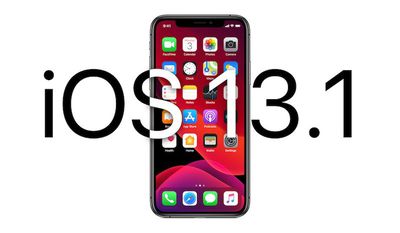
Apple started beta testing iOS 13.1 prior to when iOS 13 even launched, which was a surprise move as the company has never before released a point update for new software before when the software has come out.
Given Apple's early testing, it's no surprise that iOS 13.1 is coming not too long after iOS 13 became available for download. It's worth noting that iOS 13.1 is the first version of iOS 13 that's available for the 7th-generation iPod touch.
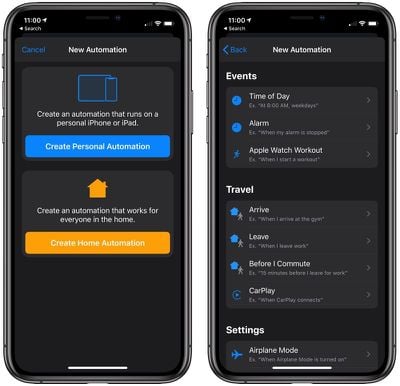
iOS 13.1 is an update that brings back several of the features that were removed during the iOS 13 beta testing. Shortcuts Automations, for example, are back.
With Automations in the Shortcuts app, you can create personal and home automations using the Shortcuts app to have certain actions performed when specific conditions occur. It's a powerful tool that adds a lot of utility to the Shortcuts app.
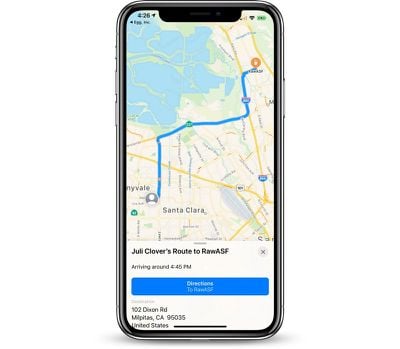
Share ETA, a feature removed during beta testing, lets users share their estimated time of arrival to a location with a friend or family member, allowing the friend or family member to follow along with the trip.
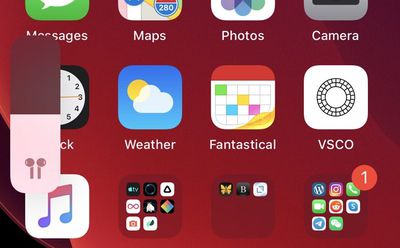
The volume indicator has been tweaked in iOS 13.1. If you have certain headphones or audio devices connected (AirPods, Powerbeats Pro, HomePod, and Beats headphones) there are special indicators that feature a unique icon that matches your listening device. There's also a special icon for when two headphones are connected to an iPhone or iPad.
The update brings the audio sharing feature introduced in iOS 13 to all Beats headphones with an H1 and W1 chip, expanding the feature from just the AirPods and Powerbeats Pro. Audio sharing, as the name suggests, allows multiple sets of headphones to be connected to a single iPhone.
HomeKit icons have been overhauled in iOS 13.1, with much more detailed, realistic designs. There are new Reading Goals options for PDF, a change to the Nike branding (it's no longer Nike+), and several other smaller tweaks outlined in our tidbits article.
Full release notes for the update are available below:
iOS 13.1 includes bug fixes and improvements, including AirDrop with Ultra Wideband technology on iPhone 11, iPhone 11 Pro, and iPhone 11 Pro Max, suggested automations in the Shortcuts app, and the ability to share ETA in Maps.
AirDrop
- Ability to select who you want to AirDrop to by pointing from one iPhone 11, iPhone 11 Pro, or iPhone 11 Pro Max to another using the new U1 chip with Ultra Wideband technology for spatial awarenessShortcuts
- Suggested automations in the Gallery personalized to your daily routine
- Personal and home automations for automatically running shortcuts based on triggers
- Home app support for shortcuts as advanced actions in the Automation tabMaps
- Share ETA to send your estimated time of arrival while your route is in progressBattery Health
- Optimized battery charging to slow the rate of battery aging by reducing the time your iPhone spends fully charged
- Performance management feature for iPhone XR, iPhone XS and iPhone XS Max to prevent the device from unexpectedly shutting down, including the option to disable this feature if an unexpected shutdown occurs
- Notifications for when Battery Health is unable to verify if a new, genuine Apple battery is in iPhone XR, iPhone XS, iPhone XS Max and laterThis update also includes bug fixes and other improvements. This update:
- Adds a link to the Me tab in Find My to allow a guest to sign in and locate a missing device
- Includes notifications for when the display on your iPhone is unable to be verified as a new, genuine Apple display in iPhone 11, iPhone 11 Pro, and iPhone 11 Pro Max
- Addresses issues in Mail that could cause incorrect download counts, missing senders and subjects, difficulty selecting or flagging threads, duplicate notifications or overlapping fields
- Fixes an issue in Mail that may prevent background downloading of email messages
- Addresses an issue that could prevent Memoji from correctly tracking facial expressions in Messages
- Fixes an issue where photos might not display in the Messages details view
- Fixes an issue in Reminders that prevented some users from sharing iCloud lists
- Resolves an issue in Notes where Exchange notes may not show up in search results
- Addresses an issue in Calendar where birthday events could appear multiple times
- Addresses an issue that could prevent third-party sign in screens from appearing in the Files app
- Fixes an issue that could cause Camera orientation to appear rotated when swiping to it from the Lock screen
- Addresses an issue that could cause the display to sleep while interacting with the Lock screen
- Resolves issues where app icons could appear as blank or as a different app on the Home screen
- Resolves an issue that could prevent supported wallpapers from switching appearances when - changing between Light and Dark modes
- Addresses stability issues when signing out of iCloud from Passwords & Accounts in Settings
- Fixes an issue where signing in to update Apple ID settings could fail repeatedly
- Fixes an issue that could prevent the device from vibrating when connecting to a charger
- Addresses an issue that could cause people and groups in the Share Sheet to appear blurred
- Fixes an issue that could prevent alternate words from displaying when tapping on a misspelled word
- Resolves an issue where multilingual typing could stop working
- Addresses an issue that could prevent switching back to the QuickType keyboard after using a third-party keyboard
- Fixes an issue that could prevent the edit menu from appearing when selecting text
- Fixes an issue where Siri may not read Messages in CarPlay
- Addresses an issue that could prevent sending a message using third party messaging apps in CarPlay
For information on the security content of Apple software updates, please visit this website:
https://support.apple.com/kb/HT201222