What's New in iOS 13.1 Beta 1: Share ETA and Shortcuts Automations Return, Plus More

Apple today released a surprise iOS 13.1 beta, which is unprecedented as the company has never before released a point update for an unreleased software update.

iOS 13.1 was not a mistake, though, and it appears to be an update that Apple will debut shortly after the release of iOS 13, necessitating developer testing now. iOS 13.1 includes new features and brings back some features that were removed from the iOS 13 update over the beta testing period.

- Shortcuts Automations - Automations, a Shortcuts feature removed in iOS 13, has returned in iOS 13.1. With Automations, you can create personal and home automations from the Shortcuts app to have certain actions performed when specific conditions occur.
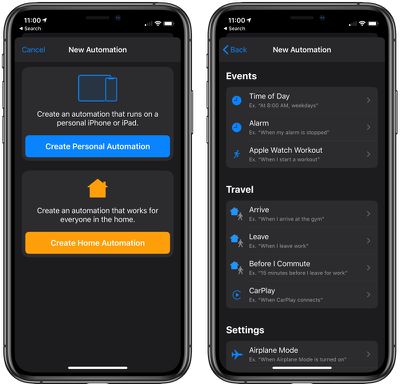
shortcutsautomations
- Share ETA - Share ETA has returned to the Maps app, allowing users to share their estimated time of arrival with a friend or family member once directions to a specific place have been entered.

mapsshareeta 1
- Dynamic Wallpapers - Apple has made some tweaks to the available dynamic wallpapers, shifting the overall look and color of some of them. The Dynamic wallpapers previously limited to the iPhone X and later are also now available on older devices.

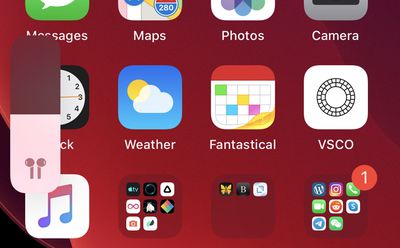
- AirPods Volume Indicator - When adjusting the volume of your ‌iPhone‌ with AirPods connected, you'll see an AirPods icon on the volume bar. This also works for Powerbeats Pro, HomePod, and other Beats headphones, plus there's a special person icon when you have two sets of headphones connected to an ‌iPhone‌ or iPad (an iOS 13 feature).

airpodsvolumeindicator
- New HomeKit Icons - ‌HomeKit‌ devices in the Home app have updated, more detailed icons in iOS 13 beta 1. These same icons were added to the most recent macOS Catalina beta.
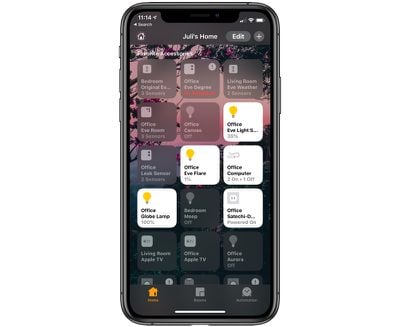
homeappicons
- Mouse Support Improvements - According to developer Steve Troughton-Smith, it's now possible to map the right click function of a mouse to the 3D Touch/long press action on an iOS device. Mouse support in iOS 13 and iPadOS is available as an accessibility option.

- TestFlight Indicator - Apps that you have installed via Apple's TestFlight app (aka apps in beta) are now denoted with a bright yellow dot next to them that's easier to see than before.
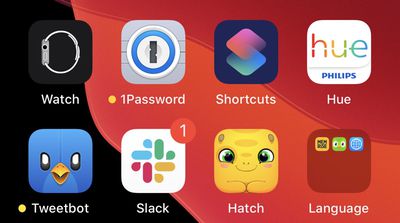
testflightdots
- HEVC Improvements - According to Jeremy Horwitz, iOS 13.1 adds HEVC video encoding with alpha channels for easier green screen-style compositing.

- Fonts - iOS 13 has a feature for downloading and installing fonts from the App Store. In iOS 13 beta 1, when opening up General > Fonts, there's new text that directs users to the ‌App Store‌. There are no fonts apps yet, but presumably in the future this option will link to specific apps for fonts.

- Reading Goals - In the Settings app under Books, there's a new toggle to make the iOS 13 reading goals feature include time spent reading PDFs.

- Nike - In the Apple Watch app on the ‌iPhone‌, Nike+ Run Club is now just "Nike Run Club," suggesting Nike and Apple are dropping the "+" branding.

Apple Watch App - In the Apple Watch app on ‌iPhone‌, Display & Text Size has been renamed to Display & Brightness.

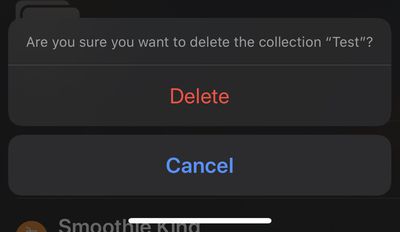
Apple Maps Collections - When deleting a collection from ‌Apple Maps‌, Apple will now confirm that you want to delete it before removing it.
applemapscollectiondelete
Know of a feature that's new in iOS 13 beta 1 that we left out? Make sure to let us know in the comments and we'll update this article.

Steve Moser contributed to this report.

Related Forum: iOS 13

Popular Stories

Aston Martin CarPlay Ultra Screen

Apple's CarPlay Ultra to Expand to These Vehicle Brands Later This Year

Sunday February 1, 2026 10:08 am PST by
Last year, Apple launched CarPlay Ultra, the long-awaited next-generation version of its CarPlay software system for vehicles. Nearly nine months later, CarPlay Ultra is still limited to Aston Martin's latest luxury vehicles, but that should change fairly soon. In May 2025, Apple said many other vehicle brands planned to offer CarPlay Ultra, including Hyundai, Kia, and Genesis. In his Powe...
iOS 26

iOS 26.3 and iOS 26.4 Will Add These New Features to Your iPhone

Tuesday February 3, 2026 7:47 am PST by
We are still waiting for the iOS 26.3 Release Candidate to come out, so the first iOS 26.4 beta is likely still at least a week or two away. Following beta testing, iOS 26.4 will likely be released to the general public in March or April. Below, we have recapped known or rumored iOS 26.3 and iOS 26.4 features so far. iOS 26.3 iPhone to Android Transfer Tool iOS 26.3 makes it easier...
Apple Logo Black

Apple's Next Launch is 'Imminent'

Sunday February 1, 2026 12:31 pm PST by
The calendar has turned to February, and a new report indicates that Apple's next product launch is "imminent," in the form of new MacBook Pro models. "All signs point to an imminent launch of next-generation MacBook Pros that retain the current form factor but deliver faster chips," Bloomberg's Mark Gurman said on Sunday. "I'm told the new models — code-named J714 and J716 — are slated...
Apple MacBook Pro M4 hero

New MacBook Pros Reportedly Launching Alongside macOS 26.3

Sunday February 1, 2026 5:42 am PST by
Apple is planning to launch new MacBook Pro models with M5 Pro and M5 Max chips alongside macOS 26.3, according to Bloomberg's Mark Gurman. "Apple's faster MacBook Pros are planned for the macOS 26.3 release cycle," wrote Gurman, in his Power On newsletter today. "I'm told the new models — code-named J714 and J716 — are slated for the macOS 26.3 software cycle, which runs from...
iOS 26 Home Feature

Apple Gives Final Warning to Home App Users

Tuesday February 3, 2026 8:55 am PST by
In 2022, Apple introduced a new Apple Home architecture that is "more reliable and efficient," and the deadline to upgrade and avoid issues is fast approaching. In an email this week, Apple gave customers a final reminder to upgrade their Home app by February 10, 2026. Apple says users who do not upgrade may experience issues with accessories and automations, or lose access to their smart...

Top Rated Comments

Compile 'em all Avatar
84 months ago
iOS 13 betas are so buggy that Apple needed to start testing 13.1 before 13 is even out

Mail app is royally ****ed up
Are a developer? No? Then don’t install “beta” software on your device then complain about stability. The entire point of betas IS finding bugs. Don’t want to test? Don’t install betas.
Score: 55 Votes (Like | Disagree)
calzon65 Avatar
84 months ago
I remember when IOS was a lot simpler, will need a PhD to operate this thing in the future.
Score: 25 Votes (Like | Disagree)
silverboy31 Avatar
84 months ago
While it seems odd, this is not unexpected to me at all. iOS 13.0 is a disaster and since beta 2 I've known that this was going to be a bomb of a release. And clearly they know it, because they are going to move right past 13.0 (never releasing it to the general public) and skip to 13.1 which will be the bare minimum for public consumption.
[doublepost=1566931190][/doublepost]
That's exactly what is happening here.
.


That’s funny I’ve never had any really major issues with any of the releases on my Xs max ,, All the betas I’ve tested over the years this has been the least buggiest ...
Score: 24 Votes (Like | Disagree)
sniffies Avatar
84 months ago
iOS 13 betas are so buggy that Apple needed to start testing 13.1 before 13 is even out

Mail app is royally ****ed up
Score: 15 Votes (Like | Disagree)
manu chao Avatar
84 months ago
13.0 will never be seeded to the public, that is definite as of right now. 13.1.x will be released to the public on the original date for 13.0 (the week of September 16-20).
Will you eat your hat if they release an iOS 13.0?
Score: 15 Votes (Like | Disagree)
thecastle Avatar
84 months ago
I remember when IOS was a lot simpler, will need a PhD to operate this thing in the future.
What are you even talking about? iOS is still as simple and user friendly as it gets. Nothing has changed about opening and navigating apps since the first iPhone OS. My 85 year old grandmother can use her iPad just fine.
Score: 12 Votes (Like | Disagree)