Samsung is in hot water with Australia's consumer watchdog for allegedly misleading consumers about the level of water resistance its Galaxy smartphones offer.
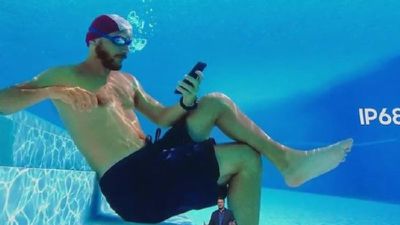
samsung galaxy underwater ad

Samsung Galaxy advertisement

Reuters reports that the Australian Competition and Consumer Commission (ACCC) is suing the South Korean firm for falsely representing its Galaxy phones as suitable for use underwater, following ads that show the devices being submerged in swimming pools and used in ocean water.

Samsung did not know or sufficiently test the effects of pool or saltwater exposure on its phones when ads showed them fully submerged, claims the ACCC lawsuit.

"The ACCC alleges Samsung's advertisements falsely and misleadingly represented Galaxy phones would be suitable for use in, or for exposure to, all types of water, including in ocean water and swimming pools, and would not be affected by such exposure to water for the life of the phone, when this was not the case," ACCC Chairman Rod Sims said in a statement.

Samsung Galaxy phones are marketed as having IP68 water resistance, defined as resistant to water 1.5 meters deep for 30 minutes. The ACCC's point is the IP68 rating doesn't cover all types of water. However, Samsung told Reuters it stood by its advertising, complied with Australian law, and would defend the case.

The smartphone maker has invested heavily in advertising to rebuild its reputation in the public eye, following its 2016 global recall of fire-prone Galaxy Note 7 devices.
Top Rated Comments

LaraCroft835 Avatar
84 months ago
As I already said, Apple should be sued too.

The iPhone X is absolutely not water resistant after some days of use, way off the advertised “30 minutes in 1.5m of water”. Or something.
just to clarify
About splash, water, and dust resistance of iPhone 7 and later
Learn about splash, water, and dust resistance on your iPhone. And learn what to do if your iPhone gets wet accidentally.


iPhone XS, iPhone XS Max, iPhone XR, iPhone X, iPhone 8, iPhone 8 Plus, iPhone 7, and iPhone 7 Plus are splash, water, and dust resistant and were tested under controlled laboratory conditions.

iPhone XS and iPhone XS Max have a rating of IP68 under IEC standard 60529 (maximum depth of 2 meters up to 30 minutes). iPhone XR, iPhone X, iPhone 8, iPhone 8 Plus, iPhone 7, and iPhone 7 Plus have a rating of IP67 under IEC standard 60529 (maximum depth of 1 meter up to 30 minutes). Splash, water, and dust resistance are not permanent conditions and resistance might decrease as a result of normal wear. Liquid damage is not covered under warranty.

iPhone XS, iPhone XS Max, and iPhone XR are resistant to accidental spills from common liquids, such as soda, beer, coffee, tea, and juice. In the event of a spill, rinse the affected area with tap water, then wipe your iPhone off and dry it ('https://support.apple.com/en-au/HT207043#dry').

To prevent liquid damage, avoid these:


* Swimming or bathing with your iPhone
* Exposing your iPhone to pressurized water or high velocity water, such as when showering, water skiing, wake boarding, surfing, jet skiing, and so on
* Using your iPhone in a sauna or steam room
* Intentionally submerging your iPhone in water
* Operating your iPhone outside the suggested temperature ranges or in extremely humid conditions
* Dropping your iPhone or subjecting it to other impacts
* Disassembling your iPhone, including removing screws

Minimize exposing your iPhone to soap, detergent, acids or acidic foods, and any liquids—for example, perfume, insect repellent, lotions, sunscreen, oil, adhesive remover, hair dye, and solvents. If your iPhone comes into contact with any of these substances, follow the instructions to clean your iPhone ('https://support.apple.com/en-us/ht207123').

What should I do if my iPhone gets wet?
[LIST=1]
* If a liquid other than water splashes on your iPhone, rinse the affected area with tap water.
* Wipe your iPhone off with a soft, lint-free cloth—for example, a lens cloth.

Make sure that your iPhone is dry before opening the SIM tray.

To dry your iPhone, tap it gently against your hand with the Lightning connector facing down to remove excess liquid. Leave your iPhone in a dry area with some airflow. Placing your iPhone in front of a fan blowing cool air directly into the Lightning connector might help the drying process.

Don't dry your iPhone using an external heat source or insert a foreign object, such as a cotton swab or a paper towel, into the Lightning connector.

If my iPhone gets wet, can I charge it?
If your iPhone has been exposed to liquid, unplug all cables and do not charge your device until it’s completely dry. Using accessories or charging when wet might damage your iPhone. Allow at least 5 hours before charging with a Lightning cable or connecting a Lightning accessory.

For wireless charging, wipe off your iPhone with a soft, lint-free cloth—for example, a lens cloth. Make sure that your iPhone is dry before you place it on a compatible wireless charging mat.

What should I do if my iPhone got wet, and now its speaker sounds muffled?
Check to see if water is in the microphone or speaker: Place your iPhone, speaker side down, on a lint-free cloth and see if water drips out. Water in the port might degrade speaker or microphone performance until it completely evaporates. Dry your iPhone using the previous instructions.

What should I do if dust gets on my iPhone?
If dust or dirt gets on your iPhone, wipe it off with a soft, lint-free cloth—for example, a lens cloth. Make sure that your iPhone is free of dust before opening the SIM tray. Don't use cleaning products or compressed air.

Published Date: April 16, 2019
Score: 25 Votes (Like | Disagree)
Guidonculous Avatar
84 months ago
Problem I have with that is extracted above, (assuming I understand correctly).......
So in one breath they are saying that your phone can withstand water ingress under the conditions I've highlighted in red. Then in the next they're saying that they won't honour a warranty if they find water inside that might actually be as a result of being submerged for less than those limits???
My car is designed to withstand crashing into another vehicle at extreme force.

My car’s warranty does not cover me crashing or into things.

There’s two different things here. The iPhone is “designed to be IP68 resistant”. The warranty does not cover using the device in the extreme circumstances that the device is designed to be capable of withstanding.

I.E. Apple did the best they could to make the device survive being in water, they do not suggest you put such designs to the test, and if you do, the responsibility is on you.

This isn’t done weird bait and switch, this is a basic understanding of warranties and how they differ from technical specifications.
Score: 22 Votes (Like | Disagree)
Khedron Avatar
84 months ago
Just don't advertise use cases that you simultaneously claim would void the user's warranty.
Score: 17 Votes (Like | Disagree)
maximage77 Avatar
84 months ago
My car is designed to withstand crashing into another vehicle at extreme force.
My car’s warranty does not cover me crashing or into things.
...
This isn’t some weird bait and switch, this is a basic understanding of warranties and how they differ from technical specifications.
That has got to be, hands down, the best explanation and analogy I have seen, nicely put!!
Score: 12 Votes (Like | Disagree)
x-evil-x Avatar
84 months ago
My car is designed to withstand crashing into another vehicle at extreme force.

My car’s warranty does not cover me crashing or into things.

There’s two different things here. The iPhone is “designed to be IP68 resistant”. The warranty does not cover using the device in the extreme circumstances that the device is designed to be capable of withstanding.

I.E. Apple did the best they could to make the device survive being in water, they do not suggest you put such designs to the test, and if you do, the responsibility is on you.

This isn’t done weird bait and switch, this is a basic understanding of warranties and how they differ from technical specifications.
Does your car manufacturer show you video of your car crashing into things with no damage? Yea didn’t think so.
Apple shouldn’t release commercials showing that the phone is capable of getting wet and then not cover warranty on it.
Score: 10 Votes (Like | Disagree)
KJH Avatar
84 months ago
My iPhone X has submerged under 30 cm of water for 2 mins. The selfie camera got steamy from the inside and the phone is now completely trash because of the water damage. Can I sue Apple now as well? They falsely claim that 3feet/1m for sure.
If you watch the iPhone 7 keynote they specifically mention its splash resistant and not waterproof. In fact in one of the original iPhone commercials it shows a man riding a bike with the iPhone getting wet with rain. It never shows the iPhone completely submerged which is the issue this article is talking about. Samsung specifically shows their phones submerged in its advertising.


And here is another ad where Apple shows specifically what they have stated on the Apple Support website.


And another

Score: 7 Votes (Like | Disagree)

Popular Stories

iOS 26

iOS 26.4 and iOS 27 Features Revealed in New Leak

Friday December 12, 2025 10:56 am PST by
Macworld's Filipe Espósito today revealed a handful of features that Apple is allegedly planning for iOS 26.4, iOS 27, and even iOS 28. The report said the features are referenced within the code for a leaked internal build of iOS 26 that is not meant to be seen by the public. However, it appears that Espósito and/or his sources managed to gain access to it, providing us with a sneak peek...
iOS 26

iOS 26.2 Coming Soon With These 8 New Features on Your iPhone

Thursday December 11, 2025 8:49 am PST by
Apple seeded the second iOS 26.2 Release Candidate to developers earlier this week, meaning the update will be released to the general public very soon. Apple confirmed iOS 26.2 would be released in December, but it did not provide a specific date. We expect the update to be released by early next week. iOS 26.2 includes a handful of new features and changes on the iPhone, such as a new...
iOS 26

Apple Releases iOS 26.2 With Alarms for Reminders, Lock Screen Changes, Enhanced Safety Alerts and More

Friday December 12, 2025 10:10 am PST by
Apple today released iOS 26.2, the second major update to the iOS 26 operating system that came out in September, iOS 26.2 comes a little over a month after iOS 26.1 launched. ‌iOS 26‌.2 is compatible with the ‌iPhone‌ 11 series and later, as well as the second-generation ‌iPhone‌ SE. The new software can be downloaded on eligible iPhones over-the-air by going to Settings >...
AirPods Pro Firmware Feature

Apple Releases New Firmware for AirPods Pro 2 and AirPods Pro 3

Thursday December 11, 2025 11:28 am PST by
Apple today released new firmware designed for the AirPods Pro 3 and the prior-generation AirPods Pro 2. The AirPods Pro 3 firmware is 8B30, up from 8B25, while the AirPods Pro 2 firmware is 8B28, up from 8B21. There's no word on what's include in the updated firmware, but the AirPods Pro 2 and AirPods Pro 3 are getting expanded support for Live Translation in the European Union in iOS...
macOS Tahoe 26 Thumb

Apple Releases macOS Tahoe 26.2 With Edge Light

Friday December 12, 2025 10:08 am PST by
Apple today released macOS Tahoe 26.2, the second major update to the macOS Tahoe operating system that came out in September. macOS Tahoe 26.2 comes five weeks after Apple released macOS Tahoe 26.1. Mac users can download the macOS Tahoe update by using the Software Update section of System Settings. macOS Tahoe 26.2 includes Edge Light, a feature that illuminates your face with soft...
AirTag 2 Mock Feature

Apple AirTag 2: Four New Features Found in iOS 26 Code

Thursday December 11, 2025 10:31 am PST by
The AirTag 2 will include a handful of new features that will improve tracking capabilities, according to a new report from Macworld. The site says that it was able to access an internal build of iOS 26, which includes references to multiple unreleased products. Here's what's supposedly coming: An improved pairing process, though no details were provided. AirTag pairing is already...
ipados 26 1 slide over

Apple Releases iPadOS 26.2 With Multitasking Improvements

Friday December 12, 2025 10:09 am PST by
Apple today released iPadOS 26.2, the second major update to the iPadOS 26 operating system released in September. iPadOS 26.2 comes a month after iPadOS 26.1. The new software can be downloaded on eligible iPads over-the-air by going to Settings > General > Software Update. iPadOS 26.2 continues with the multitasking improvements that were added with iPadOS 26.1. You can now drag and...
bug security vulnerability issue fix larry

Update Now: iOS 26.2 Fixes 20+ Security Vulnerabilities

Friday December 12, 2025 11:11 am PST by
Apple today released iOS 26.2, iPadOS 26.2, and macOS 26.2, all of which introduce new features, bug fixes, and security improvements. Apple says that the updates address over 20 vulnerabilities, including two bugs that are known to have been actively exploited. There are a pair of WebKit vulnerabilities that could allow maliciously crafted web content to execute code or cause memory...