

Attention Correction Feature in iOS 13 Beta Enables Appearance of Eye Contact During FaceTime Calls [Updated] - MacRumorsOpen MenuShow RoundupsShow Forums menuVisit ForumsOpen Sidebar
Skip to Content

Attention Correction Feature in iOS 13 Beta Enables Appearance of Eye Contact During FaceTime Calls [Updated]

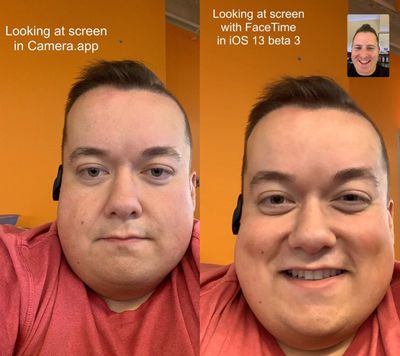
A new feature in the latest iOS 13 beta makes users appear as if they're looking directly at the camera to make eye contact during FaceTime calls, when actually they're looking away from the camera at the image of the other person on their screen.
facetime correction feature ios 13 1

The ‌FaceTime‌ Correction Feature as demoed by Will Sigmon (@Wsig)

The new "‌FaceTime‌ Attention Correction" feature, first spotted by Mike Rundle on Twitter, can be turned on and off in the ‌FaceTime‌ section of the Settings app, although it only appears to work on iPhone XS and XS Max devices in the third iOS 13 beta sent out to developers on Tuesday.

Why the feature is limited to these devices right now remains unknown. It clearly relies on some form of image manipulation to achieve its results, so maybe the software algorithms require the more advanced processing power of Apple's latest devices.

Rundle predicted in 2017 that ‌FaceTime‌ attention correction would be introduced by Apple in "years to come," but its apparent inclusion in iOS 13, due to be released this fall, has surprised and impressed him.

For more details on the many features coming to iPhones with iOS 13, be sure to check out our comprehensive MacRumors roundup.

Update: As demonstrated by Dave Schukin, the feature uses ARKit depth maps to adjust eye position to make it appear the user is looking at the camera.

Related Forum: iOS 13

Popular Stories

iOS 27 on iPhone 17 1

iOS 27 Will Add These New Features to Your iPhone

Saturday May 2, 2026 8:43 am PDT by
Apple is expected to unveil iOS 27 during its WWDC 2026 keynote on June 8, and there are already many rumored features and changes for iPhones. The first developer beta of iOS 27 will likely be available immediately following the keynote, and a public beta typically follows in July. Following beta testing, the software update should be released to all users with a compatible iPhone in...
Apple Event Logo

Apple Just Released a New Accessory

Monday May 4, 2026 8:13 am PDT by
Apple today released a new Pride Edition Sport Loop for the Apple Watch. The band features a rainbow design with 11 colors of woven nylon yarns. The new Pride Edition Sport Loop is available to order now on Apple.com and in the Apple Store app in 40mm, 42mm, and 46mm sizes, and it will be available at Apple Store locations starting later this week. In the U.S., the band costs $49. There...
Apple MacBook Pro M4 hero

Why You Might Want to Wait to Buy a MacBook Pro

Friday May 1, 2026 3:43 pm PDT by
Apple refreshed the 14-inch and 16-inch MacBook Pro with M5 Pro and M5 Max models in March 2026, but depending on your needs and interests, you might want to skip this generation because there's something better in the works. The M5 Pro and M5 Max MacBook Pro models have faster chips, but the same design that Apple has used since 2021. An updated design with new display technology and faster ...

Top Rated Comments

89 months ago
Awesome and creepy at the same time.
Score: 53 Votes (Like | Disagree)
89 months ago
I spend most FaceTime calls looking at myself in the corner lol
Score: 37 Votes (Like | Disagree)
89 months ago
The big question is, what comes next? Brave new world.
Looking at his expression on the left, mood correction?
Score: 35 Votes (Like | Disagree)
chrono1081 Avatar
89 months ago
Sorry but this is a horrible comparison picture. I can't even tell what it's supposedly doing. My guess based on the description is that it "fixes your eyes" so to speak but the entirely different image between the two shots isn't very useful.
Score: 26 Votes (Like | Disagree)
89 months ago
Now if they can only make it look like I'm there when I'm in the next room getting a snack.
Score: 20 Votes (Like | Disagree)
testcard Avatar
89 months ago
Not sure those images explain the feature very well at all.
Score: 17 Votes (Like | Disagree)
Related Apple News: Iphone | Reviews | Travel | Motoring | Ipad


















