Apple Seeds First Beta of tvOS 13 to Public Beta Testers - MacRumorsOpen MenuShow RoundupsShow Forums menuVisit ForumsOpen Sidebar
Skip to Content

Apple Seeds First Beta of tvOS 13 to Public Beta Testers

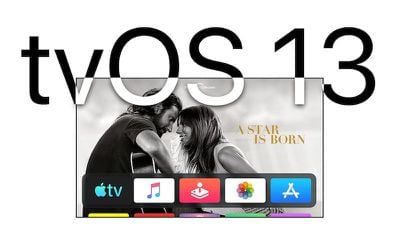
Apple today seeded the first beta of an upcoming tvOS 13 software update to its public beta testing group, giving non-developers a chance to try out the new software ahead of its fall public release. The first beta of tvOS 13 corresponds to the second tvOS 13 update made available to developers last week.

Public beta testers can download the new update by going to the Settings app on the Apple TV and navigating to the Software Updates section under "System." "Get Public Beta Updates" will need to be toggled on, and once it is, the ‌Apple TV‌ will download the beta software.

tvos13
Those who want to beta test the software can sign up to do so on Apple's beta testing website.

tvOS 13 includes a new Home screen that's aimed at making it easier to find new content, with support for autoplaying videos to show off new TV shows, movies, and apps, similar to Netflix.

Multi-user support is new in tvOS 13, letting each member of the family have their own customized ‌Apple TV‌ interface with separate recommendations, music playlists, and Watch Now lists. A new Control Center lets you swap between profiles.

tvOS 13 gets the ‌Apple TV‌ ready for Apple Arcade, Apple's new gaming service that's coming to the ‌Apple TV‌, iOS, iPadOS, and macOS later this year. ‌Apple Arcade‌ will offer unlimited access to more than 100 new and exclusive games, for one subscription fee.

‌Apple Arcade‌ preparations include support for the Xbox Wireless Bluetooth Controller and the PlayStation DualShock 4 Controller, both of which can be connected to an ‌Apple TV‌ over Bluetooth.

Apple is also adding new under-the-sea themed screensavers made in partnership with the BBC Natural History unit, also known for "Blue Planet," and the new software brings support for a picture-in-picture mode that lets you watch TV while doing other things on the ‌Apple TV‌.

For more on what's new in tvOS 13, make sure to check out our tvOS 13 roundup.

Related Roundup: Apple TV
Buyer's Guide: Apple TV (Don't Buy)

Popular Stories

iPhone 18 Pro Deep Red Feature

iPhone 18 Pro Launching Later This Year With These 12 New Features

Wednesday March 18, 2026 7:39 am PDT by
While the iPhone 18 Pro and iPhone 18 Pro Max are not expected to launch for another six months or so, there are already plenty of rumors about the devices. It was initially reported that the iPhone 18 Pro models would have fully under-screen Face ID, with only a front camera visible in the top-left corner of the screen. However, the latest rumors indicate that only one Face ID component...
imac video apple feature

Apple Released Yet Another New Product Today

Friday March 20, 2026 2:39 pm PDT by
Apple has unveiled a whopping nine new products so far this March, including an iPhone 17e, iPad Air models with the M4 chip, MacBook Air models with the M5 chip, MacBook Pro models with M5 Pro and M5 Max chips, the all-new MacBook Neo, an updated Studio Display, a higher-end Studio Display XDR, AirPods Max 2, and now the Nike Powerbeats Pro 2. iPhone 17e features the same overall design as...
ios 26 4 yellow

Here Are Apple's Release Notes for iOS 26.4

Wednesday March 18, 2026 11:56 am PDT by
Apple provided developers and public beta testers with the release candidate versions of iOS 26.4 and iPadOS 26.4, which means we're going to see a public launch as soon as next week. The RC versions of the software include Apple's official release notes, giving us final details on what's included in the update. Apple Music - Playlist Playground (beta) generates a playlist from your...

Top Rated Comments

Chris The Bipolarbear Avatar
88 months ago
do not install this on Apple TV 4K as it almost impossible to revert back to TVos 12.
Score: 2 Votes (Like | Disagree)
88 months ago
Question for anyone that has DirecTV NOW...does it work? I do not want to install this and have my main source of entertainment not work.

Thank you!

:apple:
I installed the dev beta on day 1; DTV Now, Netflix, Amazon all seem fine.
Score: 1 Votes (Like | Disagree)
GIZBUG Avatar
88 months ago
noob question, how do I get out of the public beta into the GM build when it's released in fall? Thanks!
Switch off publicbeta in settings
Score: 1 Votes (Like | Disagree)
d21mike Avatar
88 months ago
Just installed it on my Apple TV (5th Gen) and testing out some apps I have on and everything seems to be working ok and stable so far. There’s a new preinstalled app called Arcade, just like in the iOS App Store. Not sure what else is new just yet.

Edit: I hope running TvOS 13 and iOS 13 will help fix the issue I keep having with the tv remote that’s in control center. It would never connect to the TV, I would have to unplug the Apple TV and plug it back in to get the remote to sync up.
Is the Arcade the New Arcade Service coming in the fall? Does it do much? If so, does the multiuser support work with it?
Score: 1 Votes (Like | Disagree)
spellnight Avatar
88 months ago
Not sure why but the Beta toggle doesn't appear on my 4th gen Apple TV. I tried with both accounts. :(
Score: 1 Votes (Like | Disagree)
Related Apple News: Health | Ipad | Sport | Business | Local News