Apple Expected to Remove 3D Touch From All 2019 iPhones in Favor of Haptic Touch

Four years after 3D Touch debuted on the iPhone 6s, the pressure-sensitive feature appears to be on the chopping block.
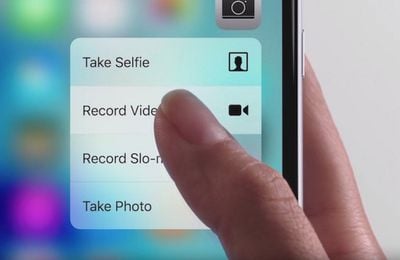
3d touch iphone zoom
Last week, in a research note shared with MacRumors, a team of Barclays analysts "confirmed" that 3D Touch "will be eliminated" in all 2019 iPhones, as they predicted back in August 2018. The analysts gathered this information from Apple suppliers following a trip to Asia earlier this month.

This isn't the first time we've heard this rumor. The Wall Street Journal said the same thing back in January.

Apple already replaced ‌3D Touch‌ with Haptic Touch on the iPhone XR in order to achieve a nearly edge-to-edge LCD on the device, and it is likely the feature will be expanded to all 2019 iPhones. Haptic Touch is simply a marketing name for a long press combined with haptic feedback from the Taptic Engine.

It's unclear why Apple would remove ‌3D Touch‌ from the next-generation ‌iPhone‌ XS and ‌iPhone‌ XS Max, since Apple has already proven that it can integrate the feature into edge-to-edge OLED displays without issue.

‌Haptic Touch‌ on the ‌iPhone‌ XR works in fewer places than ‌3D Touch‌, including the flashlight and camera shortcuts on the lock screen, in Control Center to view hidden toggles, and to expand notifications. ‌Haptic Touch‌ does not support Quick Actions app menus or Peek and Pop for previewing content.
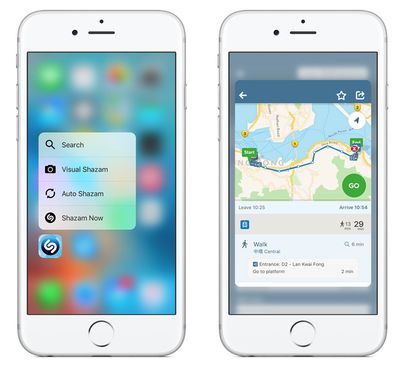
peek pop

‌3D Touch‌ features: Quick Actions on left, Peek and Pop on right

Perhaps we'll see some hints that ‌3D Touch‌ is going away entirely in iOS 13, which Apple is expected to unveil at its WWDC 2019 keynote next Monday. That should be followed by new iPhones in September as usual.


Related Forum: iPhone

Popular Stories

iOS 26

iOS 26.4 and iOS 27 Features Revealed in New Leak

Friday December 12, 2025 10:56 am PST by
Macworld's Filipe Espósito today revealed a handful of features that Apple is allegedly planning for iOS 26.4, iOS 27, and even iOS 28. The report said the features are referenced within the code for a leaked internal build of iOS 26 that is not meant to be seen by the public. However, it appears that Espósito and/or his sources managed to gain access to it, providing us with a sneak peek...
iOS 26

iOS 26.2 Coming Soon With These 8 New Features on Your iPhone

Thursday December 11, 2025 8:49 am PST by
Apple seeded the second iOS 26.2 Release Candidate to developers earlier this week, meaning the update will be released to the general public very soon. Apple confirmed iOS 26.2 would be released in December, but it did not provide a specific date. We expect the update to be released by early next week. iOS 26.2 includes a handful of new features and changes on the iPhone, such as a new...
iOS 26

Apple Releases iOS 26.2 With Alarms for Reminders, Lock Screen Changes, Enhanced Safety Alerts and More

Friday December 12, 2025 10:10 am PST by
Apple today released iOS 26.2, the second major update to the iOS 26 operating system that came out in September, iOS 26.2 comes a little over a month after iOS 26.1 launched. ‌iOS 26‌.2 is compatible with the ‌iPhone‌ 11 series and later, as well as the second-generation ‌iPhone‌ SE. The new software can be downloaded on eligible iPhones over-the-air by going to Settings >...
AirPods Pro Firmware Feature

Apple Releases New Firmware for AirPods Pro 2 and AirPods Pro 3

Thursday December 11, 2025 11:28 am PST by
Apple today released new firmware designed for the AirPods Pro 3 and the prior-generation AirPods Pro 2. The AirPods Pro 3 firmware is 8B30, up from 8B25, while the AirPods Pro 2 firmware is 8B28, up from 8B21. There's no word on what's include in the updated firmware, but the AirPods Pro 2 and AirPods Pro 3 are getting expanded support for Live Translation in the European Union in iOS...
macOS Tahoe 26 Thumb

Apple Releases macOS Tahoe 26.2 With Edge Light

Friday December 12, 2025 10:08 am PST by
Apple today released macOS Tahoe 26.2, the second major update to the macOS Tahoe operating system that came out in September. macOS Tahoe 26.2 comes five weeks after Apple released macOS Tahoe 26.1. Mac users can download the macOS Tahoe update by using the Software Update section of System Settings. macOS Tahoe 26.2 includes Edge Light, a feature that illuminates your face with soft...
AirTag 2 Mock Feature

Apple AirTag 2: Four New Features Found in iOS 26 Code

Thursday December 11, 2025 10:31 am PST by
The AirTag 2 will include a handful of new features that will improve tracking capabilities, according to a new report from Macworld. The site says that it was able to access an internal build of iOS 26, which includes references to multiple unreleased products. Here's what's supposedly coming: An improved pairing process, though no details were provided. AirTag pairing is already...
ipados 26 1 slide over

Apple Releases iPadOS 26.2 With Multitasking Improvements

Friday December 12, 2025 10:09 am PST by
Apple today released iPadOS 26.2, the second major update to the iPadOS 26 operating system released in September. iPadOS 26.2 comes a month after iPadOS 26.1. The new software can be downloaded on eligible iPads over-the-air by going to Settings > General > Software Update. iPadOS 26.2 continues with the multitasking improvements that were added with iPadOS 26.1. You can now drag and...
bug security vulnerability issue fix larry

Update Now: iOS 26.2 Fixes 20+ Security Vulnerabilities

Friday December 12, 2025 11:11 am PST by
Apple today released iOS 26.2, iPadOS 26.2, and macOS 26.2, all of which introduce new features, bug fixes, and security improvements. Apple says that the updates address over 20 vulnerabilities, including two bugs that are known to have been actively exploited. There are a pair of WebKit vulnerabilities that could allow maliciously crafted web content to execute code or cause memory...

Top Rated Comments

its93rc Avatar
86 months ago
This is a feature mostly everyone on here calls a gimmick but I love using. I hope they keep a variation of it on the new iPhone.
Score: 107 Votes (Like | Disagree)
Nimoy Avatar
86 months ago
I'm hoping this change is "invisible" because I use 3D Touch all the time. Also hoping we "get something" for it, like longer battery life.
Score: 55 Votes (Like | Disagree)
Biu_miu Avatar
86 months ago
Sad. It was really convenient to reply to texts/e-mails from lock screen with 3D Touch.
Score: 54 Votes (Like | Disagree)
Mike MA Avatar
86 months ago
Once you got used to 3D Touch you won’t want to miss it. Let’s see the reason why and the replacing feature and judge afterwards.
Score: 47 Votes (Like | Disagree)
plotikai Avatar
86 months ago
Probably because nobody is using it. it's to unintuitive.
I disagree, I use it every day and once you learn which apps have the function built in, it's extremely intuitive. Being able to quickly see how far an address is when someone messages it to me is much better than opening it in another app, then moving back to the messages app to respond, you don't even have to move your thumb! Removing 3 steps to do the same thing, tripling the total time to accomplish the same task
Score: 46 Votes (Like | Disagree)
goobot Avatar
86 months ago
But I like 3D Touch. The real problem is Apple doesn’t know how to make software that highlights their hardware functions anymore. Since iOS 7 the whole ui sucks.
Score: 44 Votes (Like | Disagree)