Google Adds New Auto-Delete Controls for Location History and Activity Data - MacRumorsOpen MenuShow RoundupsShow Forums menuVisit ForumsOpen Sidebar
Skip to Content

Google Adds New Auto-Delete Controls for Location History and Activity Data

by

Google today announced a new privacy-focused auto-delete option for automatically removing Location History and Web & App Activity after a set period of time.

You can now choose to delete your information manually, every three months, or every 18 months. With these settings enabled, Google will regularly clear out your data at the three month mark or the 18 month mark.
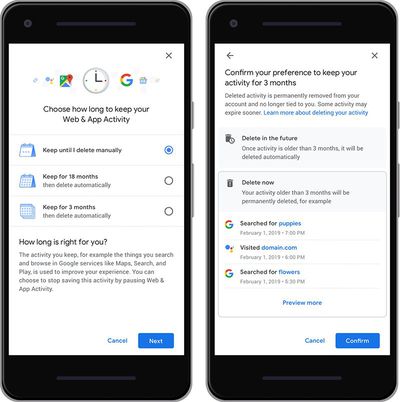
googleautodelete
Prior to this change, Google allowed Location History and Web & App Activity to be disabled or manually deleted, but there were no controls for regular deletion, which may encourage more people to use these features.

Google's Location History feature tracks the locations that you've visited, while Web & App Activity tracks websites you've visited and apps that you've used. Google uses this information for recommendations and cross device syncing.

Google says the new controls for Location History and Web & App Activity will be rolling out "in the coming weeks," and has suggested the auto-delete functionality will be coming to additional features in the future.


Tag: Google

Top Rated Comments

92 months ago
Almost pointless... it’s ‘deleted’ for you- not them.
Score: 18 Votes (Like | Disagree)
92 months ago
The wording is pretty clever, "is permanently removed from your account". Not deleted, "removed", as in no longer accessible.

Whilst I am currently happy to use Google and benefit from the services they provide me, if I choose to delete my data I definitely want to know that the data has indeed been deleted. That's not a delete, just a disconnect.
Score: 12 Votes (Like | Disagree)
92 months ago
Is it me, or does this article completely omit the app that's involved here? Are we talking about Chrome on iOS? Or all Google apps across the device? It's really unclear to me.

UPDATE - Even the original article by Google on this topic doesn't make it clear where you actually access these controls. Is this at the Google website when you're logged into your account? Why is it showing it on a mobile device? Makes it look like an app interface.

UPDATE #2 - I suspect this is what you see when you log into your Google account on a mobile device. Just poorly presented here and by Google.
Score: 2 Votes (Like | Disagree)
atikalz Avatar
92 months ago
But google keeps your data forever
Score: 2 Votes (Like | Disagree)
warp9 Avatar
92 months ago
I don't have a problem with Google having my data. Their only purpose for it is to try to sell me something I was probably going to buy anyways. Of all the things to be outraged about, shopping is not it.

What DOES worry me is what might happen with that data in the future. There's a real chance of discrimination rising up. Medically, socially, culturally, really anything.
Score: 2 Votes (Like | Disagree)
NickName99 Avatar
92 months ago
Bravo! I avoid Google products as much as possible, because of their shady privacy policies. This is a positive step. I agree with others that Facebook ought to follow this example, if they want to stop hemorrhaging users.
Score: 2 Votes (Like | Disagree)

Popular Stories

google chrome vertical tabs

Google Brings Vertical Tabs and Improved Reading Mode to Chrome

Tuesday April 7, 2026 1:27 pm PDT by
Google today updated its Chrome browser with support for vertical tabs, which are displayed in a sidebar instead of at the top of the browser. The tab layout can be changed by right clicking on any Chrome window and choosing the "Show Tabs Vertically" option. Sidebar tabs feature full page titles and make it simple to organize tab groups. Google has also added a new full-page interface...
Chrome Feature 22

Gemini in Google Chrome Gets a Skills Library for Saving Custom AI Prompts

Tuesday April 14, 2026 10:00 am PDT by
Chrome has been updated today with a Skills library that's designed to let Chrome users turn AI tasks into repeatable skills that can be used on any website. Useful prompts you create for Gemini in Chrome can be saved as a Skill that can be accessed later with a single click. If you're shopping for skincare and ask Gemini about the ingredients in a product, for example, you can save the...
gemini for mac app google

Google Launches Native Gemini AI App for Mac

Wednesday April 15, 2026 10:46 am PDT by
Google is bringing Gemini to the Mac with a new native macOS app that's available starting today. Gemini for Mac can be activated with a keyboard shortcut, and it has built-in tools for generating images, analyzing what's on your screen, reviewing files, and more. Gemini is the last of the three major AI services to have a dedicated Mac app, because OpenAI and Anthropic have had Mac apps for ...
Related Apple News: South Africa | Ipad | Ipad | Instant Digital | Local News