

Gmail for iOS Gains Customizable Swipe Actions - MacRumorsOpen MenuShow RoundupsShow Forums menuVisit ForumsOpen Sidebar
Skip to Content

Gmail for iOS Gains Customizable Swipe Actions

by

Google today announced that its Gmail for iOS app has been updated with customizable swipe actions that can be set to do the following things: Archive, Trash, Mark as read/unread, Snooze, and Move To.

These are the actions that will be enabled when you use the left and right swipe gestures on emails in your inbox in the recently redesigned Gmail for iOS app.
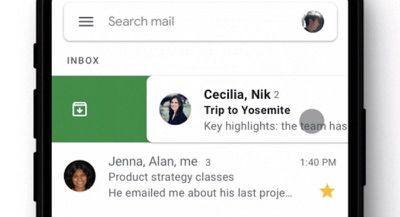
gmailswipegestures
You can customize the gestures by opening up the Gmail for iOS app, selecting the Settings section, and choosing Swipe Actions.

Google says that the same swipe actions can now be used for notifications. On an incoming Gmail notification on iOS, if you long press or 3D Touch, you can get your swipe options to interact directly with emails without opening up the app.

Google says that the customizable Gmail swipe actions are rolling out to users today, but it could take up to 15 days for the option to become available to everyone.

Tag: Gmail

Top Rated Comments

ericg301 Avatar
91 months ago
Instead of putting a Google app on your phone, just forward them all to your iCloud account. It works very well.
and then you lose all the features of gmail like snooze, labels, tabs, filters, etc....

iCloud suite is woefully behind.
Score: 10 Votes (Like | Disagree)
Romeo_Nightfall Avatar
91 months ago
Is there a swipe to stop Google employees reading your mails option?
Who is interested in your mails?
Score: 5 Votes (Like | Disagree)
keysofanxiety Avatar
91 months ago
Is there a swipe to stop Google employees reading your mails option?
Score: 3 Votes (Like | Disagree)
rk-apple Avatar
91 months ago
A most welcome new feature! Something Outlook has long had.
Score: 3 Votes (Like | Disagree)
nouveau_redneck Avatar
91 months ago
Gmail is the absolute worst email platform. The company I previously worked for switched from Exchange/Outlook to Gmail, and everyone hated it. I do mean everyone. What a useless platform for enterprise email. The most absurd thing was it was almost impossible to find emails using Gmail search, Exchange was just so much better.

I think one of the biggest benefits of leaving that company was deleting that trash Gmail app from my phone. Good riddance.
Score: 2 Votes (Like | Disagree)
Dreadx37 Avatar
91 months ago
It also has the "Important" markers now. It's still not close to Inbox so I'm going to go continue mourning now.
Score: 2 Votes (Like | Disagree)

Popular Stories

iPhone 18 Pro Deep Red Feature

iPhone 18 Pro Launching Later This Year With These 12 New Features

Wednesday March 18, 2026 7:39 am PDT by
While the iPhone 18 Pro and iPhone 18 Pro Max are not expected to launch for another six months or so, there are already plenty of rumors about the devices. It was initially reported that the iPhone 18 Pro models would have fully under-screen Face ID, with only a front camera visible in the top-left corner of the screen. However, the latest rumors indicate that only one Face ID component...
imac video apple feature

Apple Released Yet Another New Product Today

Friday March 20, 2026 2:39 pm PDT by
Apple has unveiled a whopping nine new products so far this March, including an iPhone 17e, iPad Air models with the M4 chip, MacBook Air models with the M5 chip, MacBook Pro models with M5 Pro and M5 Max chips, the all-new MacBook Neo, an updated Studio Display, a higher-end Studio Display XDR, AirPods Max 2, and now the Nike Powerbeats Pro 2. iPhone 17e features the same overall design as...
ios 26 4 pastel

iOS 26.4: Top 10 New Features Coming to Your iPhone

Friday March 20, 2026 2:44 pm PDT by
iOS 26.4 isn't the major update with new Siri features that we hoped for, but there are some useful quality of life improvements, and a little bit of fun with an AI playlist generator and new emoji characters. Playlist Playground - Apple Music has a Playlist Playground option that lets you generate playlists from text-based descriptions. You can include moods, feelings, activities, or...
Related Apple News: Bird Buddy | Mac | Mac | Use Precision Finding Airtag | M4 Ipad Air Vs M5 Ipad Pro
















