Apple's Clips App Gains New Selfie Scenes, Filters, Stickers and Soundtracks - MacRumorsOpen MenuShow RoundupsShow Forums menuVisit ForumsOpen Sidebar
Skip to Content

Apple's Clips App Gains New Selfie Scenes, Filters, Stickers and Soundtracks

Apple today announced an update for its Clips app for the iPhone and the iPad, which is adding new Selfie Scenes, additional filters, fresh posters, and new stickers, text labels, and soundtracks.

Clips, for those unfamiliar with the concept, is a video editing app designed to allow users to combine several video clips, images, and photos with voice-based titles, music, filters, and graphics to create enhanced videos that can be shared on social media sites.
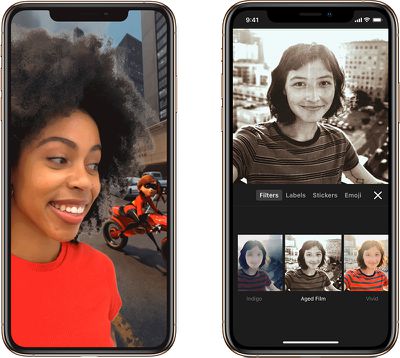
clipsscenesandfilters
Clips was released in early 2017 and has since seen several updates to add new features.

Today's update brings a total of six new Selfie Scenes, which are 360-degree backgrounds that work with devices equipped with a TrueDepth camera system. New Selfie Scenes include a rainforest, a mad scientist's lab, and a scene from "Incredibles 2."

There are three new filters, including aged film, a monochrome watercolor painting, and a black-and-white comic book, along with new posters that have themes like science, sports, and silent movies, plus content from "Coco" and "The Incredibles 2." Posters can be used as title cards for videos.
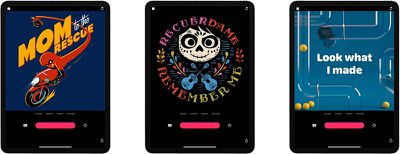
clipsposters
Apple has also added new stickers and text labels, plus there are 17 new royalty-free soundtracks that can be used in Clips creations.

The newly updated version of Clips is available starting today from the App Store. [Direct Link]

Clips is compatible with the iPhone 5s and later, the iPad Air and later, and the iPad mini 2 and later. Style transfer effects will require the iPhone 7 or 2017 iPad Pro or later, while Selfie Scenes require an iPhone or iPad Pro with TrueDepth Camera.


Tag: Clips

Popular Stories

iOS 27 on iPhone 17 1

iOS 27 Will Add These New Features to Your iPhone

Saturday May 2, 2026 8:43 am PDT by
Apple is expected to unveil iOS 27 during its WWDC 2026 keynote on June 8, and there are already many rumored features and changes for iPhones. The first developer beta of iOS 27 will likely be available immediately following the keynote, and a public beta typically follows in July. Following beta testing, the software update should be released to all users with a compatible iPhone in...
Apple Event Logo

Apple Just Released a New Accessory

Monday May 4, 2026 8:13 am PDT by
Apple today released a new Pride Edition Sport Loop for the Apple Watch. The band features a rainbow design with 11 colors of woven nylon yarns. The new Pride Edition Sport Loop is available to order now on Apple.com and in the Apple Store app in 40mm, 42mm, and 46mm sizes, and it will be available at Apple Store locations starting later this week. In the U.S., the band costs $49. There...
Apple MacBook Pro M4 hero

Why You Might Want to Wait to Buy a MacBook Pro

Friday May 1, 2026 3:43 pm PDT by
Apple refreshed the 14-inch and 16-inch MacBook Pro with M5 Pro and M5 Max models in March 2026, but depending on your needs and interests, you might want to skip this generation because there's something better in the works. The M5 Pro and M5 Max MacBook Pro models have faster chips, but the same design that Apple has used since 2021. An updated design with new display technology and faster ...

Top Rated Comments

HiRez Avatar
98 months ago
Does anyone actually use this app? I'm serious, I know no one who has it and uses it.
Score: 5 Votes (Like | Disagree)
HiVolt Avatar
98 months ago
Does anyone actually use this app? I'm serious, I know no one who has it and uses it.
Its just another line of modern day Apple flops, like Mobile Me, Ping, iAD, Apple Maps 1.0, etc...
Score: 2 Votes (Like | Disagree)
OldSchoolMacGuy Avatar
98 months ago
I don't get why the scenes aren't baked into the camera app as well. Am I missing something there?
Keep the Camera app simple. No need to overbloat it with features. For the majority of people (read: your mom, your dad your aunt, and all kinds of general users), they just want to take a photo. A ton of goofy effects and Snapchat-style filters are too much.

I like that they keep it out of the Camera app. Keep things to a minimum. That's a good design choice.
[doublepost=1541617894][/doublepost]
What's the target market for this app? and does that target market actually use it? i'm genuinely curious.
People who post on social media. It's a way to spice up their photos.

Apple has analytics built into the app, along with download data. They can clearly see not just how many are downloading it but also who is using it, how often, and how long.

If they see not enough using it to justify the investment, they'll most certainly kill development of it. You do need to keep pushing the new features for a while and not killing something before things have taken off but if they keep pushing new features as they have and don't see an increase and good percentage of users making use of the app, then it's time to stop putting resources into it and invest elsewhere.

We see this with lots of apps. Many get upset and don't understand when a developer stops updating their favorite app. Sadly, unless they're able to attract significant usage and make a good profit from it, they can't keep putting the time, money, and resources into it. You wouldn't do your job for free and they shouldn't have to either.
Score: 2 Votes (Like | Disagree)
cmChimera Avatar
98 months ago
I don't get why the scenes aren't baked into the camera app as well. Am I missing something there?
Score: 2 Votes (Like | Disagree)
Attirex Avatar
98 months ago
I forgot about Clips until I saw this article. I’m guessing most iPhone users did, too.
Score: 1 Votes (Like | Disagree)
diego Avatar
98 months ago
What's the target market for this app? and does that target market actually use it? i'm genuinely curious.
Score: 1 Votes (Like | Disagree)
Related Apple News: Lifestyle | Reviews | Buyers Guide | Motoring | Health