

Pixelmator Pro Gains Full Support for macOS Mojave, Light Mode and New Core ML 2-Powered Auto Enhance Feature - MacRumorsOpen MenuShow RoundupsShow Forums menuVisit ForumsOpen Sidebar
Skip to Content

Pixelmator Pro Gains Full Support for macOS Mojave, Light Mode and New Core ML 2-Powered Auto Enhance Feature

by

Popular image editing app Pixelmator Pro was today updated to version 1.2, which adds full support for macOS Mojave, a new light mode, faster machine learning tools, and more.

The update introduces compatibility for Continuity Camera and Quick Actions, two macOS Mojave features. Continuity Camera support is designed to let you import a photo into Pixelmator Pro directly from an iPhone, while Quick Actions let you edit images using Finder.
pixelmatorprobatchprocessing
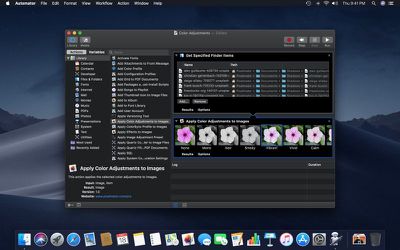
Batch processing functionality has been added to Automator for white balance, auto enhance, color adjustments, effects, and file conversions, and Automator is what powers the new Quick Actions you'll find in Finder. There are also tools for creating your own Pixelmator Pro Quick Actions that can be executed without opening the Pixelmator app.

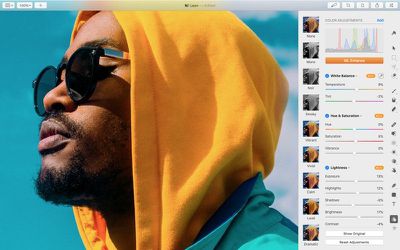
macOS Mojave brought Core ML 2, which is now powering Pixelmator Pro features like Auto Layer Naming, ML Color Adjustments, ML Hue & Saturation, ML White Balance, ML Lightness, and a new ML Enhance feature that's designed to let Apple's neural network analyze and improve the colors of an image in just a few seconds.

ML Enhance is an auto enhance feature that was trained on 20 million professional photos, which lets it tweak 37 color adjustments all at once for the best possible automatic color tuning.
pixelmatorpromlenhance
The updated version of Pixelmator Pro includes a new light appearance and a revamped dark appearance, both of which are designed to work with the Light Mode and Dark Mode in macOS Mojave. Pixelmator Pro will automatically activate one of these modes based on your macOS settings.

SVG fonts are also supported in Pixelmator Pro 1.2, and several bug fixes have been included.

Pixelmator Pro 1.2 can be downloaded from the App Store for $29.99, a 50 percent discount off of the regular Pixelmator Pro price. Customers who have already purchased Pixelmator Pro will get the update for free. [Direct Link]

Top Rated Comments

Pakaku Avatar
97 months ago
The updated version of Pixelmator Pro includes a new light appearance and a revamped dark appearance, both of which are designed to work with the Light Mode and Dark Mode in macOS Mojave.
Pixelmator is the only OSX app that I'm aware of that actually added a light theme after Mojave started adding support for a dark themed UI.
Score: 5 Votes (Like | Disagree)
97 months ago
I like how fast and consistent they are with adding/using new OS features. I wish other developers would do the same.
Score: 4 Votes (Like | Disagree)
macbanjo Avatar
97 months ago
Allow me please to throw the typical question:
Which one is better now: Pixelmator Pro or Affinity Photo?

It would be a huge plus if Pixelmator Pro releases an iOS app with all the features of the macOS version.
I have AP on booth the Mac and iPad, AP to me is more a pro tool along the lines of photoshop with the learning curve.
for color corrections I think AP has the edge, but for building a file with layers and text and whatnot I like using PP.
Pixelmator is very Mac like in its layout and learning curve and I like the pro version one window workflow.
I believe I read a while back that they were working on a new version for the Ipad that would be more in line with the desktop version, which I'm hoping to see
Score: 2 Votes (Like | Disagree)
Amazing Iceman Avatar
97 months ago
Allow me please to throw the typical question:
Which one is better now: Pixelmator Pro or Affinity Photo?

It would be a huge plus if Pixelmator Pro releases an iOS app with all the features of the macOS version.
Score: 2 Votes (Like | Disagree)
97 months ago
Pixelmator is the only OSX app that I'm aware of that actually added a light theme after Mojave started adding support for a dark themed UI.
I'll have to try this out! Maybe Light Mode will help me see the icons better, but:

Wow ! Great news ! Plus an option to view the interface without having to use a scanning electron microscope would be nice.
Yes, I also wish for non-microscopic icons. Maybe the next release, or so I've been wishing for years. :)
Score: 1 Votes (Like | Disagree)
travelsheep Avatar
97 months ago
Pixelmator is the only OSX app that I'm aware of that actually added a light theme after Mojave started adding support for a dark themed UI.
Wow ! Great news ! Plus an option to view the interface without having to use a scanning electron microscope would be nice.
Score: 1 Votes (Like | Disagree)

Popular Stories

imac video apple feature

Apple Released Yet Another New Product Today

Friday March 20, 2026 2:39 pm PDT by
Apple has unveiled a whopping nine new products so far this March, including an iPhone 17e, iPad Air models with the M4 chip, MacBook Air models with the M5 chip, MacBook Pro models with M5 Pro and M5 Max chips, the all-new MacBook Neo, an updated Studio Display, a higher-end Studio Display XDR, AirPods Max 2, and now the Nike Powerbeats Pro 2. iPhone 17e features the same overall design as...
iPhone 18 Pro Deep Red Feature

iPhone 18 Pro Launching Later This Year With These 12 New Features

Wednesday March 18, 2026 7:39 am PDT by
While the iPhone 18 Pro and iPhone 18 Pro Max are not expected to launch for another six months or so, there are already plenty of rumors about the devices. It was initially reported that the iPhone 18 Pro models would have fully under-screen Face ID, with only a front camera visible in the top-left corner of the screen. However, the latest rumors indicate that only one Face ID component...
ios 26 4 pastel

iOS 26.4: Top 10 New Features Coming to Your iPhone

Friday March 20, 2026 2:44 pm PDT by
iOS 26.4 isn't the major update with new Siri features that we hoped for, but there are some useful quality of life improvements, and a little bit of fun with an AI playlist generator and new emoji characters. Playlist Playground - Apple Music has a Playlist Playground option that lets you generate playlists from text-based descriptions. You can include moods, feelings, activities, or...
Related Apple News: Apple Watch Live Activities Fix | App Store | M4 Ipad Air | World News | Macbook Pro Air Deals















