

Police Told to Avoid Looking at iPhone Screens Locked With Face ID

Police in the United States are being advised not to look at iPhone screens secured with Face ID, because doing so could disable facial authentication and leave investigators needing a potentially harder-to-obtain passcode to gain access.

Face ID on iPhone X and iPhone XS attempts to authenticate a face up to five times before the feature is disabled and the user's passcode is required to unlock the smartphone.
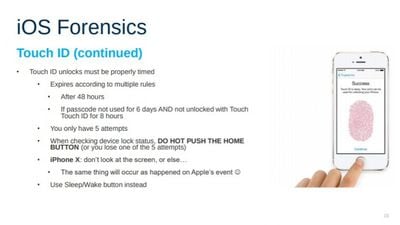
ios forensics slide elcomsoft

Elcomsoft presentation slide talking about Face ID (image via Motherboard)

Given the way the security system works, Motherboard reports that forensics company Elcomsoft is advising law enforcement, "don't look at the sceen, or else... the same thing will occur as happened [at] Apple's event."

The note appears on a slide belonging to an Elcomsoft presentation on iOS forensics, and refers to Apple's 2017 presentation of Face ID, in which Apple VP Craig Federighi tried and failed to unlock an iPhone X with his own face, before the device asked for a passcode instead.

Apple later explained that the iPhone locked after several people backstage interacted with it ahead of Federighi, causing it to require a passcode to unlock.

The advice follows a recent report of the first known case of law enforcement forcing a suspect to unlock an iPhone using Face ID. The action subsequently helped police uncover evidence that was later used to charge the suspect with receiving and possessing child pornography.

In the United States, forcing someone to give up a password is interpreted as self-incrimination, which is protected by the Fifth Amendment, but courts have ruled that there's a difference between a biometric recognition system like Touch ID and a passcode that you type into your phone.

In some cases, police have gained access to digital data by forcing people to unlock mobile devices using their fingers. Indeed, before Face ID was in use, law enforcement was advised how it could avoid locking Touch ID fingerprint-based authentication on Apple's iPhones.

"With Touch ID, you have to press the button (or at least touch it)," Vladimir Katalov, CEO of Elcomsoft, told Motherboard. "That's why we always recommend (on our trainings) to use the power button instead, e.g to see whether the phone is locked. But with Face ID, it is easier to use 'accidentally' by simply looking at the phone."

Note: Due to the political nature of the discussion regarding this topic, the discussion thread is located in our Politics, Religion, Social Issues forum. All forum members and site visitors are welcome to read and follow the thread, but posting is limited to forum members with at least 100 posts.

Related Forum: iPhone

Popular Stories

iOS 26

iOS 26.4 and iOS 27 Features Revealed in New Leak

Friday December 12, 2025 10:56 am PST by
Macworld's Filipe Espósito today revealed a handful of features that Apple is allegedly planning for iOS 26.4, iOS 27, and even iOS 28. The report said the features are referenced within the code for a leaked internal build of iOS 26 that is not meant to be seen by the public. However, it appears that Espósito and/or his sources managed to gain access to it, providing us with a sneak peek...
apple beta 26 lineup

Apple Leak Confirms Work on Foldable iPhone, AirTag 2, and Dozens More Devices

Monday December 15, 2025 2:05 pm PST by
Last week, details about unreleased Apple devices and future iOS features were shared by Macworld. This week, we learned where the information came from, plus we have more findings from the leak. As it turns out, an Apple prototype device running an early build of iOS 26 was sold, and the person who bought it shared the software. The OS has a version number of 23A5234w, and the first...
Apple Logo Top Half

Early iOS 26 Software Leak Uncovers Dozens of Upcoming Apple Features

Monday December 15, 2025 3:05 pm PST by
Software from an iPhone prototype running an early build of iOS 26 leaked last week, giving us a glimpse at future Apple devices and iOS features. We recapped device codenames in our prior article, and now we have a list of some of the most notable feature flags that were found in the software code. In some cases, it's obvious what the feature flags are referring to, while some are more...
Apple Foldable Thumb

Leak Reveals Foldable iPhone Details

Monday December 15, 2025 9:09 am PST by
The first foldable iPhone will feature a series of design and hardware firsts for Apple, according to details shared by the Weibo leaker known as Digital Chat Station. According to a new post, via machine translation, Apple is developing what the leaker describes as a "wide foldable" device, a term used to refer to a horizontally oriented, book-style foldable with a large internal display....
iOS 26

Apple Releases iOS 26.2 With Alarms for Reminders, Lock Screen Changes, Enhanced Safety Alerts and More

Friday December 12, 2025 10:10 am PST by
Apple today released iOS 26.2, the second major update to the iOS 26 operating system that came out in September, iOS 26.2 comes a little over a month after iOS 26.1 launched. ‌iOS 26‌.2 is compatible with the ‌iPhone‌ 11 series and later, as well as the second-generation ‌iPhone‌ SE. The new software can be downloaded on eligible iPhones over-the-air by going to Settings >...
iOS 26

iOS 26.3 Beta 1 Features: What's New So Far

Monday December 15, 2025 4:23 pm PST by
Apple is testing iOS 26.3, the next version of iOS 26 that will launch around January. Since iOS 26.3's testing is happening over the holidays, it is a smaller update with fewer features than we've seen in prior betas. We've rounded up what's new so far, and we'll add to our list with subsequent betas if we come across any other features. Transfer to Android Apple is making it simpler...
iOS 26

iOS 26.2 Coming Soon With These 8 New Features on Your iPhone

Thursday December 11, 2025 8:49 am PST by
Apple seeded the second iOS 26.2 Release Candidate to developers earlier this week, meaning the update will be released to the general public very soon. Apple confirmed iOS 26.2 would be released in December, but it did not provide a specific date. We expect the update to be released by early next week. iOS 26.2 includes a handful of new features and changes on the iPhone, such as a new...
airpods max 2024 colors

AirPods Max 2 Likely to Offer These 10 New Features

Monday December 15, 2025 7:41 am PST by
Apple released the AirPods Max on December 15, 2020, meaning the over-ear headphones launched five years ago today. While the AirPods Max were updated with a USB-C port and new color options last year, followed by support for lossless audio and ultra-low latency audio this year, the headphones lack some of the features that have been introduced for newer generations of the regular AirPods and the ...

Top Rated Comments

musicpenguy Avatar
94 months ago
I disabled all security check on my Iphone. With no passwords, no Face ID, I'm saving so many seconds and if I forget my phone somewhere it can be easily returned to me.
My private data is not worse than average and I have nothing to hide.
With my "unsecured" Iphone 6s, I have a faster reaction time than any 2018 Iphone with Face ID on.
The only reason my mom has her phone returned to her was because she had it locked and used Find My iPhone - the young kid who stole it quickly realized with it locked that he couldn’t resell it - with a completely open device it is easily resold and I can’t imagine you’d ever get it back.
Score: 69 Votes (Like | Disagree)
Velok Avatar
94 months ago
I disabled all security check on my Iphone. With no passwords, no Face ID, I'm saving so many seconds and if I forget my phone somewhere it can be easily returned to me.
My private data is not worse than average and I have nothing to hide.
With my "unsecured" Iphone 6s, I have a faster reaction time than any 2018 Iphone with Face ID on.
So, if a scammer finds you phone, he can easily misuse your phone in his scamming attempts. Much easier to social engineer someone at at your bank etc when they can call from your number. Plus full access to emails+++

That you don’t have anything to hide might be the least important factor when you consider wether to secure your phone or not.

Enjoy the milliseconds you save compared to faceID; you will need them all (and more) when you’re cleaning up after a scammer that got to your phone.
Score: 62 Votes (Like | Disagree)
flyingspur Avatar
94 months ago
Side button and volume up or down button a couple seconds, Face ID disabled.
Score: 50 Votes (Like | Disagree)
keysofanxiety Avatar
94 months ago
I disabled all security check on my Iphone. With no passwords, no Face ID, I'm saving so many seconds and if I forget my phone somewhere it can be easily returned to me.
My private data is not worse than average and I have nothing to hide.
With my "unsecured" Iphone 6s, I have a faster reaction time than any 2018 Iphone with Face ID on.
That’s so ridiculous, I don’t even know where to begin.
Score: 34 Votes (Like | Disagree)
sinsin07 Avatar
94 months ago
Would be nice to have an anti-law enforcement feature that makes it as easy as possible to completely lock out any law enforcement official.
While you're waiting for Apple to make an official method, some clever person/people came up with this Shortcut:
https://www.icloud.com/shortcuts/2d68cb1ee7b84f08ace2fd600b9855b5
Based on what MacRumors member rjtyork posted it does the following:
"Just by saying “Hey Siri, I’m getting pulled over”, Siri will pause your music, turn on do not disturb, send your location and a message to pre-determined contacts, dim your screen, start recording video from your front camera, upload that video to iCloud Drive or google drive, and send the video to any contacts you choose."
Score: 28 Votes (Like | Disagree)
826317 Avatar
94 months ago
Would be nice to have an anti-law enforcement feature that makes it as easy as possible to completely lock out any law enforcement official.
Score: 25 Votes (Like | Disagree)
















