

Amazon Alexa App Gains Redesigned Interface for Controlling Devices and Groups - MacRumorsOpen MenuShow RoundupsShow Forums menuVisit ForumsOpen Sidebar
Skip to Content

Amazon Alexa App Gains Redesigned Interface for Controlling Devices and Groups

by

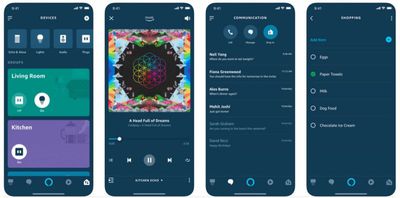
Amazon is currently rolling out an updated version of its companion app for Alexa-enabled devices that includes a significantly redesigned user interface.

The visual changes are immediately apparent on firing up the app, and center around a new Devices and Groups tab located in the lower right of the screen.
alexa app update
With the new menu selected, the devices are listed in a horizontal strip along the top of the interface, allowing users to control individual smart lights, audio devices, and power outlets all from the same screen.

Below that, Alexa devices are also grouped by room indicated by colored cards, which have on/off buttons and can also be tapped to control and edit included devices.

Elsewhere, users can add new devices by tapping a plus button in the upper right of the interface, while the original clunky sidebar menu remains available via a button in the upper right.

The changes to the app come on the heels of Amazon's recent additions to its ecosystem of Alexa-powered devices, which include new Echo speakers, a subwoofer, amplifiers, a microwave, wall clock, and more.

The Amazon Alexa app is a free download on the App Store for iPhone and iPad. [Direct Link]
Tags: Alexa, Amazon

Top Rated Comments

99 months ago
I haven’t used it yet but it’s a welcomed change. The old app was HORRIBLE and I tried to use it as little as possible.
It was way better than Google Home, though. Google’s app is one of the worst UI nightmares I’ve ever seen.

On a positive note, good for Amazon for all the recent improvements to the Alexa ecosystem. Amazon is playing to win!
Score: 2 Votes (Like | Disagree)
Centris 650 Avatar
99 months ago
I haven’t used it yet but it’s a welcomed change. The old app was HORRIBLE and I tried to use it as little as possible.
Score: 2 Votes (Like | Disagree)
UnseenLlama Avatar
99 months ago
I haven’t used it yet but it’s a welcomed change. The old app was HORRIBLE and I tried to use it as little as possible.
Yes. It seemed to use a WebKit view to display settings pages. This update looks to be using much more native iOS code which is awesome. Makes it so much faster.
Score: 1 Votes (Like | Disagree)

Popular Stories

iPhone Satellite Feature

Apple and Amazon Ink Satellite Deal Amid Globalstar Takeover

Tuesday April 14, 2026 5:33 am PDT by
Amazon and Globalstar have announced a definitive merger agreement under which Amazon will acquire the satellite operator. News of the deal puts to bed questions about the fate of Apple's exclusive satellite connectivity partner, and reveals how Apple will still benefit. Alongside the acquisition, Amazon and Apple have signed a separate agreement for Amazon's Leo satellite network to power...
iOS 27 on iPhone 17 1

iOS 27 Will Add These New Features to Your iPhone

Saturday May 2, 2026 8:43 am PDT by
Apple is expected to unveil iOS 27 during its WWDC 2026 keynote on June 8, and there are already many rumored features and changes for iPhones. The first developer beta of iOS 27 will likely be available immediately following the keynote, and a public beta typically follows in July. Following beta testing, the software update should be released to all users with a compatible iPhone in...
Apple Event Logo

Apple Just Released a New Accessory

Monday May 4, 2026 8:13 am PDT by
Apple today released a new Pride Edition Sport Loop for the Apple Watch. The band features a rainbow design with 11 colors of woven nylon yarns. The new Pride Edition Sport Loop is available to order now on Apple.com and in the Apple Store app in 40mm, 42mm, and 46mm sizes, and it will be available at Apple Store locations starting later this week. In the U.S., the band costs $49. There...
Related Apple News: News | South Africa | Mac | Lifestyle | Health

















