Some iPhone XS and XS Max Units Won't Start Charging While Screen is Turned Off [Fix Coming in iOS 12.1]

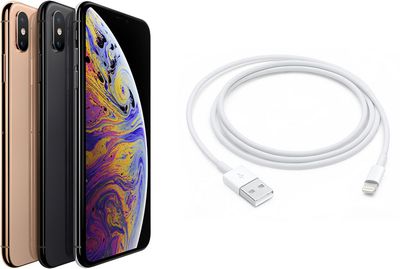
A number of iPhone XS and iPhone XS Max owners in the Apple Support Communities and MacRumors Forums report that the devices fail to start charging when a Lightning cable is plugged in while the screen is turned off.
iphone xs lightning
As with many crowdsourced issues, experiences vary. In most cases, the iPhone XS or iPhone XS Max begins charging once the user wakes the device by tapping or raising the screen. However, some users report having to both wake the iPhone and disconnect and reconnect the Lightning cable to get a charge.

In rarer cases, the iPhone stops responding entirely at some point after a Lightning cable is plugged in while the screen is turned off.

Lewis Hilsenteger demonstrated the issue on his popular YouTube channel Unbox Therapy today by plugging a Lightning cable into one iPhone X, four iPhone XS, and four iPhone XS Max units. While the iPhone X began to charge, it appears two of the iPhone XS units and three of the iPhone XS Max units did not.

Unbox Therapy's video uses the hashtag #ChargeGate

Affected customers have documented the issue in at least a dozen discussion threads across the web, including the Apple Support Communities, MacRumors Forums, Reddit, Twitter, YouTube, and other forums and platforms. It's unclear how widespread the issue is at this time, but not everyone is affected.

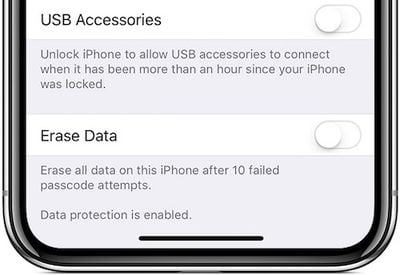
Some users have speculated the issue could be related to USB Restricted Mode, introduced in iOS 11.4.1, which prevents an iPhone, iPad, or iPod touch from communicating with USB accessories via the Lightning connector if one hour or longer has passed since the device was last unlocked.
usb restricted mode ios 12
However, while USB Restricted Mode is enabled by default in iOS 12, Hilsenteger and others say disabling the feature does not help. Apple also has a support document that ensures "your iPhone, iPad, or iPod touch charges as usual when it's connected to a USB power adapter" with the feature toggled on.

In the YouTube comments on the Unbox Therapy video, some users claim to be experiencing the same issue on older iPhones and iPads, so there is a decent chance this is a software issue that could be addressed in a future iOS 12 update. In the meantime, there does not appear to be a workaround.

If you are affected by this issue, we recommend contacting Apple Support. Apple frequently passes on device information and diagnostics to its engineering teams to address potential bugs like these, so all feedback helps.

Apple did not respond to multiple requests for comment, but we'll update this article if we receive any information.

Update: Apple has confirmed that this issue will be addressed in iOS 12.1.

Related Forum: iPhone

Popular Stories

iOS 26

iOS 26.4 and iOS 27 Features Revealed in New Leak

Friday December 12, 2025 10:56 am PST by
Macworld's Filipe Espósito today revealed a handful of features that Apple is allegedly planning for iOS 26.4, iOS 27, and even iOS 28. The report said the features are referenced within the code for a leaked internal build of iOS 26 that is not meant to be seen by the public. However, it appears that Espósito and/or his sources managed to gain access to it, providing us with a sneak peek...
iOS 26

iOS 26.2 Coming Soon With These 8 New Features on Your iPhone

Thursday December 11, 2025 8:49 am PST by
Apple seeded the second iOS 26.2 Release Candidate to developers earlier this week, meaning the update will be released to the general public very soon. Apple confirmed iOS 26.2 would be released in December, but it did not provide a specific date. We expect the update to be released by early next week. iOS 26.2 includes a handful of new features and changes on the iPhone, such as a new...
iOS 26

Apple Releases iOS 26.2 With Alarms for Reminders, Lock Screen Changes, Enhanced Safety Alerts and More

Friday December 12, 2025 10:10 am PST by
Apple today released iOS 26.2, the second major update to the iOS 26 operating system that came out in September, iOS 26.2 comes a little over a month after iOS 26.1 launched. ‌iOS 26‌.2 is compatible with the ‌iPhone‌ 11 series and later, as well as the second-generation ‌iPhone‌ SE. The new software can be downloaded on eligible iPhones over-the-air by going to Settings >...
AirPods Pro Firmware Feature

Apple Releases New Firmware for AirPods Pro 2 and AirPods Pro 3

Thursday December 11, 2025 11:28 am PST by
Apple today released new firmware designed for the AirPods Pro 3 and the prior-generation AirPods Pro 2. The AirPods Pro 3 firmware is 8B30, up from 8B25, while the AirPods Pro 2 firmware is 8B28, up from 8B21. There's no word on what's include in the updated firmware, but the AirPods Pro 2 and AirPods Pro 3 are getting expanded support for Live Translation in the European Union in iOS...
macOS Tahoe 26 Thumb

Apple Releases macOS Tahoe 26.2 With Edge Light

Friday December 12, 2025 10:08 am PST by
Apple today released macOS Tahoe 26.2, the second major update to the macOS Tahoe operating system that came out in September. macOS Tahoe 26.2 comes five weeks after Apple released macOS Tahoe 26.1. Mac users can download the macOS Tahoe update by using the Software Update section of System Settings. macOS Tahoe 26.2 includes Edge Light, a feature that illuminates your face with soft...
AirTag 2 Mock Feature

Apple AirTag 2: Four New Features Found in iOS 26 Code

Thursday December 11, 2025 10:31 am PST by
The AirTag 2 will include a handful of new features that will improve tracking capabilities, according to a new report from Macworld. The site says that it was able to access an internal build of iOS 26, which includes references to multiple unreleased products. Here's what's supposedly coming: An improved pairing process, though no details were provided. AirTag pairing is already...
ipados 26 1 slide over

Apple Releases iPadOS 26.2 With Multitasking Improvements

Friday December 12, 2025 10:09 am PST by
Apple today released iPadOS 26.2, the second major update to the iPadOS 26 operating system released in September. iPadOS 26.2 comes a month after iPadOS 26.1. The new software can be downloaded on eligible iPads over-the-air by going to Settings > General > Software Update. iPadOS 26.2 continues with the multitasking improvements that were added with iPadOS 26.1. You can now drag and...
bug security vulnerability issue fix larry

Update Now: iOS 26.2 Fixes 20+ Security Vulnerabilities

Friday December 12, 2025 11:11 am PST by
Apple today released iOS 26.2, iPadOS 26.2, and macOS 26.2, all of which introduce new features, bug fixes, and security improvements. Apple says that the updates address over 20 vulnerabilities, including two bugs that are known to have been actively exploited. There are a pair of WebKit vulnerabilities that could allow maliciously crafted web content to execute code or cause memory...

Top Rated Comments

aaronhead14 Avatar
94 months ago
Absolutely ridiculous. Especially considering the price of these things. If Apple charges a premium, they need to deliver on the premium experience.
Score: 129 Votes (Like | Disagree)
Meicyn Avatar
94 months ago
Unbox Therapy's cringy thumbnails are eye cancer. Dude's so desperate to repeat the views for bendgate.
Score: 116 Votes (Like | Disagree)
yes3sir Avatar
94 months ago
Someone please invite this guy to the next Apple event so he can shut up.
Score: 114 Votes (Like | Disagree)
iamMacPerson Avatar
94 months ago
'Serious problem'. It's a bug lol. Talk about clickbait. I'm not a huge Apple defender, but this guy is desperate.
Score: 56 Votes (Like | Disagree)
yes3sir Avatar
94 months ago
He's trying so hard to get the same glory of 'Bendgate' back.
Score: 48 Votes (Like | Disagree)
Ries Avatar
94 months ago
How Apple changed after Steve.

https://www.siliconvalley.com/2018/09/27/apple-went-rotten-after-steve-jobs-death-former-engineer-claims/

“Many talented employees who’ve given part of their life for Apple were now regularly being disciplined and terminated for reporting issues they were expected to (report) during Mr. Jobs tenure,”
Score: 41 Votes (Like | Disagree)