

Multiple Mac Apps Updated With Support for macOS Mojave's Dark Mode and Other New Features

With the release of macOS Mojave today, third-party Mac app developers are releasing updates to take advantage of features like Dark Mode and other new Mojave additions.

Dark Mode options in third-party apps will let them blend right in to Mojave's new Dark Mode, which is a systemwide dark theme that can be used in lieu of the traditional light mode theme. We've rounded up a list of prominent apps that are embracing macOS Mojave's new features.
macosmojaveimac
1Password - Popular password management app 1Password is introducing support for Dark Mode with a new darker theme that blends right into the macOS Mojave operating system.
1password1
1Password's new update also includes a Safari App Extension to make it easier to input 1Password info into Safari webpages, it features a hardened runtime to make it so other processes on your computer can't access it, and it's been notarized with the new notary service in macOS Mojave that Apple introduced to make apps more secure.
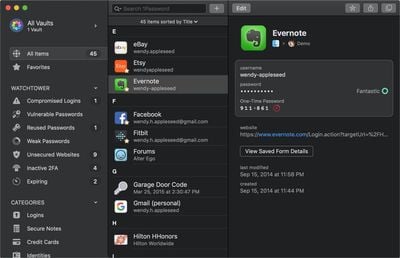
1password2
Banktivity - Personal finance management app Banktivity, priced at $70 for new customers and $34.99 for those upgrading, is getting an update that adds support for macOS Mojave's Dark Mode. Version 7 of the app also includes expanded search features, summary view customization options, lot selection, improved envelope budgeting, calendar support, and more.
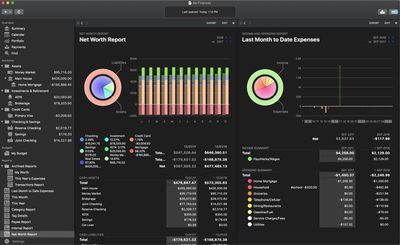
banktivity
Things 3 - Popular todo app Things 3 for Mac is gaining Dark Mode support for macOS Mojave, and it will automatically change between light and dark based on a user's system setting in the Mojave operating system, but there are custom controls as well. The new dark theme is also available for Things customers running older versions of macOS.
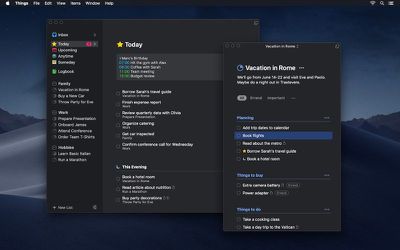
thingsmojave
OmniFocus 3 - Task management app OmniFocus, priced at $39.99 or $79.99 for the Pro version, is getting a major update today, which introduces version 3. The updated app has a redesigned, modernized interface that will feel familiar but fresh to OmniFocus 2 users. It includes tags for better organization, a forecast view to see tasks and calendar events in order, and enhanced repeating tasks. OmniFocus implemented a dark mode a few years back and it works great with macOS Mojave.
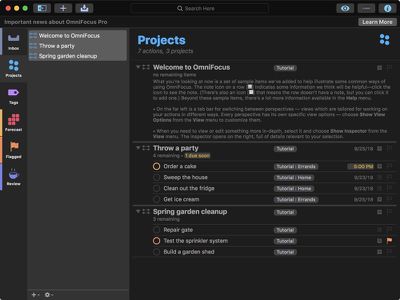
omnifocuspro
Agenda - Note taking app Agenda has added a new dark theme for macOS Mojave, and it's been designed to activate when you have your Mac set to Mojave's Dark Mode. The updated Agenda app has been designed to use the look and feel of the Mojave Dark Mode interface while retaining the clean, modern style of the Agenda app. The new darker theme is also available in Agenda for older versions of macOS.
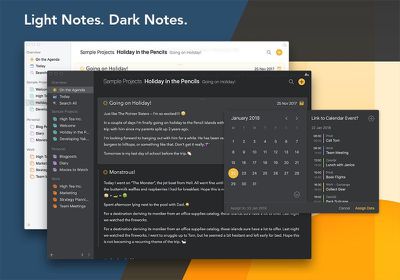
agendadarkmode
Transmit - Panic's Transmit 5 app for file transfers has been updated with a new dark theme that matches the Dark Mode in macOS Mojave.


Fantastical for Mac - Popular calendar app Fantastical for Mac has been updated with support for macOS Mojave's Dark Mode. There's no new look to the app, but the built-in dark theme is activated whenever Dark Mode is turned on in Mojave.

Do you have favorite Mac apps that were updated with support for Dark Mode? Let us know in the comments.


Related Forum: macOS Mojave

Popular Stories

iOS 26

iOS 26.4 and iOS 27 Features Revealed in New Leak

Friday December 12, 2025 10:56 am PST by
Macworld's Filipe EspĂłsito today revealed a handful of features that Apple is allegedly planning for iOS 26.4, iOS 27, and even iOS 28. The report said the features are referenced within the code for a leaked internal build of iOS 26 that is not meant to be seen by the public. However, it appears that EspĂłsito and/or his sources managed to gain access to it, providing us with a sneak peek...
iOS 26

iOS 26.2 Coming Soon With These 8 New Features on Your iPhone

Thursday December 11, 2025 8:49 am PST by
Apple seeded the second iOS 26.2 Release Candidate to developers earlier this week, meaning the update will be released to the general public very soon. Apple confirmed iOS 26.2 would be released in December, but it did not provide a specific date. We expect the update to be released by early next week. iOS 26.2 includes a handful of new features and changes on the iPhone, such as a new...
iOS 26

Apple Releases iOS 26.2 With Alarms for Reminders, Lock Screen Changes, Enhanced Safety Alerts and More

Friday December 12, 2025 10:10 am PST by
Apple today released iOS 26.2, the second major update to the iOS 26 operating system that came out in September, iOS 26.2 comes a little over a month after iOS 26.1 launched. ‌iOS 26‌.2 is compatible with the ‌iPhone‌ 11 series and later, as well as the second-generation ‌iPhone‌ SE. The new software can be downloaded on eligible iPhones over-the-air by going to Settings >...
AirPods Pro Firmware Feature

Apple Releases New Firmware for AirPods Pro 2 and AirPods Pro 3

Thursday December 11, 2025 11:28 am PST by
Apple today released new firmware designed for the AirPods Pro 3 and the prior-generation AirPods Pro 2. The AirPods Pro 3 firmware is 8B30, up from 8B25, while the AirPods Pro 2 firmware is 8B28, up from 8B21. There's no word on what's include in the updated firmware, but the AirPods Pro 2 and AirPods Pro 3 are getting expanded support for Live Translation in the European Union in iOS...
macOS Tahoe 26 Thumb

Apple Releases macOS Tahoe 26.2 With Edge Light

Friday December 12, 2025 10:08 am PST by
Apple today released macOS Tahoe 26.2, the second major update to the macOS Tahoe operating system that came out in September. macOS Tahoe 26.2 comes five weeks after Apple released macOS Tahoe 26.1. Mac users can download the macOS Tahoe update by using the Software Update section of System Settings. macOS Tahoe 26.2 includes Edge Light, a feature that illuminates your face with soft...
AirTag 2 Mock Feature

Apple AirTag 2: Four New Features Found in iOS 26 Code

Thursday December 11, 2025 10:31 am PST by
The AirTag 2 will include a handful of new features that will improve tracking capabilities, according to a new report from Macworld. The site says that it was able to access an internal build of iOS 26, which includes references to multiple unreleased products. Here's what's supposedly coming: An improved pairing process, though no details were provided. AirTag pairing is already...
ipados 26 1 slide over

Apple Releases iPadOS 26.2 With Multitasking Improvements

Friday December 12, 2025 10:09 am PST by
Apple today released iPadOS 26.2, the second major update to the iPadOS 26 operating system released in September. iPadOS 26.2 comes a month after iPadOS 26.1. The new software can be downloaded on eligible iPads over-the-air by going to Settings > General > Software Update. iPadOS 26.2 continues with the multitasking improvements that were added with iPadOS 26.1. You can now drag and...
bug security vulnerability issue fix larry

Update Now: iOS 26.2 Fixes 20+ Security Vulnerabilities

Friday December 12, 2025 11:11 am PST by
Apple today released iOS 26.2, iPadOS 26.2, and macOS 26.2, all of which introduce new features, bug fixes, and security improvements. Apple says that the updates address over 20 vulnerabilities, including two bugs that are known to have been actively exploited. There are a pair of WebKit vulnerabilities that could allow maliciously crafted web content to execute code or cause memory...

Top Rated Comments

dannys1 Avatar
94 months ago
Prefer "light mode" to be honest, not a fan of this dark stuff at all - white text on a black/dark background is a no from me, just looks weird.
Score: 8 Votes (Like | Disagree)
bloomfeld Avatar
94 months ago
So when will my favorite Website macrumors.com feature a dark CSS? :)
Score: 5 Votes (Like | Disagree)
Black Magic Avatar
94 months ago
...If only MS Office supported Dark Mode - but Microsoft seems even unable (or unwilling?) to give it the dark theme its Windows version has enjoyed for awhile :-(
Office 2019 for Mac drops on 1 Oct 2018.
Score: 3 Votes (Like | Disagree)
twolf2919 Avatar
94 months ago
...If only MS Office supported Dark Mode - but Microsoft seems even unable (or unwilling?) to give it the dark theme its Windows version has enjoyed for awhile :-(
Score: 3 Votes (Like | Disagree)
velocityg4 Avatar
94 months ago
Dark mode needs a green font option. I have Terminal and Thunderbird setup to display in black background with green font. Gives you a retro feel for the old green monochrome days.

I even had a default Apple II era font setup in some programs. I should set that up again.

I do wonder why an OS dark mode took so long? It is so much easier on the eyes.
Score: 3 Votes (Like | Disagree)
mozumder Avatar
94 months ago
Aperture (which I still use!) and Final Cut Pro X also has support for dark mode...
Score: 3 Votes (Like | Disagree)
















