1Password, LastPass, Dashlane and More Updated With Support for iOS 12's AutoFill Password Feature - MacRumorsOpen MenuShow RoundupsShow Forums menuVisit ForumsOpen Sidebar
Skip to Content

1Password, LastPass, Dashlane and More Updated With Support for iOS 12's AutoFill Password Feature

Multiple popular password management apps for iOS devices have been updated with support for a convenient new iOS 12 feature, Password AutoFill.

With Password AutoFill, logins and passwords stored in third-party password management apps will be available throughout the iOS 12 operating system right alongside iCloud Keychain, letting you log into websites, apps, and more much more quickly.

1Password, LastPass, Dashlane, Keeper, and Remembear all now support Password AutoFill features.

Setting Up Password AutoFill

Setting up a password management app to work with Password AutoFill will require you to go to Settings > Passwords & Accounts > AutoFill Passwords to toggle on the AutoFill Password option while also making sure your password management app of choice, such as 1Password, is selected.
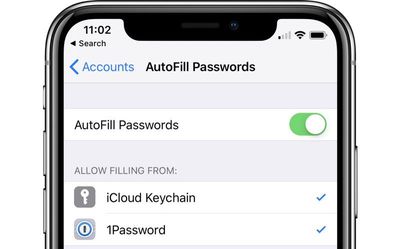
autofillpasswordssetup

How it Works

The Password AutoFill feature lets a third-party app function just like iCloud Keychain, with your sensitive data protected but easily accessible within apps when you need your login information.

When you encounter a login field in an app or on the web, tapping in the entry field will display the stored username and password from your password management app if you've saved one right above the keyboard.

From there, you can tap the information to enter it into the app or website's login window, such as in the Spotify example below.
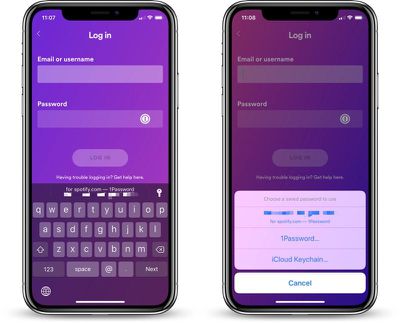
passwordautofillspotify
There are instances where your password management app does not have saved information entirely right or where you have multiple logins, like if you have multiple Twitter or Instagram accounts.

With Instagram, for example, when logging into the Instagram app, I see my two Instagram accounts listed in 1Password (my password app of choice) and I can tap either one to enter my login information.
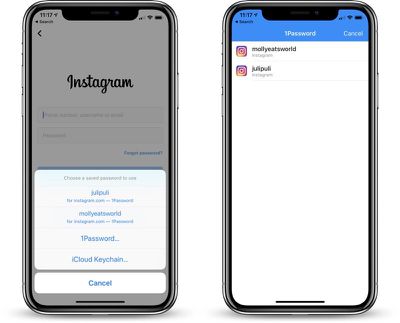
passwordautofillinstagram
For apps that your password management app cannot automatically identify, you will be able to access your entire password vault to find the login information that you need.

Where it Works

What's great about the Password AutoFill API is that it does not require developers to implement any kind of integration with your password management app to function, as was required in previous versions of iOS for this kind of functionality.

It works automatically in most apps and websites, with your password archive available no matter where you're logging in.
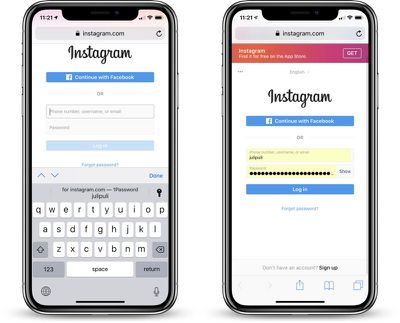
passwordautofillonweb

One-Time Passwords

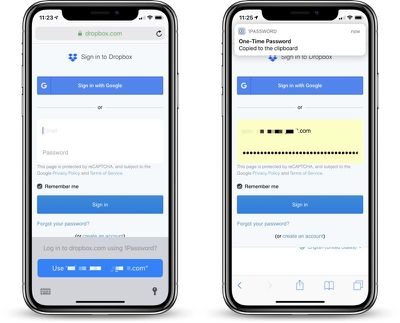
When logging into apps and websites that require two-factor authentication, using a one-time password is also simplified.

If your two-factor authentication setup is linked to a password management app like 1Password, when you log into an app or website that requires two-factor authentication, your password is entered in the field and your one-time authentication password is automatically copied to the clipboard for easy pasting.
passwordautofill1timepass
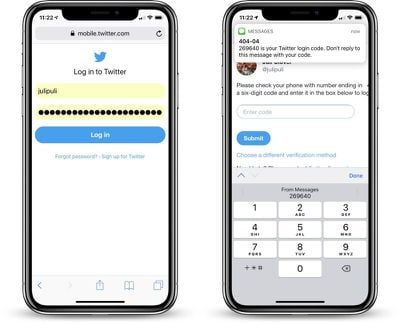
For apps that use your phone number for authentication purposes, iOS 12 introduces a feature that takes a code from an incoming iMessage and copies it to the clipboard, so two-factor authentication is simplified no matter the method.
ios12automaticsecuritycode

Password AutoFill on Apple TV

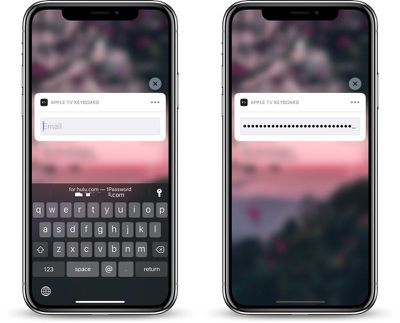
Password AutoFill extends to the Apple TV using the continuity keyboard that permits the iPhone to be used to enter passwords and login information on the Apple TV.

For this to work, both the Apple TV and the iOS device need to be signed into the same iCloud account, and from there, the process is identical to using Password AutoFill on the iPhone.
passwordautofill1passappletv
In a text entry field, when prompted to use the iPhone to enter login information, passwords stored in a password management app and linked to Password AutoFill will be able to be entered on the Apple TV.

Note: tvOS 12 and iOS 12 are required for Password AutoFill to work on the Apple TV.

The Password AutoFill feature in 1Password, Dashlane, LastPass, and Keeper is available starting today so long as you've downloaded and installed iOS 12 and updated your apps.

Have you tried Password AutoFill? What do you think of the new feature? Let us know in the comments.


Related Forum: iOS 12

Popular Stories

imac video apple feature

Apple Released Yet Another New Product Today

Friday March 20, 2026 2:39 pm PDT by
Apple has unveiled a whopping nine new products so far this March, including an iPhone 17e, iPad Air models with the M4 chip, MacBook Air models with the M5 chip, MacBook Pro models with M5 Pro and M5 Max chips, the all-new MacBook Neo, an updated Studio Display, a higher-end Studio Display XDR, AirPods Max 2, and now the Nike Powerbeats Pro 2. iPhone 17e features the same overall design as...
iPhone 18 Pro Deep Red Feature

iPhone 18 Pro Launching Later This Year With These 12 New Features

Wednesday March 18, 2026 7:39 am PDT by
While the iPhone 18 Pro and iPhone 18 Pro Max are not expected to launch for another six months or so, there are already plenty of rumors about the devices. It was initially reported that the iPhone 18 Pro models would have fully under-screen Face ID, with only a front camera visible in the top-left corner of the screen. However, the latest rumors indicate that only one Face ID component...
ios 26 4 pastel

iOS 26.4: Top 10 New Features Coming to Your iPhone

Friday March 20, 2026 2:44 pm PDT by
iOS 26.4 isn't the major update with new Siri features that we hoped for, but there are some useful quality of life improvements, and a little bit of fun with an AI playlist generator and new emoji characters. Playlist Playground - Apple Music has a Playlist Playground option that lets you generate playlists from text-based descriptions. You can include moods, feelings, activities, or...

Top Rated Comments

MacDawg Avatar
98 months ago
What do you do when you want to log in on a non-owned by you device? Just gotta type in 40 digits?
What do you do now?
Score: 7 Votes (Like | Disagree)
avanpelt Avatar
98 months ago
This is great stuff. Glad I passed on buying new hardware this year. iOS 12 has made my iPhone 7 feel like a brand new phone. Not having to open up the share sheet in Safari to access 1Password anymore is fantastic.
Score: 6 Votes (Like | Disagree)
98 months ago
Is there a reason to use these 3rd party password management apps instead of Keychain?
There are lots of reason, whether they are important to you is your decision. Here are some the reason I use (and pay a subscription for) 1Password:


* Finer control on password to meet site requirements that don't fit Keychains' one size fits all.
* On macOS can use to fill in password on Apps other than Safari
* Share passwords cross platform (including a web based solution)
* Security is published, I know for a fact that my passwords encrypted locally, in addition to being in the cloud.
* Multiuser vaults (paid subscription) - I have multiple vaults that have different user access. Video site (Netflix, etc.) all my family has the password. Financial site - only myself and my wife have access. Work passwords - only myself.

That is just scratching the surface.
Score: 5 Votes (Like | Disagree)
98 months ago
I wish there was a way to export iCloud Keychain to 1password
Score: 5 Votes (Like | Disagree)
Jemi9OD Avatar
98 months ago
I love 1Password and I've been looking forward to this since iOS 12 was announced. So happy to have it finally ready. I use 1Password for everything - not just passwords, but also notes, credit cards, where bodies are buried, etc.
Score: 3 Votes (Like | Disagree)
98 months ago
Is there a reason to use these 3rd party password management apps instead of Keychain?
Score: 3 Votes (Like | Disagree)
Related Apple News: Education | Ipad | South Africa | Iphone | Local News