

MacPaw Launches CleanMyMac X With Smarter, Faster Mac Scanning and Cleaning - MacRumorsOpen MenuShow RoundupsShow Forums menuVisit ForumsOpen Sidebar
Skip to Content

MacPaw Launches CleanMyMac X With Smarter, Faster Mac Scanning and Cleaning

by

MacPaw today announced the launch of CleanMyMac X, an updated version of the CleanMyMac software that's designed to help users get rid of unwanted files and clean up space on their Macs.

According to MacPaw, CleanMyMac X offers up a new Malware Removal option along with 14 tools for optimizing macOS. It also offers a Menu app for quick access to CleanMyMac X options, an extended Safety Database, and personalized cleanup tips.
cleanmymacx1
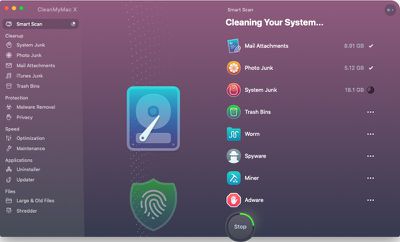
A Smart Scan feature offers up a quick, complete scan of the Mac with options for Cleanup, Protection, and Speed to remove unnecessary system junk and malware while also offering performance optimization tips.

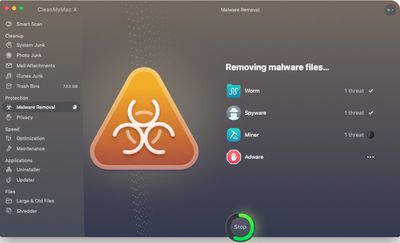
Scanning with CleanMyMac X is up to three times faster than the previous CleanMyMac 3 software, while the newly implemented Malware Removal tool will check for vulnerabilities and get rid of suspicious files.

An optimization module provides tools for managing login items, launch agents, and apps that are absorbing too many system resources, and a built-in assistant will provide explanations, reminders for regular checkups, and additional optimization steps that are meant to improve performance.
cleanmymacx2
All of these tools are run when using the Smart Scan option, but there are also individual controls for cleaning up system junk, photo junk, mail attachments, trash bins, and iTunes junk.

Malware scans can also be conducted individually, as can optimization scans, and there is a built-in uninstaller and updater for application management.

MacPaw is charging $39.95 per year for a subscription to CleanMyMac X, or $89.95 for a one-time purchase, but the new software is also included in Setapp, MacPaw's Mac software subscription service priced at $9.99 per month.

Setapp offers more than 100 apps for the $9.99 per month price tag, including titles like iStat Menus, Bartender, Ulysses, Canary Mail, and more.

Note: MacRumors is an affiliate partner with MacPaw. When you click a link and make a purchase, we may receive a small payment, which helps us keep the site running.


Top Rated Comments

keysofanxiety Avatar
100 months ago
I'm a big fan of this site and understand you need to make ends meet, but there needs to be a point where your editorial ethics take hold.

This is a crap program and you should, if anything, be discouraging people from using it. I don't care if you're an affiliate partner. If this is the stuff you'll be promoting for money, then myself and others will happily stop being contributors.
Score: 101 Votes (Like | Disagree)
keysofanxiety Avatar
100 months ago
What’s so bad about it? Been using it since like 2011 almost weekly
I always use it but reading comments shall i not is it better to just leave it
Can you briefly explain why you are saying this is crap and why you would discourage people from using it? That would be very helpful for me and others who may have OS-OCD lol
Why is it a crap program? Asking for a friend.
Every time I see CMM mentioned there are these arguments. I don’t know why.

MalwareBytes correctly detects this application as a PUP (potentially unwanted program). That should say enough, but I'll expand.

It's very aggressively marketed and incorrectly promotes the idea that you need to carry out constant maintenance on your Mac. This is profoundly wrong.

Full of nice little animations to satisfy the Candy Crush generation. This tricks people into thinking their Mac’s running faster as a result — yet a simple restart would do just as much, which CMM will do anyway. It’s amazing how much goes wrong on macOS with a large 30 day uptime.

You don’t really know what it’s deleting. Not only is this incredibly dangerous but there have been instances where it’s caused damage to the operating system.

It used to be promoted as “on average, clears 50GB of data from a Mac.” On average. Now that’s either one of two things: an outright lie, or a terrifyingly high number. That should not be right.

Furthermore the people who defend it always seem to go back to the argument: “Well I’ve always used it and it’s never done any damage.

As if that’s the criteria for a good application. It’s never bricked my computer so it must be fine, right?

This application promotes ignorance about both good computing habits and how macOS works. At the absolute best case scenario, there are many other free apps which do the same thing CMM does and provides more information on what they’re doing.

There are countless seas of threads about this. Avoid cleaner apps on both Mac and Windows. Practice good computing habits and use MalwareBytes. It’s as simple as that.
Score: 34 Votes (Like | Disagree)
100 months ago
This app is a waste of money. Just use DaisyDisk to locate and clean up stuff if your computer is really full of junk. Anything else you’re clearing out will slow down your computer temporarily as cache is rebuilt...unless of course you believe this company has insider knowledge above and beyond that of Apple’s own engineers. Remember, remnants of old apps are smaller than the CMMs install file and if they aren’t, DaisyDisk will make that obvious.
Score: 26 Votes (Like | Disagree)
SBlue1 Avatar
100 months ago
Hey Macrumors, can you please mark ads like these at the beginning so people don't get fooled think its an editorial article but an ad? Thank you!
Score: 20 Votes (Like | Disagree)
Heineken Avatar
100 months ago
Almost as bad as mac keeper. stay away. If you want to clean something use OnyX it's free and does what is needed.
Score: 14 Votes (Like | Disagree)
100 months ago
I'm a big fan of this site and understand you need to make ends meet, but there needs to be a point where your editorial ethics take hold.

This is a crap program and you should, if anything, be discouraging people from using it. I don't care if you're an affiliate partner. If this is the stuff you'll be promoting for money, then myself and others will happily stop being contributors.
This is one of the better posts I’ve seen on Macrumors. Good job, sir.
Score: 14 Votes (Like | Disagree)

Popular Stories

iOS 27 on iPhone 17 1

iOS 27 Will Add These New Features to Your iPhone

Saturday May 2, 2026 8:43 am PDT by
Apple is expected to unveil iOS 27 during its WWDC 2026 keynote on June 8, and there are already many rumored features and changes for iPhones. The first developer beta of iOS 27 will likely be available immediately following the keynote, and a public beta typically follows in July. Following beta testing, the software update should be released to all users with a compatible iPhone in...
Apple Event Logo

Apple Just Released a New Accessory

Monday May 4, 2026 8:13 am PDT by
Apple today released a new Pride Edition Sport Loop for the Apple Watch. The band features a rainbow design with 11 colors of woven nylon yarns. The new Pride Edition Sport Loop is available to order now on Apple.com and in the Apple Store app in 40mm, 42mm, and 46mm sizes, and it will be available at Apple Store locations starting later this week. In the U.S., the band costs $49. There...
Apple Announces 2026 Pride Band Watch Face and iPhone Wallpaper Article 2

iOS 26.5 Coming Soon With These New Features

Monday May 4, 2026 8:40 am PDT by
iOS 26.5 is expected to be released next week, following more than a month of beta testing. The update is relatively minor, but there are a couple of new features and changes across the operating system that we have recapped below. iOS 26.5 lays the groundwork for end-to-end encryption for RCS in the Messages app and ads in the Apple Maps app, and it will include a new Pride wallpaper and a...
Related Apple News: Lifestyle | Mac | Iphone | News | Travel














