watchOS 5 Beta Adds 'Edit' Button to Control Center for Adjusting Icon Layout
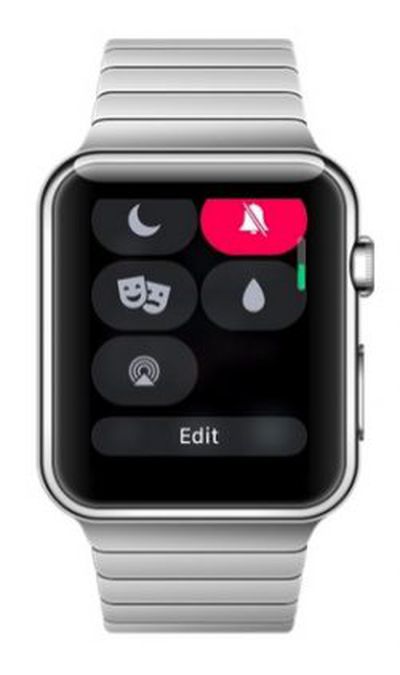 Testers of the new watchOS 5 Beta that Apple released yesterday have discovered a new function that allows Apple Watch users to change the arrangement of icons in the Control Center menu, which is accessed by swiping up on a watch face.
As shown in this image shared by Reddit user brooksdbrewer, the option appears as an Edit button when you scroll down to the bottom of the Control Center menu. Tapping the button then allows you to drag the icons around into a new arrangement – placing the icons you most often use up to the top of the menu, for instance.
So for example, if you use Theater Mode frequently, you could locate the associated icon next to the battery percentage icon at the top, and move the Ping iPhone icon to the bottom of the menu to prevent accidental taps. Likewise, you could drop the Expel Water icon right to the bottom of the screen if you never use it.
Whether or not the Control Center's new Edit function makes it to the final public release of watchOS 5, due in the fall, remains to be seen. However, there are plenty of other features to look forward to, including Activity Competitions so you can compete on workouts with friends, Automatic Workout Detection and new Workout types, a new Walkie-Talkie app, and more.
Popular Stories
Apple has two new Apple Watch activity challenges coming up, celebrating Earth Day and International Dance Day. The Earth Day activity challenge will launch on Wednesday, April 22, while the Dance Day challenge will take place a week later on Wednesday, April 29.
To complete the Earth Day challenge, Apple Watch owners will need to complete a workout that lasts for 30 minutes or longer.
This ...
Apple retail locations and Apple Authorized Service Providers will soon be able to restore Apple Watch software in-store without needing to send an Apple Watch to a service center, according to a retail source that spoke to MacRumors.
Right now, Apple Watches that can't be restored using an iPhone need to be mailed to an Apple Repair Center for service. There is no in-store repair option, so ...
Apple has published a new ad to appeal to customers in the market for an iPhone and Apple Watch pairing, highlighting the insights it can offer for your health.
Titled simply "Health with iPhone + Apple Watch," the half-minute ad focuses on a woman waiting in line at a cafe who begins receiving unsolicited health and fitness advice from other people in the queue, as well as local residents,...