

'Philips Hue Sync' App Launches for Mac and PC to Sync Lights With Movies, Music, and Games - MacRumorsOpen MenuShow RoundupsShow Forums menuVisit ForumsOpen Sidebar
Skip to Content

'Philips Hue Sync' App Launches for Mac and PC to Sync Lights With Movies, Music, and Games

by

A few days after updating its iOS app to version 3.0, Philips Hue today is launching the "Philips Hue Sync" app for Mac and PC computers. Using the app, users can sync their Hue lights to films, music, and games that they're interacting with for an even more "immersive experience," according to the company.
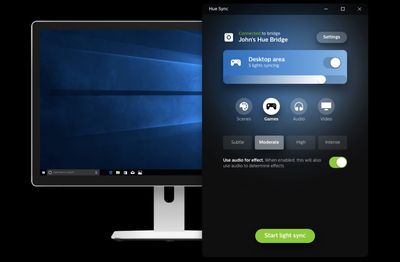
philips hue sync
The app works by creating light scripts for nearby Hue lights, based on screen-grabbed content from the Mac and what Philips calls a "smart color algorithm." With this information gathered, the app then matches the chosen Hue lights to the on-screen action of games and films in real time.

For music, Philips Hue Sync creates light scripts based on the beat and type of song "on the fly," and matches the playing music with dynamic lighting effects. Any of these features can be further customized, including brightness levels, "immersion controls" from subtle to intense, and a mode change for easily switching out the color pallet.


To set up the app, users will need to create a new entertainment area within the updated Philips Hue app on iOS or Android devices. Entertainment areas can encompass everything from one Hue bulb to a collection of devices like Hue Light Strips and table lamps (totaling up to 10 lights), but they most be color capable. Then simply download the Philips Hue Sync app for Mac, connect to a bridge, and choose the new entertainment area in the start-up menu.

Following the 3.0 iOS app update and the new Sync app for Mac, Philips is planning a line of Hue lights for outdoors that will be coming in July. With the outdoor Hue bulbs, users can connect and control their lighting on a patio, balcony, or other environments outside. The new lights include the Philips Hue Lily, which can be used to highlight key features in a garden, and the Philips Hue Calla, which can be placed in the ground and light pathways through outdoor spaces.


Top Rated Comments

Hermes Monster Avatar
102 months ago
This would make much more sense as a tvOS app
Score: 26 Votes (Like | Disagree)
BeardMan7 Avatar
102 months ago
Sigh.

Is it actually that hard to:

1. Get up.
2. Walk over to light switch.
3. Dim/turn off lights (using said switch).

Seriously?!?
Must be fun for you, standing at the light switch, dim/turn on and off the lights manually to sync to your watched movie. :D
Score: 16 Votes (Like | Disagree)
larryj Avatar
102 months ago
Sigh.

Is it actually that hard to:

1. Get up.
2. Walk over to light switch.
3. Dim/turn off lights (using said switch).

Seriously?!?
You didn't read the article, did you?
Score: 11 Votes (Like | Disagree)
x-evil-x Avatar
102 months ago
This is way more immersive than just turning on a light though.
It's a cool feature but not necessary.
Some people dont get it, its ok. If you cant imagine what its like in a house full of voice controlled lights or watch/phone controlled then you dont get it. Changing how your place feels in .2 of a second is pretty fun to do. Laying in bed and turning the air on without getting up is nice. Turning off all the lights with one button or voice command is pretty big. It makes little things like turning on a light switch seem that much more ancient.
Try Turning off 18 lights multiple times a day dimming them, changing the color hue to fit how you want your place to look. Then turning them off when you go to sleep and see how much better having a smart controlled home is.
But its true if you dont have it you dont know what your missing
Score: 9 Votes (Like | Disagree)
chrixxa Avatar
102 months ago
This would make much more sense as a tvOS app
^^ SO much this. I'm way past watching movies on my computer. tvOS app please. only makes sense people!!
Score: 7 Votes (Like | Disagree)
102 months ago
Sigh.

Is it actually that hard to:

1. Get up.
2. Walk over to light switch.
3. Dim/turn off lights (using said switch).

Seriously?!?
Smart lights are more than turning them on and off like traditional light switches. You can set them up to be on timers when you are on holidays/vacations which is my main reason for purchashing them. After buying them for that reason i fou d out loads of other great features like geofencing your location so it turns the lights on when you get home andturn all lights off at 11pm. So good
Score: 6 Votes (Like | Disagree)

Popular Stories

iPhone 18 Pro Deep Red Feature

iPhone 18 Pro Launching Later This Year With These 12 New Features

Wednesday March 18, 2026 7:39 am PDT by
While the iPhone 18 Pro and iPhone 18 Pro Max are not expected to launch for another six months or so, there are already plenty of rumors about the devices. It was initially reported that the iPhone 18 Pro models would have fully under-screen Face ID, with only a front camera visible in the top-left corner of the screen. However, the latest rumors indicate that only one Face ID component...
imac video apple feature

Apple Released Yet Another New Product Today

Friday March 20, 2026 2:39 pm PDT by
Apple has unveiled a whopping nine new products so far this March, including an iPhone 17e, iPad Air models with the M4 chip, MacBook Air models with the M5 chip, MacBook Pro models with M5 Pro and M5 Max chips, the all-new MacBook Neo, an updated Studio Display, a higher-end Studio Display XDR, AirPods Max 2, and now the Nike Powerbeats Pro 2. iPhone 17e features the same overall design as...
ios 26 4 yellow

Here Are Apple's Release Notes for iOS 26.4

Wednesday March 18, 2026 11:56 am PDT by
Apple provided developers and public beta testers with the release candidate versions of iOS 26.4 and iPadOS 26.4, which means we're going to see a public launch as soon as next week. The RC versions of the software include Apple's official release notes, giving us final details on what's included in the update. Apple Music - Playlist Playground (beta) generates a playlist from your...
Related Apple News: Culture | Travel | Opinion | Health | Motoring
















