

Google launched its redesigned Gmail web interface today, introducing several new features including some the company trialed in its Inbox for Gmail app. The launch is a phased rollout, so not all users will have immediate access to all the changes listed below, and those who do will need to opt-in to them.

gmail web
The major visual difference comes in the form of a new right-hand sidebar that provides multiple options for customization. Users can choose to add Google Calendar, Google Keep, or Google Tasks in the side window, or collapse it completely and focus only on their inbox. Likewise, the left-hand panel can be collapsed now, too.

The inbox view has also been updated with the ability to perform actions on messages without opening them. Hovering over an email with the mouse cursor displays buttons to archive, delete, mark as read, and a new "snooze" feature.
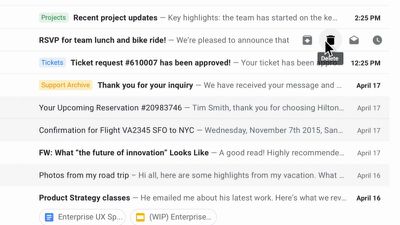
Gmail web buttons
Opting to snooze an email hides the message until later in the day, tomorrow, or later in the week. The function has been brought over from Inbox for Gmail, but currently there doesn't seem to be any way to activate it for an email that's currently open.

Google has also introduced a new AI-powered feature that "nudges" the user to follow up and respond to messages it thinks are important, offering up quick reminders for them to take action. Also, the smart reply function has been brought over from the Gmail mobile apps, allowing users to respond to emails quicker.
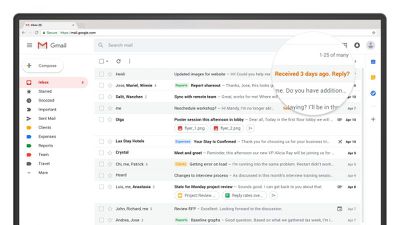
Nudging
In addition, Gmail is rolling out a number of security/privacy features in the coming weeks, one of which is a new confidential mode. This lets the sender set a time-limit in which a message can be accessed, should the email contain sensitive information. It works by sending a link to the content in your inbox that the recipient clicks, rather than sending the content in the email itself.

There will also be a new two-factor authentication (2FA) option for confidential individual messages, which means recipients can be asked to authenticate with a passcode via SMS message before they're granted access to the content of an email.
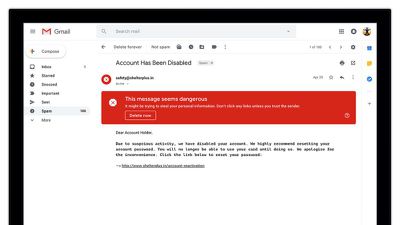
gmail SecurityWarning
Elsewhere, Gmail now includes integrated rights management (IRM), which allows business users to block the forwarding, copying, downloading, or printing of specific messages, offering a welcome extra line of defense against accidentally sharing certain emails.

Also new under the hood are a series of machine learning algorithms to help protect users from phishing scams. The user-facing element of this redesign comes in the form of warning banners and color-coded alerts.

In tandem with the web interface redesign, Google is also launching a new Google Tasks mobile app later today on both iOS and Android. For more information on the new Gmail web features, click here.


Top Rated Comments

BuffaloTF Avatar
100 months ago
Gmail rolls out Outlook.com.
Score: 5 Votes (Like | Disagree)
Kaibelf Avatar
100 months ago
Um... what? No. I mean, sure I can always take a screenshot, but my mail is mine. Don’t want people to share what you said, then don’t say it.

Maybe I do not get it. When is this going to be a good idea for a company to use? They aren’t going to use it on a coupon because if it really is a one time use they would just make the coupon only work once. If it’s for a rather unfriendly message it will only fuel the fire when the recipient sees it can’t be shared. I get that there are some documents a recipient might not want to share, but that should be their call and not the business.
If you are using gmail as a company email, then no that email isn’t yours. It’s theirs. This feature would be to prevent someone from quickly sending company info outside of a specific circle due to confidentiality. Think of accounting, HR, and legal.
Score: 5 Votes (Like | Disagree)
jedwards87 Avatar
100 months ago
The five people in the world who sext over email, rejoice!
Only 5 ? Is there a 3-way going on or someone sexting themselves here....lol
Score: 5 Votes (Like | Disagree)
MrGuder Avatar
100 months ago
Where is night mode? Too much white.
Score: 4 Votes (Like | Disagree)
GadgetBen Avatar
100 months ago
Just an FYI for UK and European folk, its not released here yet. I've been told it may be 24 hours.

If you have G Suite for your business like me, you should be able to activate it here:

Apps > G Suite > Settings for Gmail > Advanced settings > End User Settings
Score: 4 Votes (Like | Disagree)
usamaah Avatar
100 months ago
Where is night mode? Too much white.
Hi,

With the old Gmail or this new Gmail, go to Settings (gears icon > Settings) > and all the way to the right is "Themes" > select a dark color

If you want it to change depending on context (time of day) there used to be a Theme for this but I can't find it now. Perhaps it will show up again later.
Score: 3 Votes (Like | Disagree)

Popular Stories

iOS 26

iOS 26.4 and iOS 27 Features Revealed in New Leak

Friday December 12, 2025 10:56 am PST by
Macworld's Filipe Espósito today revealed a handful of features that Apple is allegedly planning for iOS 26.4, iOS 27, and even iOS 28. The report said the features are referenced within the code for a leaked internal build of iOS 26 that is not meant to be seen by the public. However, it appears that Espósito and/or his sources managed to gain access to it, providing us with a sneak peek...
Apple Logo Top Half

Early iOS 26 Software Leak Uncovers Dozens of Upcoming Apple Features

Monday December 15, 2025 3:05 pm PST by
Software from an iPhone prototype running an early build of iOS 26 leaked last week, giving us a glimpse at future Apple devices and iOS features. We recapped device codenames in our prior article, and now we have a list of some of the most notable feature flags that were found in the software code. In some cases, it's obvious what the feature flags are referring to, while some are more...
apple beta 26 lineup

Apple Leak Confirms Work on Foldable iPhone, AirTag 2, and Dozens More Devices

Monday December 15, 2025 2:05 pm PST by
Last week, details about unreleased Apple devices and future iOS features were shared by Macworld. This week, we learned where the information came from, plus we have more findings from the leak. As it turns out, an Apple prototype device running an early build of iOS 26 was sold, and the person who bought it shared the software. The OS has a version number of 23A5234w, and the first...
Apple Foldable Thumb

Leak Reveals Foldable iPhone Details

Monday December 15, 2025 9:09 am PST by
The first foldable iPhone will feature a series of design and hardware firsts for Apple, according to details shared by the Weibo leaker known as Digital Chat Station. According to a new post, via machine translation, Apple is developing what the leaker describes as a "wide foldable" device, a term used to refer to a horizontally oriented, book-style foldable with a large internal display....
iOS 26

iOS 26.3 Beta 1 Features: What's New So Far

Monday December 15, 2025 4:23 pm PST by
Apple is testing iOS 26.3, the next version of iOS 26 that will launch around January. Since iOS 26.3's testing is happening over the holidays, it is a smaller update with fewer features than we've seen in prior betas. We've rounded up what's new so far, and we'll add to our list with subsequent betas if we come across any other features. Transfer to Android Apple is making it simpler...
iOS 26

Apple Releases iOS 26.2 With Alarms for Reminders, Lock Screen Changes, Enhanced Safety Alerts and More

Friday December 12, 2025 10:10 am PST by
Apple today released iOS 26.2, the second major update to the iOS 26 operating system that came out in September, iOS 26.2 comes a little over a month after iOS 26.1 launched. ‌iOS 26‌.2 is compatible with the ‌iPhone‌ 11 series and later, as well as the second-generation ‌iPhone‌ SE. The new software can be downloaded on eligible iPhones over-the-air by going to Settings >...
iOS 26

iOS 26.2 Coming Soon With These 8 New Features on Your iPhone

Thursday December 11, 2025 8:49 am PST by
Apple seeded the second iOS 26.2 Release Candidate to developers earlier this week, meaning the update will be released to the general public very soon. Apple confirmed iOS 26.2 would be released in December, but it did not provide a specific date. We expect the update to be released by early next week. iOS 26.2 includes a handful of new features and changes on the iPhone, such as a new...
airpods max 2024 colors

AirPods Max 2 Likely to Offer These 10 New Features

Monday December 15, 2025 7:41 am PST by
Apple released the AirPods Max on December 15, 2020, meaning the over-ear headphones launched five years ago today. While the AirPods Max were updated with a USB-C port and new color options last year, followed by support for lossless audio and ultra-low latency audio this year, the headphones lack some of the features that have been introduced for newer generations of the regular AirPods and the ...
















