Apple Seeds First Beta of watchOS 4.3.1 to Developers

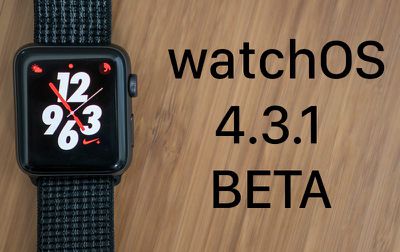
Apple today seeded the first beta of an upcoming watchOS 4.3.1 update to developers, a little under one week after releasing watchOS 4.3, a major update that introduced portrait Nightstand mode and iPhone music controls on Apple Watch.

Once the proper configuration profile has been installed from the Apple Developer Center, the new watchOS beta can be downloaded through the dedicated Apple Watch app on the iPhone by going to General --> Software update.
watchos431beta
To install the update, the Apple Watch needs to have at least 50 percent battery, it must be placed on the charger, and it has to be in range of the iPhone.

It's not yet clear what new features will be introduced in the watchOS 4.3.1 update, but it's likely to include bug fixes for issues that have been discovered since the release of watchOS 4.3.

Related Roundup: Apple Watch 11
Buyer's Guide: Apple Watch (Neutral)

Popular Stories

iOS 26

iOS 26.3 and iOS 26.4 Will Add These New Features to Your iPhone

Tuesday February 3, 2026 7:47 am PST by
We are still waiting for the iOS 26.3 Release Candidate to come out, so the first iOS 26.4 beta is likely still at least a week or two away. Following beta testing, iOS 26.4 will likely be released to the general public in March or April. Below, we have recapped known or rumored iOS 26.3 and iOS 26.4 features so far. iOS 26.3 iPhone to Android Transfer Tool iOS 26.3 makes it easier...
Apple Logo Black

Apple's Next Launch is 'Imminent'

Sunday February 1, 2026 12:31 pm PST by
The calendar has turned to February, and a new report indicates that Apple's next product launch is "imminent," in the form of new MacBook Pro models. "All signs point to an imminent launch of next-generation MacBook Pros that retain the current form factor but deliver faster chips," Bloomberg's Mark Gurman said on Sunday. "I'm told the new models — code-named J714 and J716 — are slated...
iOS 26 Home Feature

Apple Gives Final Warning to Home App Users

Tuesday February 3, 2026 8:55 am PST by
In 2022, Apple introduced a new Apple Home architecture that is "more reliable and efficient," and the deadline to upgrade and avoid issues is fast approaching. In an email this week, Apple gave customers a final reminder to upgrade their Home app by February 10, 2026. Apple says users who do not upgrade may experience issues with accessories and automations, or lose access to their smart...
Aston Martin CarPlay Ultra Screen

Apple's CarPlay Ultra to Expand to These Vehicle Brands Later This Year

Sunday February 1, 2026 10:08 am PST by
Last year, Apple launched CarPlay Ultra, the long-awaited next-generation version of its CarPlay software system for vehicles. Nearly nine months later, CarPlay Ultra is still limited to Aston Martin's latest luxury vehicles, but that should change fairly soon. In May 2025, Apple said many other vehicle brands planned to offer CarPlay Ultra, including Hyundai, Kia, and Genesis. In his Powe...
Apple Foldable Thumb

First Foldable iPhone Design Details Revealed

Monday February 2, 2026 7:19 am PST by
Apple's first foldable iPhone will feature relocated volume buttons, an all-black camera plateau, a smaller Dynamic Island, and more, according to design leaks from a known Weibo leaker. The user known as "Instant Digital" today claimed to share several key details about the design of the foldable iPhone: The volume buttons will be located on the top edge of the device, aligned to the...

Top Rated Comments

newtestleper Avatar
102 months ago
I have a red (1) badge indicating an update, but I get a failed connection error when I check. I have now updated my phone to iOS 11.4 beta 1, but I saw the error before the 11.4 beta installed. (I checked Watch while the iOS beta was downloading.)

I've tried the obvious things for troubleshooting: rebooting both devices, turning radios off and on. The Watch *is* otherwise connected to the iPhone and working fine. I have a few more troubleshooting tricks to try (deleting and reinstalling profiles is next). I *really* don't want to unpair and re-pair.

Don’t worry, they’re going to nail the watch update process by watchOS 7, you’ll see.
Score: 8 Votes (Like | Disagree)
MrGimper Avatar
102 months ago
Whether people should or should not be installing betas on their devices is irrelevant and lets not forget that Apple release public beta builds of most of their operating systems these days.

There is what would appear to be a widespread issue in the latest developer build. Which is exactly what developer beta testing is for. Apple will need to address that issue before releasing iOS 11.4 or Watch OS 4.3.1 to the wild and the more people who inform of that and help them with testing any potential fixes the better
And they don't release a public beta of watchOS for a very specific reason.... a user cannot roll it back themselves. So watch betas should be treated differently.
Score: 4 Votes (Like | Disagree)
MLVC Avatar
102 months ago
I have a red (1) badge indicating an update, but I get a failed connection error when I check. I have now updated my phone to iOS 11.4 beta 1, but I saw the error before the 11.4 beta installed. (I checked Watch while the iOS beta was downloading.)

I've tried the obvious things for troubleshooting: rebooting both devices, turning radios off and on. The Watch *is* otherwise connected to the iPhone and working fine. I have a few more troubleshooting tricks to try (deleting and reinstalling profiles is next). I *really* don't want to unpair and re-pair.

Same issue. Deleting and reinstalling profile didn’t help either. Maybe patience will help? I hate red badges though.
Score: 3 Votes (Like | Disagree)
AppleFan91 Avatar
102 months ago
Genuine question, is it 4.3.1 or 4.4? The article states 4.4 and the iOS beta, which it usually stays with is 11.4. However the article title and photo states 4.3.1
Score: 3 Votes (Like | Disagree)
decypher44 Avatar
102 months ago
Would it kill them to add at least a few new watch faces? Or, at least have some in the App Store.
Score: 3 Votes (Like | Disagree)
tiguk Avatar
102 months ago
(Re)Install the WatchOS profile onto your phone. Seems to work then.
Score: 3 Votes (Like | Disagree)