

Logitech's G brand today announced the launch of a new gaming speaker, the G560. While primarily designed for gaming PCs, the G560 Gaming Speaker has unique features that may also be appealing to Mac users.

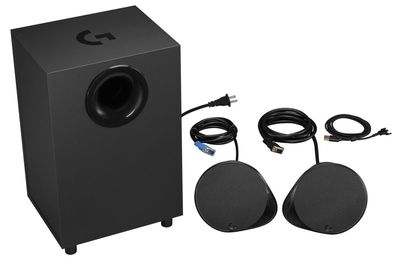
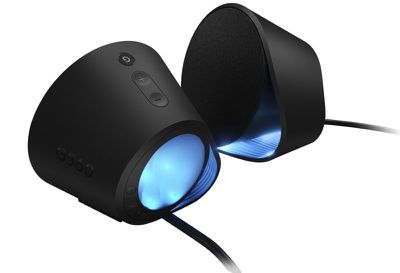
The G560, which features two light-up speakers and a subwoofer, is the first of Logitech's gaming speaker systems to come equipped with Logitech G Lightsync, designed to synchronize light and sounds to gameplay, movies, music, and more for a more immersive experience.

logitechg5601
With Lightsync support, the lights built into the speaker can light up while you're playing games that have implemented the Lightsync API to add ambiance to gameplay. Many game developers have added support for Lightsync and have custom chosen the colors that will be displayed during various aspects of the gameplay. Supported games include Dota 2, Final Fantasy XIV, Fortnite, Grand Theft Auto V, and more.

Developer-supported Lightsync options are mainly for PCs, but Lightsync also works based solely on the colors on your display. Using the screen sampling tool in Logitech's Gaming Software for Mac, you can tie the lights to four different zones of your Mac's display, so while you're playing a game or watching a movie, the G560 lights will light up with colors that are linked to whatever colors are in the media you're using.
logitechg5602
If you're watching a colorful movie, for example, the colors of the movie will be reflected through the G560's lights, and the same is true for when you're playing a game. If you're playing music, you can also set the lights to change in time with the beat of the music, and colors can be customized using Logitech's app. The lights support 16.8 million colors and several animation effects, and sound can be customized using a detailed equalizer tool.

According to Logitech, the G560 offers "amazing sound" with 240 Watts Peak/120 Watts RMS power, making it suitable for all kinds of media on PC and Mac. On PCs, it also includes DTS:X Ultra 1.0 support for precise positional audio.
logitechg5603
Along with these features, the G560 supports Logitech's Easy-Switch technology, which allows you to connect several devices to the speaker at once and then switch between them. You can connect one USB device, one device through the 3.5mm input, and two Bluetooth devices at the same time. So, for example, you could connect your Mac, your iPhone, and your iPad to the speakers and then easily swap between them, allowing you to use the G560 with all of your devices.

Logitech's new G560 Gaming Speaker will be available for purchase from retailers around the world starting in April of 2018. It will be priced at $199.99, and it will be sold alongside the new $150 G513 Mechanical Gaming Keyboard, which also supports Lightsync.


Top Rated Comments

twistedpixel8 Avatar
101 months ago
I have lost faith in Logitech. Their hardware is still top-notch but their decision to outsource the software components to a truly awful developer in India is showing. The first hint was with the Circle 2 camera. Fundamental software engineering errors were made that a competent team would never have made. I can’t see this device being any different.

Very cool, but until they go back to in-house software, I’m not giving them any more money.
Score: 3 Votes (Like | Disagree)
oldmantick Avatar
101 months ago
Who remembers Philips AMBX system?
That one had lights and FANS that blew in your face.
The original Far Cry had AMBX support and a few other games, and then it went away
Score: 1 Votes (Like | Disagree)
btrach144 Avatar
101 months ago
I need this but in 5.1. Something to compete with their Z906 product
Score: 1 Votes (Like | Disagree)
btrach144 Avatar
101 months ago
I have lost faith in Logitech. Their hardware is still top-notch but their decision to outsource the software components to a truly awful developer in India is showing. The first hint was with the Circle 2 camera. Fundamental software engineering errors were made that a competent team would never have made. I can’t see this device being any different.

Very cool, but until they go back to in-house software, I’m not giving them any more money.
Is this why Logitech G software hasn’t been updated since October?
Score: 1 Votes (Like | Disagree)

Popular Stories

iOS 26

iOS 26.4 and iOS 27 Features Revealed in New Leak

Friday December 12, 2025 10:56 am PST by
Macworld's Filipe Espósito today revealed a handful of features that Apple is allegedly planning for iOS 26.4, iOS 27, and even iOS 28. The report said the features are referenced within the code for a leaked internal build of iOS 26 that is not meant to be seen by the public. However, it appears that Espósito and/or his sources managed to gain access to it, providing us with a sneak peek...
iOS 26

iOS 26.2 Coming Soon With These 8 New Features on Your iPhone

Thursday December 11, 2025 8:49 am PST by
Apple seeded the second iOS 26.2 Release Candidate to developers earlier this week, meaning the update will be released to the general public very soon. Apple confirmed iOS 26.2 would be released in December, but it did not provide a specific date. We expect the update to be released by early next week. iOS 26.2 includes a handful of new features and changes on the iPhone, such as a new...
iOS 26

Apple Releases iOS 26.2 With Alarms for Reminders, Lock Screen Changes, Enhanced Safety Alerts and More

Friday December 12, 2025 10:10 am PST by
Apple today released iOS 26.2, the second major update to the iOS 26 operating system that came out in September, iOS 26.2 comes a little over a month after iOS 26.1 launched. ‌iOS 26‌.2 is compatible with the ‌iPhone‌ 11 series and later, as well as the second-generation ‌iPhone‌ SE. The new software can be downloaded on eligible iPhones over-the-air by going to Settings >...
AirPods Pro Firmware Feature

Apple Releases New Firmware for AirPods Pro 2 and AirPods Pro 3

Thursday December 11, 2025 11:28 am PST by
Apple today released new firmware designed for the AirPods Pro 3 and the prior-generation AirPods Pro 2. The AirPods Pro 3 firmware is 8B30, up from 8B25, while the AirPods Pro 2 firmware is 8B28, up from 8B21. There's no word on what's include in the updated firmware, but the AirPods Pro 2 and AirPods Pro 3 are getting expanded support for Live Translation in the European Union in iOS...
macOS Tahoe 26 Thumb

Apple Releases macOS Tahoe 26.2 With Edge Light

Friday December 12, 2025 10:08 am PST by
Apple today released macOS Tahoe 26.2, the second major update to the macOS Tahoe operating system that came out in September. macOS Tahoe 26.2 comes five weeks after Apple released macOS Tahoe 26.1. Mac users can download the macOS Tahoe update by using the Software Update section of System Settings. macOS Tahoe 26.2 includes Edge Light, a feature that illuminates your face with soft...
AirTag 2 Mock Feature

Apple AirTag 2: Four New Features Found in iOS 26 Code

Thursday December 11, 2025 10:31 am PST by
The AirTag 2 will include a handful of new features that will improve tracking capabilities, according to a new report from Macworld. The site says that it was able to access an internal build of iOS 26, which includes references to multiple unreleased products. Here's what's supposedly coming: An improved pairing process, though no details were provided. AirTag pairing is already...
Apple Foldable Thumb

Leak Reveals Foldable iPhone Details

Monday December 15, 2025 9:09 am PST by
The first foldable iPhone will feature a series of design and hardware firsts for Apple, according to details shared by the Weibo leaker known as Digital Chat Station. According to a new post, via machine translation, Apple is developing what the leaker describes as a "wide foldable" device, a term used to refer to a horizontally oriented, book-style foldable with a large internal display....
ipados 26 1 slide over

Apple Releases iPadOS 26.2 With Multitasking Improvements

Friday December 12, 2025 10:09 am PST by
Apple today released iPadOS 26.2, the second major update to the iPadOS 26 operating system released in September. iPadOS 26.2 comes a month after iPadOS 26.1. The new software can be downloaded on eligible iPads over-the-air by going to Settings > General > Software Update. iPadOS 26.2 continues with the multitasking improvements that were added with iPadOS 26.1. You can now drag and...















