

Netflix Rolling Out iOS Update That Adds Bottom Tab Bar for Easier Navigation - MacRumorsOpen MenuShow RoundupsShow Forums menuVisit ForumsOpen Sidebar
Skip to Content

Netflix Rolling Out iOS Update That Adds Bottom Tab Bar for Easier Navigation

by

Over the past few days there have been multiple reports of a new update to the Netflix app on iOS and Android devices, which includes a design overhaul for the streaming service's navigation bar on smartphones. Instead of placing every piece of navigation within the top lefthand corner "hamburger" menu, Netflix has introduced a simpler tab bar at the bottom of the app with four tabs for Home, Search, Downloads, and More.
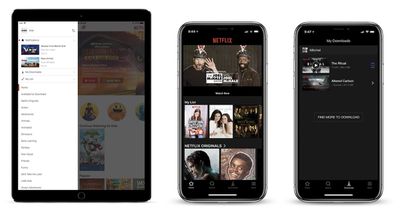
netflix update ios

Netflix's hamburger menu (iPad) compared to the new bottom tab bar (iPhone)

Previously, the left-handed menu housed profile switching, notifications, downloads, My List, and various themed categories. Now, these options are mostly located in the "More" tab, and Netflix has broken out Search and Downloads as a quicker method of jumping into those areas of the app. TV and film categories are also now located in the Search tab, including those Available for Download, Netflix Originals, Action, Dramas, Horror, and more. On Android, it appears that there will be an additional tab for users called "Coming Soon," displaying TV shows and movies launching soon on Netflix.

Apple encourages developers to use tab bars at the bottom of their apps in its Human Interface Guidelines, since they're easier to use one-handed and provide more information at a glance. Two years ago Spotify made a similar change, replacing its hamburger menu with five tabs for Home, Browse, Search, Radio, and Your Library, akin to Apple Music's tabs on iOS. Earlier this month, Google Maps added a bottom tab bar in its iOS app as well, so users could easily jump to Explore, Driving, or Transit information.

Netflix's rollout plan for the new tab bar remains unclear, with some iPhone and iPad users already seeing the update and others remaining on the older hamburger menu style.


Tag: Netflix

Top Rated Comments

Iconoclysm Avatar
105 months ago
Netflix ... just please do NOT screw up the AppleTV UI like Google did with their YouTube app. Please I'm begging you!!
Netflix's AppleTV app wastes massive amounts of space. You can literally only see one row at a time. Youtube's app isn't great but at least they don't devote 2/3 of the screen to a jpeg image.
Score: 6 Votes (Like | Disagree)
WiseAJ Avatar
105 months ago
Can they make the Apple TV app easier to navigate now?
Score: 2 Votes (Like | Disagree)
105 months ago
I hate hamburger menus. They literally looked at the worst design mistake you can ever make, mystery meat navigation, and said “YES! LETS DO THAT!” And to add insult injury they even made it look like a hamburger
Score: 2 Votes (Like | Disagree)
105 months ago
Care to provide some suggestions for improvements? I feel the UI their using is pretty much standard: Tubi, Twitter is the same for scrubbing, Tubi the same for icon layout of videos, no auto preview. I don't like how auto previews have some Netflix custom audio that doesn't match with the video (Tron Classic) and is repeated for other movies.
#1: get rid of auto-play. It's an abomination. No app should just start randomly playing crap if you leave it sitting alone for a moment.
Score: 1 Votes (Like | Disagree)
supercoolmanchu Avatar
105 months ago
Netflix ... just please do NOT screw up the AppleTV UI like Google did with their YouTube app. Please I'm begging you!!
Netflix’s Apple TV UI is 100% pure *******.

Love ‘me for the video content, but their software warrants war crime prosecutions.

Worst use of space, horribly sized content thumbnails, obnoxious new auto-audio when browsing adds new lows in overall piss poor user experience, which already includes perhaps the worst content browsing of any modern media platform.

And the cherry on Netflix’s software failure is the absolutely stupid profile select screen you’re forced to click thru every time you select the app, even if your home is using only one profile.
Score: 1 Votes (Like | Disagree)
105 months ago
It’s a welcome improvement, but still not enough to make it a great app.

Why didn’t they add ‘My List’ to the tab bar as well? To me that item is more important than the download section. The app also still kicks you out of the app when you attempt to access the account settings.

I personally also still hate the horizontal scrolling. I’d rather have vertical scrolling only (you can do this on the web version).
Score: 1 Votes (Like | Disagree)

Popular Stories

iPhone 18 Pro Deep Red Feature

iPhone 18 Pro Launching Later This Year With These 12 New Features

Wednesday March 18, 2026 7:39 am PDT by
While the iPhone 18 Pro and iPhone 18 Pro Max are not expected to launch for another six months or so, there are already plenty of rumors about the devices. It was initially reported that the iPhone 18 Pro models would have fully under-screen Face ID, with only a front camera visible in the top-left corner of the screen. However, the latest rumors indicate that only one Face ID component...
ios 26 4 yellow

Here Are Apple's Release Notes for iOS 26.4

Wednesday March 18, 2026 11:56 am PDT by
Apple provided developers and public beta testers with the release candidate versions of iOS 26.4 and iPadOS 26.4, which means we're going to see a public launch as soon as next week. The RC versions of the software include Apple's official release notes, giving us final details on what's included in the update. Apple Music - Playlist Playground (beta) generates a playlist from your...
Apple Logo Sketch Feature

Apple Has Now Unveiled Eight New Products This Month

Tuesday March 17, 2026 9:25 am PDT by
Apple has unveiled a whopping eight new products so far this March, including an iPhone 17e, iPad Air models with the M4 chip, MacBook Air models with the M5 chip, MacBook Pro models with M5 Pro and M5 Max chips, the all-new MacBook Neo, an updated Studio Display, a higher-end Studio Display XDR, and now the AirPods Max 2 this week. iPhone 17e features the same overall design as the iPhone...
Related Apple News: Travel | Local News | Mac | Health | Sport

















