

Camera+ App Update Adds Ability to Transfer Applied Edits Between Images - MacRumorsOpen MenuShow RoundupsShow Forums menuVisit ForumsOpen Sidebar
Skip to Content

Camera+ App Update Adds Ability to Transfer Applied Edits Between Images

by

Camera+ received an update on Friday that brings a handful of welcome UI and workflow improvements, while fixing a number of issues reported by users of the popular long-running photo app for iPhone and iPad.

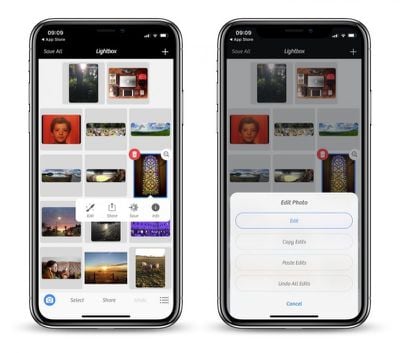
Although the latest v10.10.12 update of Camera+ focuses on enhancing reliability, there are a couple of notable additions to its feature set that are worth highlighting, the ability to copy and paste edits between images on the Lightbox being one of them.
camera 1
To transfer complex applied edits to another photo, select the image on the Lightbox, long-tap the edit button, and then select Copy Edits. With your adjustments in the memory, simply select your target photo, long-tap Edit, and then select Paste Edits to apply them.

Compatible edits will be automatically applied to images with no issues, but it's worth noting that things like Portrait mode will only make the jump if the destination photo was originally captured with depth information, which Camera+ has supported since October.

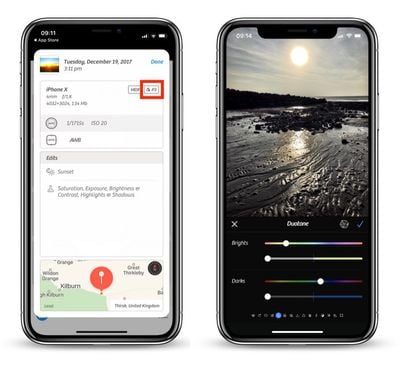
Meanwhile, long-time users of Camera+ may have noticed that the badge indicating the color space of a photo on the Info summary screen was missing for HEIF and TIFF formats. That's no longer the case, with wider color space tags like DCI/P3 now displaying on the relevant images.
camera 2
Additionally, users who like to shoot in RAW will be happy to learn that Camera+ now correctly honors the preference for saving the DNG representation independently of the JPEG/HEIF asset when exporting to Camera Roll, although bear in mind that the in-app Lightbox always uses the combined representation.

Elsewhere, the editing screen has been improved for iPhone X displays, while a couple of blips when sharing to the Files app or WhatsApp have been ironed out. The update also includes optimized memory usage on iPhone 6 devices, especially when shooting TIFF and macro, while a handful of crashes have also been fixed.

Camera+ costs $2.99 for iPhone and $4.99 for iPad, and can be downloaded from the App Store. [Direct Link]


Top Rated Comments

Avieshek Avatar
107 months ago
If only, Apple had ‘Horizontal Flip’ under their Photos’ edit or have ‘toggle-switch’ for Mirror-selfies on front camera.
Score: 1 Votes (Like | Disagree)
mhoutman Avatar
107 months ago
Interesting: did TapTaptap sell their apps to LateNiteSoft ? (I remember their Sketches as one of the first app in the App Store)
Score: 1 Votes (Like | Disagree)

Popular Stories

iPhone 18 Pro Deep Red Feature

iPhone 18 Pro Launching Later This Year With These 12 New Features

Wednesday March 18, 2026 7:39 am PDT by
While the iPhone 18 Pro and iPhone 18 Pro Max are not expected to launch for another six months or so, there are already plenty of rumors about the devices. It was initially reported that the iPhone 18 Pro models would have fully under-screen Face ID, with only a front camera visible in the top-left corner of the screen. However, the latest rumors indicate that only one Face ID component...
imac video apple feature

Apple Released Yet Another New Product Today

Friday March 20, 2026 2:39 pm PDT by
Apple has unveiled a whopping nine new products so far this March, including an iPhone 17e, iPad Air models with the M4 chip, MacBook Air models with the M5 chip, MacBook Pro models with M5 Pro and M5 Max chips, the all-new MacBook Neo, an updated Studio Display, a higher-end Studio Display XDR, AirPods Max 2, and now the Nike Powerbeats Pro 2. iPhone 17e features the same overall design as...
ios 26 4 pastel

iOS 26.4: Top 10 New Features Coming to Your iPhone

Friday March 20, 2026 2:44 pm PDT by
iOS 26.4 isn't the major update with new Siri features that we hoped for, but there are some useful quality of life improvements, and a little bit of fun with an AI playlist generator and new emoji characters. Playlist Playground - Apple Music has a Playlist Playground option that lets you generate playlists from text-based descriptions. You can include moods, feelings, activities, or...
Related Apple News: Ipad Deals | Perplexity | Iphone | Technology | Anker Solix C1000 Gen 2
















