

Apple Sharing iPhone X Support Documents and Tips Ahead of Launch - MacRumorsOpen MenuShow RoundupsShow Forums menuVisit ForumsOpen Sidebar
Skip to Content

Apple Sharing iPhone X Support Documents and Tips Ahead of Launch

by

As the launch of the iPhone X approaches in the United States, Apple has started sharing iPhone X support documents and tips that instruct users on how to operate the device.

The iPhone X is the first iPhone that doesn't feature a Home button, which means there are a range of new gestures to get used to, as well as several functions like Face ID and Animoji.
phonexsupportdoc
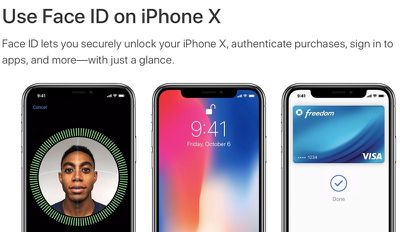
Support documents, listed below, cover setting up and using Face ID, getting help with Face ID should it fail, creating and sending Animoji, and using gestures to navigate on iPhone X.

- Use Face ID on iPhone X
- Get help with Face ID on your iPhone X
- Use Animoji on your iPhone X
- Use gestures to navigate your iPhone X

Many of these support documents cover features that have been well-outlined in reviews, first impressions, and hands-on experiences with the iPhone X, but it's useful to have all of the information in one place.

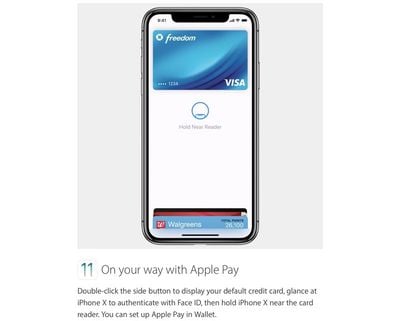
As for Tips, Apple has several short GIFs and images on topics like turning the iPhone X off, using Face ID, Animoji, Tap to Wake, Apple Pay, Multitasking, using Siri, and accessing the Home screen.
iphonextips
The first iPhone X devices are already being delivered in Australia and New Zealand, and deliveries will expand to additional countries as November 3 rolls around across the globe. In the United States, iPhone X deliveries and in-store sales will kick off first on the east coast at 8:00 a.m. local time.


Related Forum: iPhone

Top Rated Comments

111 months ago
Interesting...a note at the bottom of the help with Face ID article says you may need to enter your passcode if the battery is below 10%.
Score: 4 Votes (Like | Disagree)
111 months ago
These GIFs are 20x quicker and far more to the point than the garbage on YouTube. Plus they're not filled with ads and other crap.
[doublepost=1509672634][/doublepost]

Makes sense. Running the camera uses a decent amount of battery life. Wouldn't want to kill things faster when the battery is low. I'm 100% cool with that.
Face ID doesn't use the camera. Only the dot projector and reader.
Score: 2 Votes (Like | Disagree)
OldSchoolMacGuy Avatar
111 months ago
Who wants to read the documents. Youtube is already loaded with review videos by Youtubers. Famous media is no longer exclusive it’s amazing how many youtube reviewers already have the phone prior to the official release. I’m still how surprised some of them getting a pre-release review unit. Aheeemmmm iJustine!
These GIFs are 20x quicker and far more to the point than the garbage on YouTube. Plus they're not filled with ads and other crap.
[doublepost=1509672634][/doublepost]
Interesting...a note at the bottom of the help with Face ID article says you may need to enter your passcode if the battery is below 10%.
Makes sense. Running the camera uses a decent amount of battery life. Wouldn't want to kill things faster when the battery is low. I'm 100% cool with that.
Score: 2 Votes (Like | Disagree)
Pagemakers Avatar
111 months ago
Autofill passwords in Safari
You can use Face ID to autofill saved usernames and passwords for websites in Safari. Just go to Settings > Face ID & Passcode and turn on Safari AutoFill. Then follow these steps:

[LIST=1]
* Open Safari and go to a website.
* Tap the sign in field. If you see your username or password appear above the keyboard, tap it.
* Glance at your iPhone X to autofill your username and password.


So how is that any quicker? If there’s a password there why is there a need to tab anything. The website should just open when you look at the phone.

Without Face ID you’d do step 2 and hit GO on the keyboard.
Score: 1 Votes (Like | Disagree)

Popular Stories

iOS 27 on iPhone 17 1

iOS 27 Will Add These New Features to Your iPhone

Saturday May 2, 2026 8:43 am PDT by
Apple is expected to unveil iOS 27 during its WWDC 2026 keynote on June 8, and there are already many rumored features and changes for iPhones. The first developer beta of iOS 27 will likely be available immediately following the keynote, and a public beta typically follows in July. Following beta testing, the software update should be released to all users with a compatible iPhone in...
Apple Event Logo

Apple Just Released a New Accessory

Monday May 4, 2026 8:13 am PDT by
Apple today released a new Pride Edition Sport Loop for the Apple Watch. The band features a rainbow design with 11 colors of woven nylon yarns. The new Pride Edition Sport Loop is available to order now on Apple.com and in the Apple Store app in 40mm, 42mm, and 46mm sizes, and it will be available at Apple Store locations starting later this week. In the U.S., the band costs $49. There...
Apple Announces 2026 Pride Band Watch Face and iPhone Wallpaper Article 2

iOS 26.5 Coming Soon With These New Features

Monday May 4, 2026 8:40 am PDT by
iOS 26.5 is expected to be released next week, following more than a month of beta testing. The update is relatively minor, but there are a couple of new features and changes across the operating system that we have recapped below. iOS 26.5 lays the groundwork for end-to-end encryption for RCS in the Messages app and ads in the Apple Maps app, and it will include a new Pride wallpaper and a...
Related Apple News: South Africa | Politics | Business | Iphone | Technology
















