

As we get closer to the iPhone X's launch on Friday, November 3, more tidbits about the device are beginning to emerge thanks to the first wave of impressions, reviews, and hands-on coverage that hit this morning. Within his first impressions, Steven Levy shared an interesting aspect of the iPhone X's software, which turns on hiding text previews for your notifications by default instead of making you turn this privacy feature on yourself.
As an explanation, with the launch of iOS 11 Apple introduced a way for you to hide text previews of all apps at once within Settings. With this turned on, you'll notice when you have a notification for apps like Messages and Snapchat, but the actual content of the notification is hidden until you "unlock" the iPhone with Touch ID or a passcode. Then, you can read the content, and tap the Home Button to enter your iPhone. This feature has to be turned on manually on current iPhones.
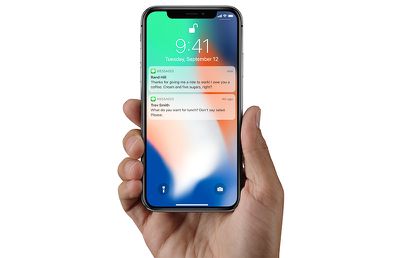
According to Levy, iOS 11 on the iPhone X defaults to hiding text previews for all of your apps, automatically providing an extra bit of privacy for users on the new smartphone. So, when you raise the iPhone X in front of you, it'll unlock with Face ID, and any notifications will then be filled out to show the full content of each message. This way, if someone picks up your iPhone and looks at it, Face ID won't unlock and show notification previews. Of course, you can revert to the traditional text previews functionality in Settings.
Levy said that he used this feature as a way to confirm that Face ID had unlocked the iPhone X. Here's the part from his review concerning text previews on the iPhone X Lock Screen:
I then see if the little lock icon on the screen has released its latch. Alternatively, a good way to see when you’ve been recognized is to notice the generic messages on the lock screen saying “you have a notification” from Facebook, Gmail, or wherever. When you and your iPhone X make that turn-on connection, those flesh out with the actual content of the message. (This feature—withholding potentially private alerts until the phone was unlocked—had previously been available as an option but now is the default.)
It's also worth noting that sometimes the iPhone X review unit would unlock with Face ID and go "straight to where [Levy] left off," while other times the UI asked him to swipe up to unlock the iPhone X, as has been showcased in marketing for the smartphone. Levy didn't have an explanation for this part of his experience with the new iPhone, further stating that he was "mystified" as to why it would sometimes say swipe up after Face ID unlock, and other times simply open the iPhone.
Check out more information on the iPhone X in our Roundup.






















Top Rated Comments
If it was manually locked with the side button, you swipe up.
It's really not that difficult, this geezer must get mystified often.
As long as you don’t change the accessibility option for the home button to “rest finger to open”, the notification will change to displaying the contents once you authenticate with Touch ID. Works well.
You don't someone glancing over who might be curious to see what notifications are lighting up your display.