Reminder: How to Pre-Sign for Your Delivery of New Apple Products Tomorrow - MacRumorsOpen MenuShow RoundupsShow Forums menuVisit ForumsOpen Sidebar
Skip to Content

Reminder: How to Pre-Sign for Your Delivery of New Apple Products Tomorrow

by

If you have an iPhone 8, Apple Watch Series 3, or Apple TV 4K scheduled for delivery tomorrow, be aware that Apple requires its courier partners like UPS and FedEx to collect a signature upon delivery since they are valuable items.
iphone 8 presign
Fortunately, if you won't be home during the day, Apple offers the option of printing, filling out, and affixing a pre-signed notice to your door, allowing the courier to leave the package without someone being there to sign for it.

How to Pre-Sign for Delivery

  1. Open your shipment notification email from Apple.
    iPhone 8 delivery 800

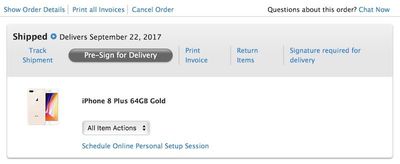
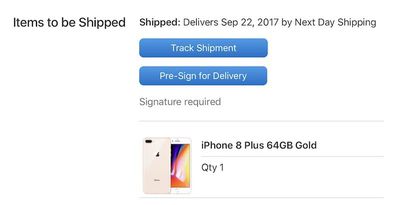
  2. Click on the blue Pre-Sign for Delivery button.

  3. Click on the gray Pre-Sign for Delivery button on Apple's order status page.
    iphone 8 order status 800

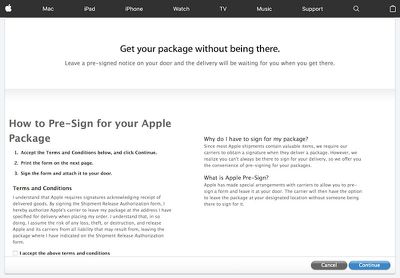
  4. Check the "I accept the above terms and conditions" box and click the blue "Continue" button.
    iphone 8 release

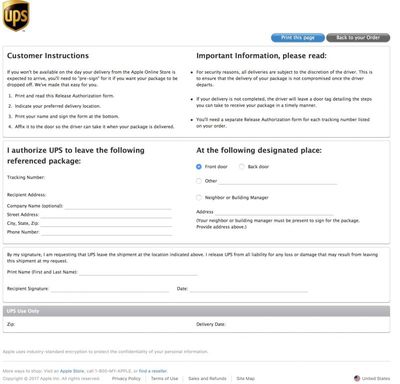
  5. Click the blue "Print this page" button on the Release Authorization page.
    iphone 8 tracking

  6. Fill out the form with your complete address information and phone number.

  7. Indicate whether you would like the delivery at the front door, back door, or somewhere else.

  8. Print your first and last name, sign, and date the form.

  9. Affix the form somewhere near the designated place of delivery.
There is also the option to authorize delivery to a neighbor or building manager, but the person must be present to sign for the package. If you prefer this option, make sure to include the person's address on the form.

To ensure that packages are not stolen once the courier leaves, all deliveries are subject to the discretion of the driver. If a delivery is not completed, the driver will leave a door tag detailing the steps you can take to receive your package.

As a point of emphasis, be aware that your shiny new products could be stolen before you get home, and Apple would not be responsible. For this reason, delivery to a back door or other obscure location, or to a neighbor, is the best option.

If you opt not to pre-sign at all, and the package arrives while you are away from home, the driver may attempt delivery again later or, as mentioned, leave a door tag detailing the steps you can take to receive your package.


Top Rated Comments

113 months ago
so people can steal your box
Score: 9 Votes (Like | Disagree)
ahunt01 Avatar
113 months ago
What's to stop the UPS driver from walking away with it?
Score: 4 Votes (Like | Disagree)
DogHouseDub Avatar
113 months ago
Pre-sign? I thought tomorrow was a holiday? At least that's what I'll tell the boss on Monday...
Score: 3 Votes (Like | Disagree)
113 months ago
If you have UPS MyChoice you can have your package held at a UPS Store near you for free.
Score: 3 Votes (Like | Disagree)
Apple_Robert Avatar
113 months ago
so people can steal your box
Definitely a bad idea to pre-sign for your phone. You give up protection once you do that.
[doublepost=1506025418][/doublepost]
How about just asking them to keep the package at their customer service center?
You can arrange for that to occur.
Score: 2 Votes (Like | Disagree)
113 months ago
How about just asking them to keep the package at their customer service center?
Score: 2 Votes (Like | Disagree)

Popular Stories

iOS 27 on iPhone 17 1

iOS 27 Will Add These New Features to Your iPhone

Saturday May 2, 2026 8:43 am PDT by
Apple is expected to unveil iOS 27 during its WWDC 2026 keynote on June 8, and there are already many rumored features and changes for iPhones. The first developer beta of iOS 27 will likely be available immediately following the keynote, and a public beta typically follows in July. Following beta testing, the software update should be released to all users with a compatible iPhone in...
Apple Event Logo

Apple Just Released a New Accessory

Monday May 4, 2026 8:13 am PDT by
Apple today released a new Pride Edition Sport Loop for the Apple Watch. The band features a rainbow design with 11 colors of woven nylon yarns. The new Pride Edition Sport Loop is available to order now on Apple.com and in the Apple Store app in 40mm, 42mm, and 46mm sizes, and it will be available at Apple Store locations starting later this week. In the U.S., the band costs $49. There...
Apple Announces 2026 Pride Band Watch Face and iPhone Wallpaper Article 2

iOS 26.5 Coming Soon With These New Features

Monday May 4, 2026 8:40 am PDT by
iOS 26.5 is expected to be released next week, following more than a month of beta testing. The update is relatively minor, but there are a couple of new features and changes across the operating system that we have recapped below. iOS 26.5 lays the groundwork for end-to-end encryption for RCS in the Messages app and ads in the Apple Maps app, and it will include a new Pride wallpaper and a...
Related Apple News: Local News | Mac | Iphone | South Africa | Politics