

Hackers Using iCloud's Find My iPhone Feature to Remotely Lock Macs and Demand Ransom Payments - MacRumorsOpen MenuShow RoundupsShow Forums menuVisit ForumsOpen Sidebar
Skip to Content

Hackers Using iCloud's Find My iPhone Feature to Remotely Lock Macs and Demand Ransom Payments

Over the last day or two, several Mac users appear to have been locked out of their machines after hackers signed into their iCloud accounts and initiated a remote lock using Find My iPhone.

With access to an iCloud user's username and password, Find My iPhone on iCloud.com can be used to "lock" a Mac with a passcode even with two-factor authentication turned on, and that's what's going on here.
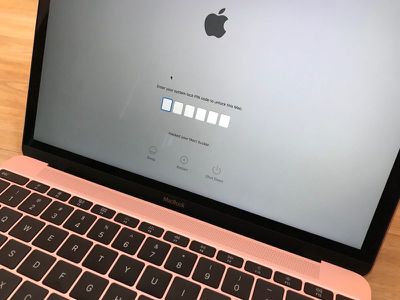
maclockedfindmyiphone
Apple allows users to access Find My iPhone without requiring two-factor authentication in case a person's only trusted device has gone missing.
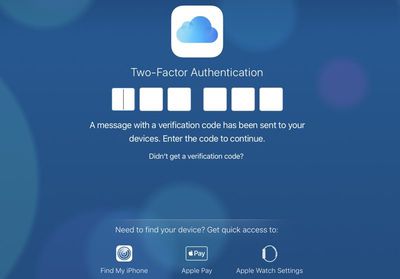
2faicloud

2-factor authentication not required to access Find My iPhone and a user's list of devices.

Affected users who have had their iCloud accounts hacked are receiving messages demanding money for the passcode to unlock a locked Mac device.


The usernames and passwords of the iCloud accounts affected by this "hack" were likely found through various site data breaches and have not been acquired through a breach of Apple's servers.

Impacted users likely used the same email addresses, account names, and passwords for multiple accounts, allowing people with malicious intent to figure out their iCloud details.
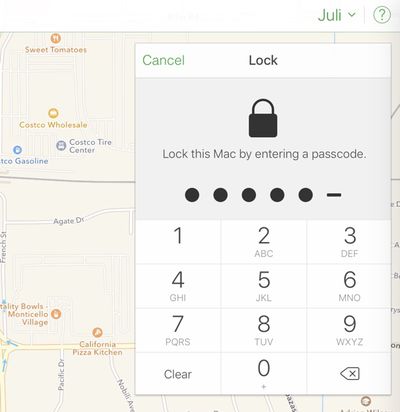
lockmacfindmyiphone

It's easy to lock a Mac with a passcode in Find My iPhone if you have someone's Apple ID and password.

To prevent an issue like this, Apple users should change their Apple ID passwords, enable two-factor authentication, and never use the same password twice. Products like 1Password, LastPass, and even Apple's own iCloud Keychain are ideal ways to generate and store new passwords for each and every website.


Users who have had their Macs locked will need to get in contact with Apple Support for assistance with removing the Find My iPhone lock.

(Thanks, Eli!)

Popular Stories

imac video apple feature

Apple Released Yet Another New Product Today

Friday March 20, 2026 2:39 pm PDT by
Apple has unveiled a whopping nine new products so far this March, including an iPhone 17e, iPad Air models with the M4 chip, MacBook Air models with the M5 chip, MacBook Pro models with M5 Pro and M5 Max chips, the all-new MacBook Neo, an updated Studio Display, a higher-end Studio Display XDR, AirPods Max 2, and now the Nike Powerbeats Pro 2. iPhone 17e features the same overall design as...
iPhone 18 Pro Deep Red Feature

iPhone 18 Pro Launching Later This Year With These 12 New Features

Wednesday March 18, 2026 7:39 am PDT by
While the iPhone 18 Pro and iPhone 18 Pro Max are not expected to launch for another six months or so, there are already plenty of rumors about the devices. It was initially reported that the iPhone 18 Pro models would have fully under-screen Face ID, with only a front camera visible in the top-left corner of the screen. However, the latest rumors indicate that only one Face ID component...
ios 26 4 pastel

iOS 26.4: Top 10 New Features Coming to Your iPhone

Friday March 20, 2026 2:44 pm PDT by
iOS 26.4 isn't the major update with new Siri features that we hoped for, but there are some useful quality of life improvements, and a little bit of fun with an AI playlist generator and new emoji characters. Playlist Playground - Apple Music has a Playlist Playground option that lets you generate playlists from text-based descriptions. You can include moods, feelings, activities, or...

Top Rated Comments

miketcool Avatar
111 months ago
Meh, this is why things live on external drives. If I lost or had my laptop stolen, I'd wipe it and be back up and running in 25 minutes without the hassle.
Score: 19 Votes (Like | Disagree)
111 months ago
Nice job MR. I only emailed them about this 4 weeks ago and asked that they run a story to inform people that this was going on.

I also emailed Apple about the issue with a simple suggestion. What they need to do is to require the device password when you try to lock a device from Find My iPhone on the web. When you go to remote lock a device you enter a lock passcode and the device's password or passcode. When that is sent to the Mac, iPhone, whatever, if the device password doesn't match, it won't lock the device. That way, even if a hacker guesses your Apple ID and password using hacked credentials, they still can't lock the device without the Mac's login.
Score: 17 Votes (Like | Disagree)
111 months ago
Macurmors quote:

"Impacted users likely used the same email addresses, account names, and passwords for multiple accounts, allowing people with malicious intent to figure out their iCloud details."

And this is exactly why I reconfigure all my passwords for my accounts on a regular basis. Stagnancy can be part of the problem.
Score: 12 Votes (Like | Disagree)
Vol7ron Avatar
111 months ago
Yup, this happened to me back in June when I installed beta 1 of MacOS High Sierra. Frustrating and embarrassing when your an IT engineer and your own device gets hacked! Had to bring it to Apple and provide proof of ownership before they would remove the lock.

And always use 2Factor. I don’t buy the second tweet about someone getting hacked with having 2FA enabled. Even if they could guess your password and the security code, your trusted device would still get a notification and you could block access.
I had 2 factor enabled, saw that someone was trying to access my account, denied them, and still had my account locked.
Score: 11 Votes (Like | Disagree)
busyscott Avatar
111 months ago
MacRumors, why are you recommending two-factor authentication if you then go onto say you can access Find My iPhone without needing 2FA??

Here's a better recommendation: turn off Find My Mac until Apple correct course and Find My iPhone requires 2FA.
Score: 10 Votes (Like | Disagree)
archvile Avatar
111 months ago
And always use 2Factor. I don’t buy the second tweet about someone getting hacked with having 2FA enabled. Even if they could guess your password and the security code, your trusted device would still get a notification and you could block access.
You can access Find my iPhone without needing 2FA authorization. Try it, go to iCloud.com, deny the 2FA request after entering username/password, then click on Find my iPhone at the bottom. This is what happened to these folks.

An easy solution would be if your account has multiple trusted devices, to require 2FA even when accessing FMI, since it would be highly unlikely you would lose access to all of your trusted devices at once.

To edit, you can actually access a good bit of things even without the 2FA authorization. You can remove Apple Pay cards and other devices from your iCloud account. I really think Apple needs to reconsider this ability.
Score: 7 Votes (Like | Disagree)
Related Apple News: Sport | Ipad | Lifestyle | Education | Local News

















