

iOS 11's SOS Feature Allows You to Temporarily Disable Touch ID and Require Passcode

In iOS 11, Apple has added an "Emergency SOS" feature that's designed to give users a quick and easy way to summon emergency services should the need arise. As it turns out, there's a secondary benefit to Emergency SOS - it's also a way to quickly and discreetly disable Touch ID.

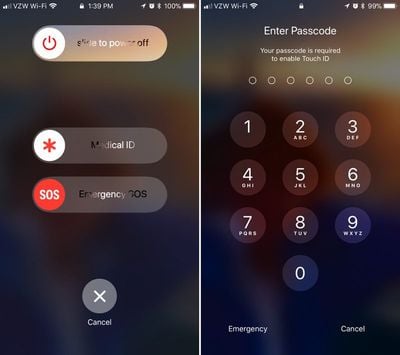
Emergency SOS is activated by pressing on the sleep/wake button of an iPhone five times in rapid succession. When the requisite number of presses is complete, it brings up a screen that offers buttons to power off the iPhone, bring up your Medical ID (if filled out) and make an emergency 911 call.
touchiddisabled
Along with these options, there's also a cancel button. If you hit the sleep/wake button five times and then hit cancel, it disables Touch ID and requires a passcode before Touch ID can be re-enabled. Touch ID is also disabled if you actually make an emergency call.

This is a handy hidden feature because it allows Touch ID to be disabled discreetly in situations where someone might be able to force a phone to be unlocked with a fingerprint, such as a robbery or an arrest. With Touch ID disabled in this way, there is no way to physically unlock an iPhone with a finger without the device's passcode.

It's also worth noting that there's no real way to tell that Touch ID has been disabled in this manner. Once you hit the sleep/wake button and then tap cancel, it's locked in the same way and with the same message that the iPhone uses when it's been more than 48 hours since a device was last unlocked with a fingerprint.

Apple's Emergency SOS feature will be available on all iPhones that run iOS 11. Along with disabling Touch ID, SOS can also be used to summon emergency services and alert your emergency contacts when an accident occurs.

iOS 11 is available to developers and public beta testers at the current time and will be released to the public in September alongside new iPhones.


Related Forum: iOS 11

Popular Stories

Aston Martin CarPlay Ultra Screen

Apple's CarPlay Ultra to Expand to These Vehicle Brands Later This Year

Sunday February 1, 2026 10:08 am PST by
Last year, Apple launched CarPlay Ultra, the long-awaited next-generation version of its CarPlay software system for vehicles. Nearly nine months later, CarPlay Ultra is still limited to Aston Martin's latest luxury vehicles, but that should change fairly soon. In May 2025, Apple said many other vehicle brands planned to offer CarPlay Ultra, including Hyundai, Kia, and Genesis. In his Powe...
Apple Logo Black

Apple's Next Launch is 'Imminent'

Sunday February 1, 2026 12:31 pm PST by
The calendar has turned to February, and a new report indicates that Apple's next product launch is "imminent," in the form of new MacBook Pro models. "All signs point to an imminent launch of next-generation MacBook Pros that retain the current form factor but deliver faster chips," Bloomberg's Mark Gurman said on Sunday. "I'm told the new models — code-named J714 and J716 — are slated...
Apple MacBook Pro M4 hero

New MacBook Pros Reportedly Launching Alongside macOS 26.3

Sunday February 1, 2026 5:42 am PST by
Apple is planning to launch new MacBook Pro models with M5 Pro and M5 Max chips alongside macOS 26.3, according to Bloomberg's Mark Gurman. "Apple's faster MacBook Pros are planned for the macOS 26.3 release cycle," wrote Gurman, in his Power On newsletter today. "I'm told the new models — code-named J714 and J716 — are slated for the macOS 26.3 software cycle, which runs from...
iOS 26

iOS 26.3 and iOS 26.4 Will Add These New Features to Your iPhone

Tuesday February 3, 2026 7:47 am PST by
We are still waiting for the iOS 26.3 Release Candidate to come out, so the first iOS 26.4 beta is likely still at least a week or two away. Following beta testing, iOS 26.4 will likely be released to the general public in March or April. Below, we have recapped known or rumored iOS 26.3 and iOS 26.4 features so far. iOS 26.3 iPhone to Android Transfer Tool iOS 26.3 makes it easier...
14 inch MacBook Pro Keyboard

Apple Changes How You Order a Mac

Saturday January 31, 2026 10:51 am PST by
Apple recently updated its online store with a new ordering process for Macs, including the MacBook Air, MacBook Pro, iMac, Mac mini, Mac Studio, and Mac Pro. There used to be a handful of standard configurations available for each Mac, but now you must configure a Mac entirely from scratch on a feature-by-feature basis. In other words, ordering a new Mac now works much like ordering an...

Top Rated Comments

fokmik Avatar
111 months ago
This is a great idea, but why pressing 5 times?
Surely 3 times would have been more than sufficient while making this action quicker and ultimately more usable.
in an emergency situation, believe me, you dont count, you will press that button 10 times in 3-4 seconds
So this is great 5 times allows us not to bring this by mistake
Score: 20 Votes (Like | Disagree)
happydude Avatar
111 months ago
not that i plan on getting arrested any time soon, but good to know you can disable touch id. with the courts having ruled the police can compel a finger print but not you to give your passcode, it's a level of privacy that i like to see in there.
Score: 20 Votes (Like | Disagree)
btrach144 Avatar
111 months ago
keeps the cops out :cool:
Score: 18 Votes (Like | Disagree)
44267547 Avatar
111 months ago
This is a great idea, but why pressing 5 times?
Surely 3 times would have been more than sufficient while making this action quicker and ultimately more usable.
I think the five times is to prevent any inadvertent actions. It's a rather fast Motion pressing five times to toggle the function if you think about it.
Score: 14 Votes (Like | Disagree)
Wando64 Avatar
111 months ago
This is a great idea, but why pressing 5 times?
Surely 3 times would have been more than sufficient while making this action quicker and ultimately more usable.
Score: 12 Votes (Like | Disagree)
Defthand Avatar
111 months ago
ZERO people will recall this feature exists, or how to activate it, when a situation arises. Utterly convoluted.
Score: 12 Votes (Like | Disagree)
















