

iPhone 8 Virtual Home Button Can Likely Resize and Hide Completely As Needed

Yesterday, HomePod firmware revealed that the iPhone 8's facial recognition software will seemingly support Apple Pay, multiple facial profiles, and third-party apps. Now, as the uncovering of Apple secrets within HomePod firmware continues apace, developer Steven Troughton-Smith has revealed details on Twitter about the iPhone 8's virtual home button, stating that it "resizes" as needed to fit certain tasks on the smartphone.

Specifically, Troughton-Smith described a "periphery" area of the system user interface that expands/minimizes and shows/hides the iPhone 8's virtual home button as it's needed. There will be tab bars that extend under this periphery area, and no evidence was discovered of an ability for this part of the UI to change color. According to Troughton-Smith, this means that the indicator Apple is building for the virtual home button area "will have to contrast well" with any background and colors displayed on the rest of the display.
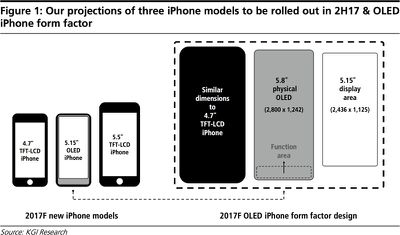
kuoiphone8size

Proposed iPhone 8 "function area" by Ming-Chi Kuo

There was also no evidence found that suggests any piece of app UI will be part of the home button area in any form, meaning Apple plans to keep the bottom home button piece of UI clean and uniform whenever it's brought up. Troughton-Smith did mention that whenever a user plays a fullscreen video, the content will hide the home button controls.

The idea of a virtual "function area" on the iPhone 8 was detailed earlier this year in a report written by KGI Securities analyst Ming-Chi Kuo, who stated the the 5.8-inch screen on the device would have a 5.15-inch usable display. The remaining area of the screen would be reserved for an area of virtual buttons, including a home button, but Kuo's report never hinted that the function area might resize or be "hidden" completely whenever the UI allows it, as Troughton-Smith has discovered.

In addition, Troughton-Smith tweeted out the metrics for the upper status bar on the iPhone 8. The code further confirmed previous HomePod firmware findings that related to a "split" status bar on the device, with what's expected to be camera and sensor hardware sitting between two virtual pieces of UI. Designer Olivier Charavel has already used the metrics to create a mockup of what this status bar should look like on the real iPhone 8, including connection strength and a battery indicator.

iphone 8 sensors area


Previously, Troughton-Smith said the new status bar seemed "more complex and powerful" in its design, and even said that it could be "interactive" in some way.

In regards to the iPhone 8's bottom area and virtual home button findings, Troughton-Smith tweeted that, "all of these things are supported by API evidence, so this is the clearest picture of its functionality we have to work from." HomePod firmware is building up a good indicator of what we can expect from the iPhone 8 when Apple announces the device next month, including advanced facial recognition features likely replacing Touch ID completely, 4K video recording, "SmartCamera" functionality, and more.


Related Forum: iPhone

Popular Stories

iOS 26

iOS 26.4 and iOS 27 Features Revealed in New Leak

Friday December 12, 2025 10:56 am PST by
Macworld's Filipe Espósito today revealed a handful of features that Apple is allegedly planning for iOS 26.4, iOS 27, and even iOS 28. The report said the features are referenced within the code for a leaked internal build of iOS 26 that is not meant to be seen by the public. However, it appears that Espósito and/or his sources managed to gain access to it, providing us with a sneak peek...
apple beta 26 lineup

Apple Leak Confirms Work on Foldable iPhone, AirTag 2, and Dozens More Devices

Monday December 15, 2025 2:05 pm PST by
Last week, details about unreleased Apple devices and future iOS features were shared by Macworld. This week, we learned where the information came from, plus we have more findings from the leak. As it turns out, an Apple prototype device running an early build of iOS 26 was sold, and the person who bought it shared the software. The OS has a version number of 23A5234w, and the first...
Apple Foldable Thumb

Leak Reveals Foldable iPhone Details

Monday December 15, 2025 9:09 am PST by
The first foldable iPhone will feature a series of design and hardware firsts for Apple, according to details shared by the Weibo leaker known as Digital Chat Station. According to a new post, via machine translation, Apple is developing what the leaker describes as a "wide foldable" device, a term used to refer to a horizontally oriented, book-style foldable with a large internal display....
Apple Logo Top Half

Early iOS 26 Software Leak Uncovers Dozens of Upcoming Apple Features

Monday December 15, 2025 3:05 pm PST by
Software from an iPhone prototype running an early build of iOS 26 leaked last week, giving us a glimpse at future Apple devices and iOS features. We recapped device codenames in our prior article, and now we have a list of some of the most notable feature flags that were found in the software code. In some cases, it's obvious what the feature flags are referring to, while some are more...
iOS 26

Apple Releases iOS 26.2 With Alarms for Reminders, Lock Screen Changes, Enhanced Safety Alerts and More

Friday December 12, 2025 10:10 am PST by
Apple today released iOS 26.2, the second major update to the iOS 26 operating system that came out in September, iOS 26.2 comes a little over a month after iOS 26.1 launched. ‌iOS 26‌.2 is compatible with the ‌iPhone‌ 11 series and later, as well as the second-generation ‌iPhone‌ SE. The new software can be downloaded on eligible iPhones over-the-air by going to Settings >...
iOS 26

iOS 26.2 Coming Soon With These 8 New Features on Your iPhone

Thursday December 11, 2025 8:49 am PST by
Apple seeded the second iOS 26.2 Release Candidate to developers earlier this week, meaning the update will be released to the general public very soon. Apple confirmed iOS 26.2 would be released in December, but it did not provide a specific date. We expect the update to be released by early next week. iOS 26.2 includes a handful of new features and changes on the iPhone, such as a new...
macOS Tahoe 26 Thumb

Apple Releases macOS Tahoe 26.2 With Edge Light

Friday December 12, 2025 10:08 am PST by
Apple today released macOS Tahoe 26.2, the second major update to the macOS Tahoe operating system that came out in September. macOS Tahoe 26.2 comes five weeks after Apple released macOS Tahoe 26.1. Mac users can download the macOS Tahoe update by using the Software Update section of System Settings. macOS Tahoe 26.2 includes Edge Light, a feature that illuminates your face with soft...
airpods max 2024 colors

AirPods Max 2 Likely to Offer These 10 New Features

Monday December 15, 2025 7:41 am PST by
Apple released the AirPods Max on December 15, 2020, meaning the over-ear headphones launched five years ago today. While the AirPods Max were updated with a USB-C port and new color options last year, followed by support for lossless audio and ultra-low latency audio this year, the headphones lack some of the features that have been introduced for newer generations of the regular AirPods and the ...

Top Rated Comments

Centris 650 Avatar
109 months ago
MacRumors needs to put the HomePod on it's payroll.
Score: 18 Votes (Like | Disagree)
nabeel24 Avatar
109 months ago
The gift that keeps giving....
Score: 18 Votes (Like | Disagree)
HobeSoundDarryl Avatar
109 months ago
With a virtual home button, I wonder what the sequence of buttons will be for a "hard reboot" and screen shot...
[LIST=1]
* Post the issue on a forum to first learn that whatever the cause of the need to reboot, it is YOUR and only your (user error) fault.
* Offer counterpoint that implies a bug and risk being called a troll or paid Android shill.
* Watch others chime in with the same issue, only to be summarily lumped into the .0001% of users that have such issues.
* Read 5+ posts that basically say "My phone is working perfectly" (so yours can't be having any such issue). Feel free to privately roll your eyes to that one. Really. They won't know. Then,
* Visit an Apple Store
* Insert phone in Recycle bin
* Buy new phone.
* Cheer on "record profits"
* Sling around "...but who makes the most profitable phone" in website forums.


;)
Score: 8 Votes (Like | Disagree)
aaronhead14 Avatar
109 months ago
I just wanna know where the dang clock is going to be.
Score: 7 Votes (Like | Disagree)
meaning-matters Avatar
109 months ago
Rumor: On-screen button can hide.
Score: 7 Votes (Like | Disagree)
Berti10 Avatar
109 months ago
Let me guess, it can be swiped up together with the dock and control center like on the iPad with iOS 11
Score: 7 Votes (Like | Disagree)
















